Choosing the right 3D scanner for clay models can make it easier to digitize sculptures, preserve detailed forms, and prepare physical work for editing or 3D printing. The best choice depends on the sculpture’s size, surface texture, desired accuracy, and whether you need a fully portable workflow.
We compared 10 handheld and all-in-one scanners from Creality, Revopoint, 3DMakerpro, and Fox, focusing on resolution, tracking, scanning speed, software features, portability, and practical ease of use for clay artists and makers.
Best 10 3d Scanner for Clay Models Picks for 2026
Best Portable Precision Scanner
Creality Pika Wireless 3D Scanner

- 0.03mm stated blue-laser accuracy
- AI hole filling and body completion
- 260g wireless design with swappable batteries
Best For: Portable clay-model scanning and scan-to-print workflows
Best Beginner-Friendly Detail Scanner
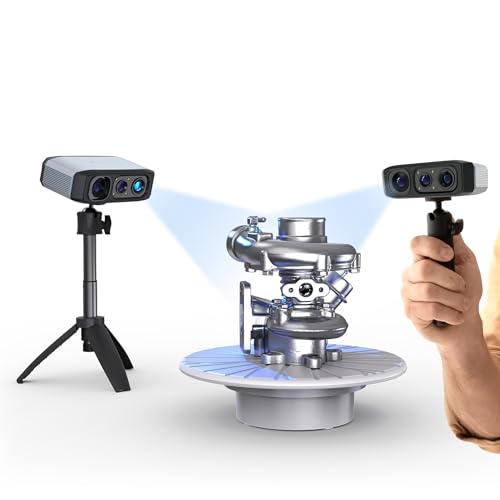
- Up to 0.03mm stated accuracy
- Anti-shake and rescanning features
- Integrated JMStudio editing and optimization
Best For: Desktop clay scanning with guided software processing
Best Feature-Packed Portable Scanner
Creality Pika Touchscreen 3D Scanner

- 0.03mm stated accuracy with blue laser mode
- Built-in 3-inch touchscreen and Wi-Fi 6
- Works with Windows, macOS, iOS, and Android
Best For: Mobile clay scanning with on-device control and broad compatibility
Best All-in-One Professional Scanner

- Standalone scanning and editing without a computer
- Up to 0.02mm stated single-frame precision
- Near/far modes and 48MP color capture
Best For: Professional clay-model scanning across varied object sizes
Best All-Around Choice

- 0.05mm accuracy and up to 30fps
- Full-color texture capture
- Scans objects from 0.8 to 78 inches
Best For: Detailed clay models with color textures and varied object sizes
Best for Precision Work

- Up to 0.03mm single-frame accuracy
- Five scanning modes for varied geometry
- AI segmentation on Windows
Best For: Detailed clay sculpts and precision-oriented workflows
Best Beginner-Friendly Option

- Lightweight 210g handheld design
- Marker-free AI SLAM tracking
- One-click model processing
Best For: Beginners digitizing clay sculptures for 3D printing
Precision Pick
3DMakerpro Moose Lite Premium Kit

- 0.05mm accuracy and 0.10mm resolution
- AI tracking with integrated JMStudio processing
- Lightweight, quiet design for medium objects
Best For: Detail-focused clay artists and makers
Wireless Performance Pick

- 30FPS scanning with up to 0.1mm accuracy
- WiFi 6 wireless transmission across supported devices
- Exports OBJ, STL, and PLY files
Best For: Fast, flexible scanning across phones and computers
Beginner-Friendly Kit
Creality Ferret Pro Full-Color Scanner

- 0.1mm accuracy with 24-bit full-color scanning
- Wireless support for major desktop and mobile platforms
- Includes tripod, power bank, holder, and carrying case
Best For: Portable entry-level clay scanning
Best Portable Precision Scanner – Creality Pika Wireless 3D Scanner
For shoppers seeking a 3d scanner for clay models, the Creality Pika combines fine-detail blue-laser scanning with faster NIR structured-light capture. Its compact wireless design, AI-assisted cleanup, and 0.03mm stated accuracy make it a flexible option for clay studies, figurines, and scan-to-print workflows.
Best For: Portable scanning of clay models, figurines, small parts, and larger objects when wireless operation and automated model cleanup matter.
Pros:
- Blue-laser mode offers stated accuracy up to 0.03mm for fine details.
- AI hole filling and body completion can reduce manual cleanup.
- Lightweight 260g body, Wi-Fi 6, and hot-swappable batteries support mobile use.
- Exports STL, OBJ, PLY, and ASC files for printing and modeling software.
Cons:
- The extensive AI and dual-mode feature set may require a learning period.
- Its very small body may be less comfortable for long scanning sessions than a larger scanner.
The Pika is a strong all-around choice when portability is as important as detail. For clay work, its anti-shake capture and hole-filling tools may help produce usable meshes with less post-processing, while the broad 5mm-to-2000mm scan range adds versatility.
Best Beginner-Friendly Detail Scanner – 3DMakerpro Moose Lite
The 3DMakerpro Moose Lite is a practical 3d scanner for clay models if you want detailed capture paired with guided processing. Its blue-light system, anti-shake hardware, and JMStudio software combine scanning, editing, and optimization for a more streamlined desktop workflow.
Best For: Windows and macOS users who want detailed clay scans, true-color output, and integrated software tools for refining models.
Pros:
- Blue-light technology provides stated accuracy up to 0.03mm and 0.07mm resolution.
- AI tracking and point-cloud processing are designed to simplify scanning.
- Optical anti-shake modules and rescanning support can help beginners recover from interruptions.
- 24-bit color capture and OBJ, STL, PLY, and ASC export support flexible projects.
Cons:
- Compatibility is listed for Windows 10/11 64-bit and macOS 12/13, limiting platform flexibility.
- The optional smartphone Smart Grip is sold separately.
- At 3.56 pounds, it is less lightweight than the pocket-sized alternatives listed here.
Moose Lite stands out for users who prefer a computer-based workflow with built-in preparation and cleanup tools. Its stated precision and color camera suit detailed clay sculptures, although buyers should confirm operating-system compatibility and plan for a more stationary setup.
Best Feature-Packed Portable Scanner – Creality Pika Touchscreen 3D Scanner
For creators who want a mobile 3d scanner for clay models, this Creality Pika pairs 0.03mm stated accuracy with a built-in touchscreen, Wi-Fi 6, and dual scanning modes. It is designed to move from small figurines and detailed forms to larger objects without requiring a cable-centered setup.
Best For: Makers who want portable, marker-free scanning with on-device controls, color capture, and broad compatibility across computers and mobile devices.
Pros:
- Seven-line blue laser mode is specified at up to 0.03mm accuracy.
- A 3-inch touchscreen enables direct control and previewing.
- Supports Windows, macOS, iOS, and Android through the listed software options.
- AI hole filling, retexturing, and body completion can streamline model preparation.
Cons:
- The maximum detail and tracking performance may depend on choosing the appropriate scanning mode and setup.
- Its many included functions may be more than casual users need.
- Battery life is not quantified in the supplied specifications.
This Pika is a compelling choice for clay artists who value freedom from a fixed workstation. The touchscreen and mobile support make it especially convenient for demonstrations or studio work, while the included turntable, tripod, and calibration board provide a more complete starting kit.
Best All-in-One Professional Scanner – Revopoint MIRACO Pro
The Revopoint MIRACO Pro is an all-in-one 3d scanner for clay models that handles scanning, editing, and file management without requiring a computer during capture. Its near and far scanning modes, high-resolution color camera, and onboard processing make it suited to artists and professionals working across different model sizes.
Best For: Users who want standalone scanning and editing for detailed clay models, color-rich references, and projects ranging from small objects to large forms.
Pros:
- Onboard scanning and editing eliminate the need for a connected computer during capture.
- Single-frame precision is stated at up to 0.02mm.
- Near and far modes support small detailed objects and larger surfaces.
- 48-megapixel RGB capture, a 2K AMOLED display, and 256GB storage support color workflows.
Cons:
- At 750g, it is heavier than the compact Pika models.
- Listed battery life is up to two hours per charge.
- Revo Design software is paid separately, Windows-only, and compatible with x86_64 architecture.
MIRACO Pro is the most self-contained option in this group and offers substantial hardware for serious scanning sessions. Its higher weight and premium-oriented workflow may be unnecessary for occasional clay projects, but the standalone operation and flexible scan modes are valuable for demanding work.
Best All-Around Choice – Creality Otter Lite Basic
If you want a versatile 3d scanner for clay models, the Creality Otter Lite Basic combines fine stated accuracy with fast 30fps scanning and full-color capture. Its multiple alignment modes and broad object-size range make it suitable for scanning individual clay sculptures as well as larger forms.
Best For: Clay artists who want detailed geometry, realistic color textures, and a scanner that can also handle larger objects.
Pros:
- Up to 0.05mm accuracy and scanning speeds of up to 30fps.
- Full-color texture capture with a built-in RGB camera and LED fill lights.
- Supports marker, geometry, and texture alignment, with exports including OBJ, STL, PLY, and 3MF.
- Scans objects from 0.8 to 78 inches and supports Windows, macOS, iOS, and Android.
Cons:
- The optional Scan Bridge handle is sold separately.
- Its extensive feature set may be more than needed for simple clay scanning.
The Otter Lite Basic is a strong choice when you need both detailed clay geometry and color information. Its handheld design and wide compatibility add flexibility, while the optional handle may be worthwhile for longer scanning sessions.
Best for Precision Work – Revopoint POP 4 Premium
The Revopoint POP 4 Premium is a capable 3d scanner for clay models when fine detail and flexible scanning modes matter most. It offers up to 0.03mm single-frame accuracy, AI segmentation, and multiple capture modes for handling different shapes and scanning conditions.
Best For: Experienced makers and studios scanning highly detailed clay sculpts for 3D printing, precision modeling, or digital archiving.
Pros:
- Up to 0.03mm single-frame accuracy for detailed surface capture.
- Five scanning modes, including markerless structured-light and laser options.
- AI object segmentation can identify the subject and filter background noise on Windows.
- Included 5500mAh battery grip provides up to four hours of continuous outdoor scanning.
Cons:
- AI object segmentation is specified for Windows only.
- The range of professional modes may involve a steeper learning curve.
- The supplied notes do not provide complete software details.
POP 4 Premium stands out for users who want maximum control over capture settings and very fine stated accuracy. Its advanced modes are especially useful when clay models include complex geometry or when the scanner must serve broader professional workflows.
Best Beginner-Friendly Option – Fox Portable 3D Scanner
Fox is a practical 3d scanner for clay models if you value a lightweight design and simplified processing. Its marker-free AI SLAM tracking, guided software, and one-click model processing can make digitizing figurines, sculptures, and other clay work more approachable.
Best For: Beginners and clay artists who want a portable scanner with straightforward workflows for 3D printing.
Pros:
- Up to 0.07mm accuracy and 0.10mm resolution for detailed scans.
- Marker-free AI tracking can re-lock onto previously scanned areas if tracking is interrupted.
- Weighs 210g for more comfortable handheld scanning.
- One-click processing handles alignment, fusion, noise reduction, and mesh optimization.
Cons:
- Compatibility is listed for Windows 10/11 64-bit and macOS 12/13 systems.
- Its stated scan range begins at 40mm, which may not suit extremely small details.
- It does not list full-color texture capture among the supplied features.
Fox is appealing when ease of use matters more than advanced scanning modes. The lightweight body and automated processing reduce setup and post-processing demands, making it a sensible entry point for clay artists creating printable digital models.
Precision Pick – 3DMakerpro Moose Lite Premium Kit
For shoppers seeking a high-precision 3d scanner for clay models, the 3DMakerpro Moose Lite emphasizes fine detail capture and straightforward model preparation. Its blue-light scanning system, AI tracking, and integrated JMStudio software make it suited to digitizing medium-sized clay sculptures for display or 3D printing.
Best For: Artists and makers who prioritize detailed scans and want integrated tools for editing and optimizing models.
Pros:
- Up to 0.05mm accuracy and 0.10mm resolution for detailed clay forms.
- AI visual tracking and point-cloud processing help preserve model detail.
- Scans objects from approximately 15mm to 1500mm.
- Lightweight 250g design with quiet, fanless operation.
Cons:
- The supplied product details do not indicate a wireless scanning feature.
- Its listed dimensions appear unusually large compared with the stated lightweight scanner design, so verify the actual kit size before purchase.
The Moose Lite is the strongest choice here for detail-focused clay scanning, particularly when accuracy and post-processing matter more than wireless convenience.
Wireless Performance Pick – Creality CR-Scan Ferret Pro
The Creality CR-Scan Ferret Pro is a practical 3d scanner for clay models when you want fast capture, wireless transfer, and flexible device support. Its 30FPS scanning, anti-shake tracking, and WiFi 6 bridge are designed to make scanning complex forms smoother across phones and computers.
Best For: Creators who want fast, wireless scanning on compatible iOS, Android, Windows, or Mac devices.
Pros:
- Scans at up to 30FPS with up to 0.1mm accuracy and 0.16mm resolution.
- WiFi 6 transmission supports wireless scanning and faster data transfer than WiFi 5.
- Anti-shake tracking helps maintain smoother capture during hand movement.
- Exports OBJ, STL, and PLY files for printing and design workflows.
Cons:
- Best results require avoiding reflective, transparent, or extremely dark surfaces.
- Compatible devices need the stated operating systems, processor, memory, and app requirements.
Choose this Ferret Pro when speed and wireless flexibility are central to your workflow. It offers a balanced feature set for scanning larger clay pieces and moving results into common 3D applications.
Beginner-Friendly Kit – Creality Ferret Pro Full-Color Scanner
This Creality Ferret Pro is a convenient 3d scanner for clay models for beginners, DIY creators, and mobile workflows. It combines wireless scanning, anti-shake tracking, full-color capture, and a lightweight 105g body, while the included accessories help you get started at home or in the studio.
Best For: Entry-level users who want a portable, full-color scanner for clay objects roughly 50mm to 2000mm in size.
Pros:
- Up to 0.1mm accuracy with 24-bit full-color scanning.
- WiFi 6 supports wireless scanning with Windows, macOS, Android, and iOS.
- Lightweight 105g scanner is easy to carry between locations.
- Kit includes a WiFi box, tripod, power bank, phone holder, and carrying case.
Cons:
- Not intended for very small or highly detailed items such as jewelry or precision parts.
- Reflective, transparent, and very dark surfaces may reduce scanning results.
- Compatible devices must meet the listed operating system and memory requirements.
Its approachable setup and included accessories make this Ferret Pro a sensible starting point for clay artists who value portability and color reference over ultra-fine scanning of tiny details.
How We Picked the Best 3d Scanner for Clay Models
We evaluated these scanners for the demands of clay sculpture rather than general-purpose scanning alone. Key considerations included stated accuracy, tracking stability, scan speed, working distance, color capture, wireless operation, and the ability to handle medium-sized organic forms. We also considered software features such as automatic alignment, AI-assisted completion, marker-free tracking, mesh editing, and export support for common 3D-printing workflows.
Specifications are only part of the decision. Clay can contain fine contours, undercuts, fingerprints, subtle surface changes, and low-contrast areas that challenge tracking. A scanner with strong software and reliable alignment may be more useful than one with the smallest advertised accuracy figure.
Quick Comparison
- Highest stated accuracy: Creality Pika models, rated at up to 0.03mm.
- Detailed handheld scanning: 3DMakerpro scanners offer fine precision for controlled studio work.
- Standalone convenience: Revopoint MIRACO Pro is designed as an all-in-one scanning system.
- Color and broad size range: Creality Otter Lite supports full-color scanning and a wide object-size range.
- Portable value: Revopoint POP 4, Fox, and CR-Scan Ferret Pro models emphasize handheld flexibility.
Key Buying Factors for a 3d Scanner for Clay Models
Accuracy and Detail
Fine stated accuracy is helpful for small sculptures and intricate facial or surface details, but real-world results also depend on lighting, distance, calibration, and software. For larger decorative pieces, stable tracking and consistent coverage can matter more than maximum laboratory precision.
Tracking and Surface Handling
Clay models often have smooth, matte, or repetitive areas. Look for structured-light or laser systems with reliable tracking, anti-shake features, AI assistance, or marker-free operation. Dark, glossy, or unusually uniform clay may still require better lighting, temporary markers, or scanning spray.
Workflow and Software
Check whether the scanner requires a computer, supports wireless use, and exports formats compatible with your modeling or slicing software. Automatic alignment, hole filling, body completion, and mesh cleanup can significantly reduce post-processing time.
Size, Speed, and Portability
Confirm the recommended object size before buying. A compact scanner is convenient for small busts and tabletop sculptures, while a faster system with a larger capture range is better for full-size figures or repeated studio work.
Who Should Buy Which 3d Scanner for Clay Models?
Choose a Creality Pika if maximum stated accuracy is your priority and you are comfortable refining scans in software. Choose a 3DMakerpro model for detailed handheld work and a more controlled studio workflow. Choose the Revopoint MIRACO Pro if you want a self-contained system with less dependence on a separate computer.
Choose the Creality Otter Lite if full-color capture and broad object-size support are important. Choose the Revopoint POP 4 or Fox scanner for flexible portable scanning with AI-assisted features. Choose a CR-Scan Ferret Pro if wireless operation, anti-shake tracking, and a practical entry point matter most.
Before ordering, verify current software compatibility, included accessories, operating-system support, and the manufacturer’s recommended scanning conditions. For the best results with any 3d Scanner for Clay Models, use even lighting, keep the scanner at a consistent distance, and plan time for mesh cleanup after capture.
