Long hours at a screen can make monitor choice feel surprisingly important. The best computer monitors for eye comfort combine sharp text, stable images, adjustable brightness, and refresh rates that make scrolling and motion feel smoother.
This roundup compares 10 displays across practical budgets and sizes, from compact 22-inch office monitors to spacious 32-inch 4K models. Look beyond the label, though: room lighting, viewing distance, resolution, and adjustability all affect how comfortable a monitor feels.
Best 10 Computer Monitors for Eye Comfort Picks for 2026
Best 4K Eye Comfort Pick

- ComfortView Plus blue-light reduction
- 4K VA display with wide color coverage
- 120Hz refresh rate and FreeSync Premium
Best For: Large-screen work, editing, and entertainment
Best Budget Reading Monitor

- EasyRead mode for lengthy documents
- Flicker-free and blue-light-filter features
- 100Hz VA display with strong contrast
Best For: Office work, reading, and everyday desktop use
Best Eye-Care Gaming Value

- Flicker-Free and Low Blue Light eye care
- 120Hz IPS display with 1ms MPRT
- HDMI, DisplayPort, and VGA connectivity
Best For: Home office, study, streaming, and casual gaming
Best Everyday 27-Inch Comfort Monitor

- Blue-light filter and flicker-free viewing
- IPS panel with consistent 178-degree color
- 100Hz refresh rate for smoother motion
Best For: Everyday work, browsing, and casual entertainment
Best Overall Eye-Care Monitor
ASUS VA279HG 27-Inch 120Hz IPS Monitor

- 27-inch Full HD IPS display with 99% sRGB
- Flicker-free TÜV-certified eye-care features
- 120Hz refresh rate with Adaptive-Sync
Best For: Home offices, everyday use, streaming, and casual gaming
Best for Smooth Motion
Dell SE2426H 24-Inch 144Hz IPS Monitor

- TÜV Rheinland 3-star eye-comfort certification
- 144Hz refresh rate with 1ms MPRT
- Two HDMI ports and a matte anti-glare screen
Best For: Compact workspaces, streaming, and smooth-motion gaming
Best Budget Compact Pick
SANSUI ES-22X3AH 22-Inch 120Hz Monitor
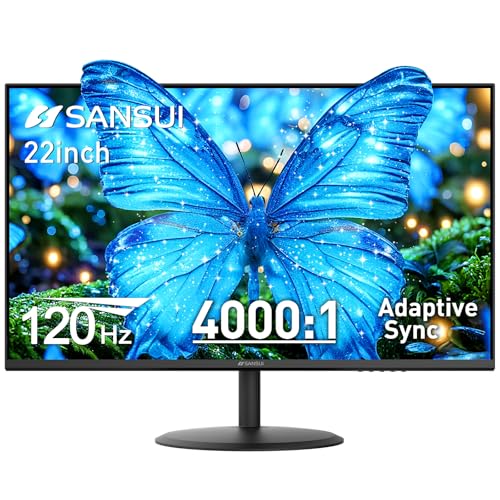
- Anti-flicker, low-blue-light, and anti-glare features
- 120Hz refresh rate with Adaptive Sync
- Two HDMI ports and VESA support
Best For: Small home offices, students, and budget-conscious buyers
Best Overall

- TÜV-certified, flicker-free eye-comfort design
- 27-inch QHD IPS display with 144Hz refresh rate
- Height, pivot, swivel, and tilt adjustments
Best For: Versatile work, entertainment, and gaming
Best Budget Eye-Care Pick

- TÜV-certified low-blue-light and flicker-free technology
- Matte 24-inch Full HD VA panel
- HDMI, VGA, audio output, and VESA support
Best For: Affordable home-office and study setups
Best Large-Screen Value

- TÜV-certified, flicker-free eye-care design
- 27-inch Full HD screen with 144Hz refresh rate
- Fully adjustable stand and built-in speakers
Best For: Large-screen 1080p work and gaming
Best 4K Eye Comfort Pick – Dell 32 Monitor S3225QS
For shoppers seeking computer monitors for eye comfort with a large, detailed workspace, the Dell S3225QS combines ComfortView Plus, a matte screen, and 4K resolution. Its 120Hz refresh rate also makes scrolling and motion feel smoother for work and entertainment.
Best For: Large-screen office work, photo and video editing, and detailed 4K viewing.
Pros:
- ComfortView Plus reduces harmful blue light emissions to 35% or less without sacrificing color accuracy.
- Sharp 4K UHD resolution with 99% sRGB and 95% DCI-P3 coverage.
- 120Hz refresh rate with FreeSync Premium supports smooth, tear-free motion.
- Height adjustment, tilt adjustment, anti-glare coating, and built-in speakers add convenience.
Cons:
- The 32-inch size and 19.3-pound weight require more desk space than smaller monitors.
- Its 4K resolution may be more than needed for basic office tasks.
The Dell is a strong all-around choice when eye comfort, high resolution, and a spacious screen matter. It is especially appealing for users who want one display for productivity, creative work, and entertainment.
Best Budget Reading Monitor – Philips 24-Inch 241V8LB
The Philips 241V8LB is a practical option for computer monitors for eye comfort in a home office or everyday desktop setup. Its flicker-free design, blue-light filter, and EasyRead mode are useful for extended document and web sessions.
Best For: Office work, reading, schoolwork, and general desktop use on a smaller budget.
Pros:
- EasyRead mode creates a more paper-like reading experience for lengthy documents.
- Flicker-free operation and a blue-light filter support more comfortable viewing.
- VA panel delivers a 3000:1 contrast ratio and 178-degree viewing angles.
- 100Hz refresh rate, FreeSync, and a virtually bezel-free design improve everyday usability.
Cons:
- Full HD resolution provides less workspace and detail than a 4K monitor.
- The glossy screen finish may be less suitable for brightly lit rooms.
- Connectivity is limited to HDMI and VGA.
This Philips monitor focuses on useful comfort features without adding unnecessary complexity. It is a sensible fit for users who primarily read, write, browse, and stream at a 23.8-inch size.
Best Eye-Care Gaming Value – ASUS VA249QG 24-Inch
The ASUS VA249QG balances computer monitors for eye comfort with smooth everyday performance. Its certified flicker-free and low-blue-light technologies pair with a 120Hz IPS display, making it suitable for long work sessions, streaming, and casual gaming.
Best For: Students, home-office users, and casual gamers who need flexible connectivity.
Pros:
- ASUS Eye Care technology includes TV-certified Flicker-Free and Low Blue Light features.
- 120Hz refresh rate and 1ms MPRT support smoother motion.
- IPS panel offers 178-degree viewing angles and 99% sRGB coverage.
- HDMI, DisplayPort, and VGA inputs support newer and legacy devices.
Cons:
- Full HD resolution is less detailed than higher-resolution alternatives.
- At 24 inches, the screen provides less workspace than larger models.
- The listed 1ms response time is specified as MPRT, which is a motion-rating measure.
With eye-care features, a fast refresh rate, built-in speakers, and a three-year advanced-replacement warranty, the VA249QG is a versatile choice. It makes the most sense for buyers who want one compact monitor for both productivity and entertainment.
Best Everyday 27-Inch Comfort Monitor – Samsung S30GD 27-Inch FHD
The Samsung S30GD is a straightforward choice among computer monitors for eye comfort, offering reduced blue light and flicker-free viewing in a spacious 27-inch format. Its IPS panel and 100Hz refresh rate suit routine work, browsing, and media use.
Best For: Everyday office work, multitasking, browsing, and casual entertainment.
Pros:
- Eye Care features include a blue-light filter and flicker-free operation.
- IPS technology maintains bright, consistent colors across 178-degree viewing angles.
- 100Hz refresh rate helps reduce lag and motion blur.
- Super-slim styling and thin bezels suit modern or multi-monitor setups.
Cons:
- Full HD resolution on a 27-inch screen is less sharp than higher-resolution options.
- The glossy finish may reflect nearby light.
- Connectivity is limited to HDMI and D-Sub.
The S30GD is a sensible everyday monitor for buyers who prioritize a larger IPS screen and basic eye-comfort features. It is less suited to detail-focused creative work than a higher-resolution display, but it covers common desktop needs well.
Best Overall Eye-Care Monitor – ASUS VA279HG 27-Inch 120Hz IPS Monitor
The ASUS VA279HG is a strong all-around choice among computer monitors for eye comfort, combining a spacious 27-inch IPS screen with flicker-free ASUS Eye Care technology and blue-light filtering. Its 120Hz refresh rate also makes everyday scrolling and motion feel smoother than a standard 60Hz display.
Best For: Home offices, general desktop use, streaming, and casual gaming where a larger screen and eye-care features are priorities.
Pros:
- 27-inch Full HD IPS panel with 178-degree viewing angles and 99% sRGB coverage.
- Flicker-free, TÜV Rheinland-certified eye-care features and a blue-light filter.
- 120Hz refresh rate, 1ms MPRT, and Adaptive-Sync for smoother motion.
- HDMI and VGA connectivity, VESA compatibility, and a three-year advanced-replacement warranty.
Cons:
- Full HD resolution on a 27-inch screen provides less pixel density than a smaller 1080p monitor.
- Connectivity is limited to one HDMI port and VGA.
The VA279HG balances comfortable long-session viewing with useful gaming performance. Choose it if you want a larger, versatile monitor with strong eye-care credentials and do not need a higher-than-1080p resolution.
Best for Smooth Motion – Dell SE2426H 24-Inch 144Hz IPS Monitor
The Dell SE2426H is a compact option for shoppers comparing computer monitors for eye comfort, with TÜV Rheinland 3-star eye-comfort certification, an anti-glare matte screen, and IPS viewing consistency. Its 144Hz refresh rate is particularly useful for smooth scrolling, gaming, and video playback.
Best For: Workspaces and entertainment setups that need a compact IPS monitor with high refresh rate performance and certified eye-comfort features.
Pros:
- TÜV Rheinland 3-star eye-comfort certification helps reduce harmful blue light.
- 144Hz refresh rate and 1ms MPRT support fluid motion.
- IPS panel offers consistent color across 178-degree horizontal and vertical viewing angles.
- Two HDMI ports and a thin-bezel design suit flexible, space-conscious setups.
Cons:
- The supplied specifications list an 8ms response time despite the 1ms MPRT rating.
- It has a smaller 23.8-inch screen than the ASUS option.
- Stand adjustment is limited to tilt.
With its certified eye-comfort design and fast refresh rate, the SE2426H is a sensible fit for a smaller desk. It is best suited to buyers who value smooth motion and straightforward HDMI connectivity over extensive ergonomic adjustment.
Best Budget Compact Pick – SANSUI ES-22X3AH 22-Inch 120Hz Monitor
The SANSUI ES-22X3AH offers a compact, budget-friendly approach to computer monitors for eye comfort. Its 22-inch Full HD VA panel includes anti-flicker technology, low-blue-light emission, and an anti-glare coating, while the 120Hz refresh rate keeps scrolling and cursor movement smooth.
Best For: Home-office users and students who want a small 1080p display with basic eye-care features and flexible connectivity.
Pros:
- Anti-flicker, low-blue-light, and anti-glare features support extended work sessions.
- 120Hz refresh rate and Adaptive Sync help reduce motion blur and tearing.
- Two HDMI 1.4 ports support up to 120Hz and multiple devices.
- VESA 75x75mm support and -5° to 22° tilt adjustment help with positioning.
Cons:
- The 22-inch screen is less spacious for multitasking than larger monitors.
- The VA panel has a listed 14ms response time.
- There are no built-in speakers.
The ES-22X3AH makes sense when desk space or budget matters most. It delivers a useful set of comfort features and smooth-refresh performance, though its compact size and lack of speakers make it a more focused office monitor than an all-purpose entertainment display.
Best Overall – Dell 27 Plus QHD Monitor
For shoppers comparing computer monitors for eye comfort, the Dell S2725DSM combines a sharp 27-inch QHD IPS display with a TÜV-certified comfort design. Its matte, flicker-free screen, reduced blue-light emissions, and broad ergonomic adjustment make it suitable for work, entertainment, and gaming.
Best For: Users who want a versatile, adjustable 27-inch monitor with QHD detail and strong eye-comfort features.
Pros:
- 4-star TÜV-certified display with reduced blue-light emissions and flicker-free operation
- QHD resolution, 144Hz refresh rate, and AMD FreeSync support smooth, detailed viewing
- Height, tilt, pivot, and swivel adjustments support personalized positioning
- Built-in dual 3W speakers and matte anti-glare finish add convenience
Cons:
- The 27-inch QHD format may cost more than a basic 24-inch Full HD monitor
- Connectivity is limited to HDMI and DisplayPort
The S2725DSM is a strong all-purpose pick when eye comfort, image detail, and ergonomic flexibility matter equally. Its QHD resolution also gives documents and multitasking more workspace than Full HD.
Best Budget Eye-Care Pick – KOORUI 24-inch FHD Monitor
The KOORUI 24-inch monitor is a practical choice among computer monitors for eye comfort, offering TÜV Rheinland-certified low-blue-light and flicker-free technology at a straightforward Full HD size. Its anti-glare VA panel and 100Hz refresh rate suit everyday office work, study, browsing, and streaming.
Best For: Budget-conscious home-office, education, and everyday productivity users.
Pros:
- TÜV Rheinland-certified low-blue-light and flicker-free features support extended viewing
- Matte anti-glare screen, 99% sRGB coverage, and a 4000:1 contrast ratio
- 100Hz refresh rate helps make scrolling and window switching smoother
- HDMI, VGA, audio output, tilt adjustment, and VESA mounting support flexible setups
Cons:
- It is limited to 1920×1080 Full HD resolution
- It does not support DisplayPort
- USB-C devices require a separate USB-C-to-HDMI adapter
This monitor keeps the essentials focused: comfortable viewing, clear Full HD images, and broad HDMI/VGA compatibility. Confirm your computer’s ports before buying, especially if you use USB-C or DisplayPort.
Best Large-Screen Value – Dell 27 Plus FHD Monitor
The Dell S2725HSM offers a roomy 27-inch screen and eye-comfort features for shoppers seeking computer monitors for eye comfort without moving to QHD. Its TÜV-certified design, matte anti-glare finish, flicker-free operation, and ergonomic stand support long desktop sessions, while 144Hz performance adds smoothness for casual gaming.
Best For: Users who prefer a larger screen for work and gaming but want Full HD efficiency.
Pros:
- 4-star TÜV-certified eye-care design with reduced blue-light emissions
- 144Hz refresh rate, 1ms MPRT, and AMD FreeSync support smooth motion
- Height, tilt, pivot, and swivel adjustments allow flexible positioning
- Dual 3W speakers, two HDMI ports, and a matte anti-glare screen add convenience
Cons:
- Full HD resolution provides less detail than the QHD Dell alternative
- Connectivity is HDMI-only
The S2725HSM is a sensible fit for buyers who value screen size, smooth refresh, and ergonomic comfort more than higher resolution. It is especially practical for general desktop use and gaming at 1080p.
How We Picked the Best Computer Monitors for Eye Comfort
We focused on features that can support comfortable everyday viewing rather than treating “eye care” as a guarantee. The selected monitors include flicker-free or eye-care claims where listed, refresh rates from 100Hz to 144Hz, and a range of IPS and VA panels. We also considered resolution, screen size, connectivity, stand flexibility, speakers, adaptive sync, and value for common uses such as office work, study, browsing, and gaming.
Because comfort is personal, this list includes multiple panel types and sizes. A sharp 4K screen may suit text-heavy work, while a 24-inch 1080p model can be a practical choice for a smaller desk.
Quick Comparison
| Best For | Recommended Type | Why It Stands Out |
|---|---|---|
| Detailed work and multitasking | 27–32-inch QHD or 4K | More workspace and sharper text |
| Everyday office use | 24-inch FHD IPS or VA | Compact size and sensible pixel density |
| Smoother scrolling and gaming | 100–144Hz display | More fluid motion than standard 60Hz |
| Limited budgets | 22–24-inch FHD | Lower cost and modest desk footprint |
Key Buying Factors for Computer Monitors for Eye Comfort
Resolution and Pixel Density
Higher resolution generally makes text and fine interface elements look cleaner, especially on larger screens. QHD is a strong middle ground at 27 inches, while 4K is useful for detailed work and generous desktop space. FHD remains appropriate for 22–24-inch displays when viewed at a normal distance.
Refresh Rate and Flicker Behavior
A 100Hz or higher refresh rate can make pointer movement, scrolling, and compatible games appear smoother. Look for explicit flicker-free or eye-care specifications, but remember that brightness level and room lighting also affect comfort.
Panel Type, Brightness, and Finish
IPS panels commonly offer consistent colors and wide viewing angles. VA panels can provide stronger contrast, which may help dark scenes and evening use. Choose a monitor with brightness controls and avoid running it much brighter than the room requires. A matte finish can reduce distracting reflections.
Ergonomics and Connections
Height, tilt, swivel, and pivot adjustment make it easier to position the screen so the top sits near eye level. VESA support can add flexibility. Check that the monitor has the inputs you need—typically HDMI, DisplayPort, or VGA—and confirm whether built-in speakers or an audio output matter to your setup.
Who Should Buy Which Computer Monitors for Eye Comfort?
Choose the Dell 32-inch 4K model if you want maximum workspace and crisp detail. The Dell 27 Plus QHD monitor is a balanced choice for multitasking, gaming, and sharper text without moving to 4K. For general office work, the Dell, Philips, ASUS, Samsung, and KOORUI 24-inch-class options offer compact, practical configurations.
Pick a 27-inch FHD model when you want a larger physical image at a lower price, particularly for casual use. The SANSUI 22-inch monitor suits small desks and basic home or office tasks. If gaming and smooth cursor movement are priorities, favor the 120Hz or 144Hz options, then fine-tune brightness, viewing distance, and posture for the most comfortable result.
