The best computer monitors for graphic design combine dependable color, sharp resolution, comfortable viewing, and practical connectivity. A good display can make detailed layouts easier to judge while reducing the compromises between a laptop, desktop, and creative peripherals.
We selected 10 monitors across professional, midrange, ultrawide, and value categories, including 4K IPS displays, USB-C models, and larger screens for multitasking. Use the guide below to match resolution, color coverage, workspace, and features to the way you design.
Best 10 Computer Monitors for Graphic Design Picks for 2026
Professional Color Accuracy Pick
ASUS ProArt PA279CRV 27-inch 4K Monitor

- 4K IPS display with 99% Adobe RGB and DCI-P3 coverage
- Factory calibrated to Delta E < 2 and Calman Verified
- USB-C with 96W power delivery and adjustable stand
Best For: Color-critical graphic design, photo, and video work
Ultrawide Workspace Pick
Samsung ViewFinity S50GC 34-inch Monitor

- 34-inch Ultra-WQHD screen with a 21:9 aspect ratio
- PBP and PIP modes support two simultaneous sources
- 100Hz refresh rate, HDR10, and eye-care features
Best For: Multitasking designers who want a wide single-screen workspace
USB-C Workflow Pick
ViewSonic VP2756A-2K 27-inch Monitor
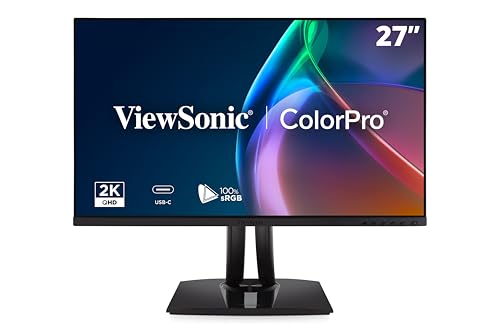
- 1440p IPS display with 100% sRGB and Rec.709 coverage
- Pantone Validated and factory calibrated to Delta E < 2
- 90W USB-C docking plus a smooth 120Hz refresh rate
Best For: USB-C laptop users handling everyday color-conscious design work
Affordable 4K Pick
LG 27US500-W UltraFine Monitor

- 27-inch 4K UHD IPS display with HDR10
- Up to 90% DCI-P3 color gamut expression
- OnScreen Control supports split workspaces and adjustments
Best For: General design and multimedia work needing sharp 4K detail
Best Compact Color Accuracy

- 100% sRGB and Rec. 709 coverage
- Calman Verified Delta E < 2 calibration
- USB-C with 65W Power Delivery
Best For: Compact color-critical design work and multi-monitor setups
Best Large 4K Workspace

- 3840 x 2160 4K resolution
- 125% sRGB and HDR10 support
- Height, tilt, and swivel-adjustable stand
Best For: Large-format design, photo editing, and detailed creative work
Best USB-C QHD Upgrade

- Pantone Validated 100% sRGB coverage
- 90W USB-C laptop charging
- 27-inch QHD IPS at 120Hz
Best For: USB-C laptop users needing calibrated color and ergonomic flexibility
Color-Accurate Pick

- 100% sRGB/Rec.709 coverage and DeltaE < 2
- 1920 x 1200 IPS display with 16:10 workspace
- Fully adjustable ergonomic stand
Best For: Color-focused photo and video editing
Best Heavy-Duty Pick
LG 34WR55QK-B 34-inch UltraWide

- 34-inch 3440 x 1440 curved 21:9 display
- Up to 99% sRGB with HDR10
- USB-C with up to 65W power delivery
Best For: Multitasking across design apps and references
High-Refresh Ultrawide Pick
Sceptre C345B-QUT168 34-inch Ultrawide

- 3440 x 1440 curved display with 99% sRGB
- Up to 165Hz refresh rate and 1ms response time
- Two DisplayPort and two HDMI connections
Best For: Designers who also game or edit fast-moving media
Professional Color Accuracy Pick – ASUS ProArt PA279CRV 27-inch 4K Monitor
The ASUS ProArt PA279CRV is a strong choice among computer monitors for graphic design when accurate color, sharp 4K detail, and laptop-friendly connectivity matter. Its 27-inch IPS display covers 99% of both DCI-P3 and Adobe RGB, and factory calibration helps support color-critical creative work.
Best For: Graphic designers, photographers, and video editors who need high-resolution color accuracy and USB-C laptop connectivity.
Pros:
- 4K UHD resolution with 99% Adobe RGB and 99% DCI-P3 coverage
- Calman Verified and factory calibrated to Delta E < 2
- USB-C provides DisplayPort connectivity and up to 96W power delivery
- Fully adjustable stand and DisplayPort daisy-chain support
Cons:
- 60Hz refresh rate is aimed at productivity rather than high-frame-rate gaming
- 27-inch screen offers less workspace than an ultrawide display
For designers who prioritize dependable color reproduction and 4K clarity, the PA279CRV is one of the most purpose-built options here. Its extensive connectivity, ergonomic stand, and included calibration report add practical value for a professional desk setup.
Ultrawide Workspace Pick – Samsung ViewFinity S50GC 34-inch Monitor
The Samsung ViewFinity S50GC expands your workspace with a 34-inch Ultra-WQHD screen and a 21:9 aspect ratio. For computer monitors for graphic design, its wide layout is useful for keeping design software, references, and project windows visible at the same time.
Best For: Designers who want a spacious single-screen workspace for multitasking and side-by-side project work.
Pros:
- 34-inch Ultra-WQHD resolution provides 3440 x 1440 workspace
- Picture-by-picture and picture-in-picture modes support multiple sources
- 100Hz refresh rate offers smoother scrolling and motion than a standard 60Hz display
- HDR10, 3000:1 contrast, and eye-care features support varied work and media use
Cons:
- Its listed 72% color gamut is less targeted at wide-gamut color-critical work
- No USB-C connectivity is listed
- 34-inch ultrawide dimensions require more desk space
The S50GC is best viewed as a productivity-focused design monitor rather than a specialist color-reference display. Its main advantage is the extra horizontal room, especially for users who prefer one uncluttered screen over a dual-monitor arrangement.
USB-C Workflow Pick – ViewSonic VP2756A-2K 27-inch Monitor
The ViewSonic VP2756A-2K combines a 27-inch 1440p IPS panel with a 120Hz refresh rate and a 90W USB-C docking connection. It is a practical option among computer monitors for graphic design if you want accurate everyday color, smooth on-screen movement, and a cleaner laptop-based setup.
Best For: Designers using a USB-C laptop who want Pantone Validated color, one-cable connectivity, and a responsive 1440p workspace.
Pros:
- 1440p IPS display with 100% sRGB and Rec.709 coverage
- Factory calibrated to Delta E < 2 and Pantone Validated
- USB-C docking provides data, audio, video, and up to 90W charging
- 120Hz refresh rate and fully adjustable ergonomic stand
Cons:
- 1440p resolution provides less pixel density than a 4K 27-inch monitor
- Color coverage is specified for sRGB and Rec.709 rather than Adobe RGB or DCI-P3
- Only one HDMI port is listed
This ViewSonic is a well-rounded choice for web, UI, branding, and general creative workflows. It gives up some 4K sharpness and wider-gamut coverage, but its calibrated color, USB-C charging, and 120Hz performance make daily work convenient.
Affordable 4K Pick – LG 27US500-W UltraFine Monitor
The LG 27US500-W offers 4K UHD resolution, an IPS panel, and HDR10 support in a straightforward 27-inch design. For shoppers comparing computer monitors for graphic design, it provides detailed workspace and up to 90% DCI-P3 color gamut expression without adding more specialized connectivity or calibration features.
Best For: Designers and creative hobbyists seeking a sharp 4K IPS monitor for general multimedia and design tasks.
Pros:
- 4K UHD resolution delivers detailed imagery on a 27-inch screen
- IPS panel offers wide viewing angles and HDR10 support
- Up to 90% DCI-P3 color gamut expression for vivid content
- OnScreen Control supports workspace splitting and monitor adjustments
Cons:
- 60Hz refresh rate is relatively basic for motion-heavy work
- No USB-C or integrated USB hub is listed
- One-year limited manufacturer warranty is shorter than some competing options
The LG is a sensible entry-level 4K choice for detailed layouts, image editing, and general creative use. Its color and resolution are appealing, while the simpler feature set makes it better suited to users who do not need built-in docking or advanced factory calibration.
Best Compact Color Accuracy – ASUS ProArt PA247CV
For computer monitors for graphic design in a compact workspace, the ASUS ProArt PA247CV focuses on dependable color and convenient laptop connectivity. Its 23.8-inch Full HD IPS panel covers 100% sRGB and 100% Rec. 709, while Calman Verified factory calibration targets Delta E < 2 accuracy.
Best For: Designers who need a calibrated 24-inch monitor, USB-C connectivity, and support for multi-monitor setups.
Pros:
- 100% sRGB and 100% Rec. 709 coverage with Calman Verified factory calibration.
- USB-C provides DisplayPort video and up to 65W Power Delivery.
- DisplayPort daisy-chaining supports seamless multi-monitor arrangements.
- Includes a five-year warranty with online registration and a three-month Adobe Creative Cloud offer.
Cons:
- Full HD resolution gives less workspace and detail than QHD or 4K alternatives.
- The 23.8-inch screen may feel small for complex, layered design projects.
The PA247CV is a practical color-focused choice when desk space and budget matter more than maximum resolution. Its USB-C hub and daisy-chain support also make it easy to build a streamlined creative workstation.
Best Large 4K Workspace – KTC H32U6 32-Inch 4K Monitor
The KTC H32U6 is a strong option for computer monitors for graphic design when you want abundant workspace and sharp detail. Its 31.5-inch 4K display provides 3840 x 2160 resolution, 125% sRGB coverage, HDR10, and a 3000:1 contrast ratio for editing images, layouts, and other visual projects.
Best For: Designers and photo editors who prefer a large 4K screen with an adjustable stand and broad color range.
Pros:
- 4K UHD resolution delivers four times the detail of 1080p.
- 125% sRGB coverage, 1.07 billion colors, and HDR10 support vivid visuals.
- Height, tilt, and swivel adjustments help position the large display comfortably.
- Two HDMI 2.0 ports and DisplayPort 1.4 support multiple connected devices.
Cons:
- The 60Hz refresh rate is less fluid than the 120Hz option in this roundup.
- Its 32-inch footprint may require a relatively deep or spacious desk.
Choose the H32U6 when resolution and screen real estate are priorities. The adjustable stand, matte finish, eye-care features, and VESA support make it flexible for long creative sessions and different desk layouts.
Best USB-C QHD Upgrade – ViewSonic ColorPro VP2766-2K
For computer monitors for graphic design that balance color confidence, smooth motion, and laptop convenience, the ViewSonic ColorPro VP2766-2K is a well-rounded choice. Its 27-inch QHD IPS panel offers 100% sRGB coverage, Pantone Validated factory calibration, 120Hz refresh, and USB-C charging up to 90W.
Best For: Creative professionals who use a USB-C laptop and want a calibrated QHD display with an ergonomic stand.
Pros:
- Pantone Validated and factory calibrated with 100% sRGB coverage.
- USB-C carries video, data, and up to 90W of power to compatible laptops.
- QHD resolution and a 120Hz refresh rate provide a useful combination of detail and smoothness.
- Stand supports height, tilt, swivel, and 90-degree portrait pivot adjustments.
Cons:
- QHD resolution provides less pixel density than a comparable 4K monitor.
- Its 1500:1 contrast ratio is lower than the KTC H32U6’s listed 3000:1 ratio.
The VP2766-2K stands out as a versatile middle ground for designers who want reliable color without giving up everyday responsiveness. Its 90W USB-C connection and extensive ergonomic adjustments are especially useful in a modern laptop-based studio.
Color-Accurate Pick – ASUS ProArt PA248QV
For designers seeking computer monitors for graphic design, the ASUS ProArt PA248QV emphasizes dependable color reproduction and a comfortable, adjustable workspace. Its 24.1-inch WUXGA IPS display covers 100% of the sRGB and Rec.709 color spaces, with DeltaE < 2 and Calman Verified technology.
Best For: Photo and video editing, color-focused design work, and users who want a compact professional monitor.
Pros:
- 100% sRGB/Rec.709 coverage with DeltaE < 2 for precise color work.
- 1920 x 1200 WUXGA resolution provides extra vertical workspace over standard 1080p.
- Height, tilt, pivot, and swivel adjustments support comfortable long sessions.
- Includes DisplayPort, HDMI, D-Sub, and four USB ports for flexible connectivity.
Cons:
- The 24.1-inch screen is less spacious than the ultrawide alternatives.
- Its 75Hz refresh rate is oriented toward productivity rather than high-refresh gaming.
The PA248QV is the most design-specialized option here, pairing verified color performance with a practical 16:10 format and ergonomic stand. It is a strong choice when accurate sRGB work matters more than maximum screen width.
Best Heavy-Duty Pick – LG 34WR55QK-B 34-inch UltraWide
The LG 34WR55QK-B is a practical choice among computer monitors for graphic design when you need room for multiple applications. Its 34-inch curved 21:9 WQHD display offers 3440 x 1440 resolution, up to 99% sRGB coverage, and workspace-splitting tools for multitasking.
Best For: Designers who want a wide single-screen workspace for layouts, references, timelines, and multiple input sources.
Pros:
- 21:9 ultrawide format and 3440 x 1440 resolution support side-by-side work.
- Up to 99% sRGB coverage and HDR10 help produce vivid imagery.
- USB-C connectivity provides up to 65W laptop power delivery.
- Height and tilt adjustment, Reader Mode, and PbP add practical flexibility.
Cons:
- Its VA panel and 300 cd/m² brightness may be less specialized for color-critical work than a dedicated ProArt display.
- The one-year warranty is shorter than the ASUS model’s listed five-year coverage.
Choose the LG when workflow space is the priority. The broad curved panel and USB-C connectivity can simplify a multi-window design setup, while 100Hz operation keeps everyday navigation smooth.
High-Refresh Ultrawide Pick – Sceptre C345B-QUT168 34-inch Ultrawide
The Sceptre C345B-QUT168 combines a spacious ultrawide canvas with gaming-oriented speed, making it a flexible option among computer monitors for graphic design. Its 34-inch curved WQHD screen provides 3440 x 1440 resolution, 99% sRGB coverage, and refresh rates up to 165Hz.
Best For: Designers who also want a fast ultrawide monitor for gaming, multimedia, and general productivity.
Pros:
- 3440 x 1440 resolution delivers a detailed, roomy 21:9 workspace.
- 99% sRGB coverage supports colorful design and media work.
- Up to 165Hz refresh rate, 1ms response time, and FreeSync Premium suit fast-moving content.
- Includes two DisplayPort connections, two HDMI ports, and built-in speakers.
Cons:
- The 280 cd/m² brightness is lower than the ASUS model’s listed 300 cd/m².
- The stand offers tilt adjustment but does not list height, pivot, or swivel adjustment.
- The limited one-year warranty provides less coverage than the ASUS option.
The C345B-QUT168 makes sense for a hybrid design-and-gaming setup. It offers the same broad WQHD workspace as the LG while adding a substantially higher refresh rate, though its ergonomics and warranty are more limited.
How We Picked the Best Computer Monitors for Graphic Design
We focused on specifications that matter during real design work: panel type, resolution, color-gamut claims, brightness and HDR support, connectivity, adjustability, and screen size. IPS models are strongly represented because they generally provide consistent viewing angles and predictable color across the panel. We also considered USB-C power delivery, height adjustment, portrait rotation, refresh rate, and ultrawide layouts for users who work across multiple applications.
Specifications alone do not guarantee professional calibration. Color-critical users should still check factory calibration information, use a colorimeter when possible, and create an appropriate color-managed workflow.
Quick Comparison
| Best for | What to look for | Strong fit from this list |
|---|---|---|
| Professional 4K design | 27-inch 4K IPS, broad gamut, USB-C | ASUS ProArt PA279CRV |
| MacBook or USB-C setup | USB-C video and substantial power delivery | ASUS ProArt PA279CRV |
| Affordable 4K work | 4K IPS and HDR support | LG 27US500-W |
| Multitasking | 34-inch ultrawide, 3440 × 1440 resolution | LG 34WR55QK-B |
| Compact workspace | 24-inch professional display | ASUS ProArt PA247CV |
| Motion and design crossover | High refresh rate with usable color coverage | ViewSonic VP2766-2K |
Key Buying Factors for Computer Monitors for Graphic Design
Resolution and Screen Size
Twenty-seven-inch 4K monitors offer a useful balance of workspace and pixel density for detailed illustrations, typography, and photo editing. A 1440p 27-inch monitor can be a sensible lower-cost choice, while 24-inch 1080p or WUXGA models suit smaller desks and less demanding layouts. Ultrawide displays provide horizontal room for timelines, panels, and reference windows, though their vertical resolution may not match a 4K screen.
Color and Panel Performance
Prioritize IPS technology, wide sRGB coverage, and—when your work requires it—Adobe RGB or DCI-P3 coverage with published calibration data. HDR labels are useful for supported content but should not replace verified color performance. Viewing-angle consistency and uniformity are also important when working across a large canvas.
Connectivity and Ergonomics
USB-C can carry display signal, data, and laptop power through one cable, but confirm the monitor’s actual wattage. HDMI and DisplayPort improve compatibility with desktops and graphics hardware. A height-adjustable, swivel-capable stand is preferable for long sessions; VESA support can expand mounting options. Eye-care modes may help comfort, but they can change color and should be disabled for color evaluation.
Who Should Buy Which Computer Monitors for Graphic Design?
- Choose the ASUS ProArt PA279CRV if you want a feature-rich 27-inch 4K display for professional design and USB-C laptop workflows.
- Choose the LG 27US500-W or KTC 32-inch 4K monitor if sharp 4K workspace is the priority and you want to control costs or move to a larger screen.
- Choose the ViewSonic VP2756A-2K or VP2766-2K for a 27-inch 1440p setup with USB-C convenience and a higher refresh rate.
- Choose the ASUS ProArt PA247CV or PA248QV for a compact, entry-level professional workspace with practical color-focused features.
- Choose the LG 34WR55QK-B or Sceptre 34-inch ultrawide when arranging multiple windows matters more than maximum vertical pixel density.
- Choose the Samsung ViewFinity S50GC for a general-purpose ultrawide that combines design work, office productivity, and smoother everyday motion.
