Moving terabytes of photos, video, backups, or project data is easier with the right hard drive duplicator. The best models can clone drives without a computer, connect over USB or eSATA, and support both 2.5-inch and 3.5-inch SATA storage.
This roundup compares ten options for home users, IT teams, repair shops, and businesses that need dependable large-file transfers, drive upgrades, erasure, or multi-drive duplication.
Best 10 Hard Drive Duplicators for Large Files Picks for 2026
Best SATA All-Rounder

- Standalone SATA cloning without a PC
- Supports 2.5/3.5-inch drives and 4Kn
- Up to 22 GB/min; USB and eSATA access
Best For: Mixed SATA drive cloning and docking
Best High-Volume USB Station

- Copies to up to 15 USB devices
- Supports drives above 2TB with no stated capacity limit
- Includes multiple copy and secure-erase modes
Best For: Batch USB duplication for business or media work
Fastest SATA Cloner

- Up to 28 GB/min standalone cloning
- USB 3.2 Gen 2 and USB-C/A cables
- Supports 4Kn, TRIM, and SATA I/II/III
Best For: Fast offline SATA cloning for IT workflows
Best Simple Budget Dock

- Dual-bay SATA HDD/SSD docking station
- Offline cloning without drivers
- Supports drives up to 10TB and USB 3.0
Best For: Straightforward home and desktop drive cloning
Reliable Standalone Pick

- Standalone duplication without a computer
- Supports 2.5- and 3.5-inch SATA drives
- 90MB/s copying with DoD erasure
Best For: Simple SATA duplication and sanitization
Most Versatile Interface Support

- Copies SATA and USB drives
- Four duplication and five erase modes
- LCD controls with Copy & Compare
Best For: Mixed-interface copying and drive sanitization
High-Volume Choice
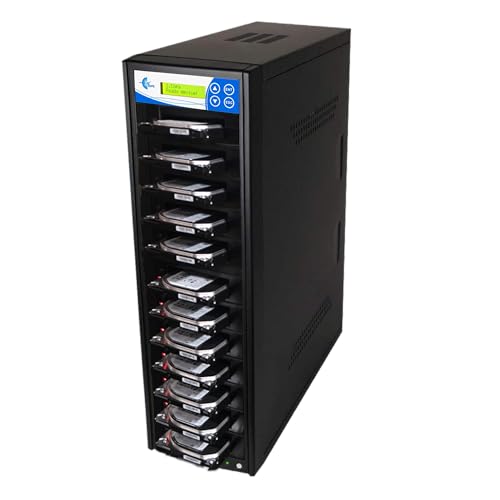
- Copies up to 11 SATA drives
- 150MB/s per slot rating
- Seven erase modes and four copy modes
Best For: Large batch duplication of SATA drives
Compact Workstation Pick
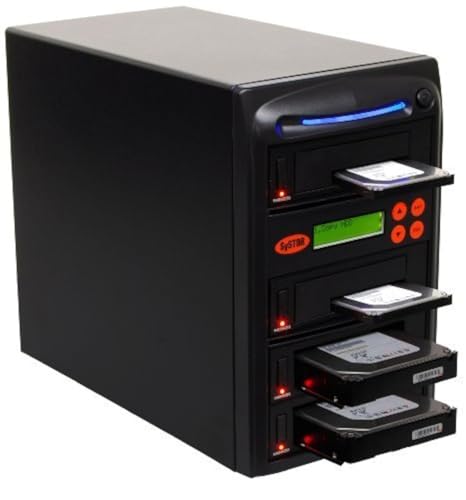
- Standalone operation with no computer or software
- Copies up to three drives at 90MB/s
- Supports 2.5-inch and 3.5-inch SATA drives
Best For: Small-scale drive duplication and sanitization
High-Volume Speed Pick

- Duplicates up to seven drives simultaneously
- Listed speed reaches 300MB/s
- Includes hot-swappable drive support
Best For: High-volume business and repair-shop workflows
Mid-Volume Standalone Pick

- Copies up to five drives at 90MB/s
- Works with 2.5-inch and 3.5-inch SATA drives
- Supports copying and drive sanitization
Best For: Moderate-volume standalone duplication
Best SATA All-Rounder – StarTech SDOCK2U33RE
For hard drive duplicators for large files, the StarTech SDOCK2U33RE offers a practical two-bay setup for standalone SATA cloning. It copies drives sector by sector, supports any file format, and can also serve as a USB or eSATA docking station.
Best For: Users cloning 2.5- or 3.5-inch SATA HDDs and SSDs without a computer.
Pros:
- Standalone cloning requires no PC or operating system.
- Supports SATA I/II/III drives of any capacity and 4Kn drives.
- Rated cloning speed reaches up to 22 GB/min.
- Includes both USB-A and eSATA connection cables.
Cons:
- Sector-by-sector duplication copies empty sectors and requires an equal- or larger-capacity target.
- IDE drives require a separately sold adapter.
This is a versatile choice when you need both offline duplication and occasional drive access. Its broad SATA compatibility and included cables make it especially useful for a mixed desktop and laptop drive workflow.
Best High-Volume USB Station – EZ DUPE USB Cyclone
The EZ DUPE USB Cyclone is designed for repeated USB duplication, making it a strong option among hard drive duplicators for large files when you need many copies at once. Its 1-to-15 layout supports USB storage and operates without a computer or software.
Best For: Businesses and media workflows duplicating multiple USB drives or external USB HDDs.
Pros:
- Duplicates up to 15 Type-A USB devices simultaneously.
- Supports USB 1.0 through USB 3.1 and drives above 2TB.
- Offers full, partitioned, essential-file, and percentage copy modes.
- Includes quick, full, DoD 3-pass, and DoD 7-pass erase modes.
Cons:
- USB slot speeds are rated up to 45 MB/s.
- Its seven-pound design is less convenient for portable use.
Choose this model when throughput across many USB targets matters more than compact size. Independent bandwidth design and slow-drive alerts help make larger batch jobs more manageable.
Fastest SATA Cloner – StarTech SDOCK2U313R
For large-drive cloning, the StarTech SDOCK2U313R combines a standalone dual-bay SATA duplicator with a faster USB 3.2 Gen 2 host connection. Its sector-by-sector copier supports any file format and is rated for speeds up to 28 GB/min.
Best For: IT users who want fast offline cloning of 2.5- or 3.5-inch SATA drives.
Pros:
- Rated duplication speed reaches up to 28 GB/min.
- Works with SATA I/II/III drives of any capacity and supports 4Kn.
- Includes TRIM support and USB-C/A connection cables.
- Toolless, trayless design includes drive doors and eject buttons.
Cons:
- The target drive must be equal to or larger than the source.
- Sector-by-sector copying includes empty sectors.
- IDE drives need a separately sold adapter.
This is the strongest fit in the group when SATA cloning speed is a priority. It also remains useful as a USB-connected SATA dock for recovery, mounting, and drive-access tasks.
Best Simple Budget Dock – SABRENT EC-HD2B
The SABRENT EC-HD2B keeps hard drive duplication straightforward with two bays, plug-and-play USB 3.0 connectivity, and offline cloning. For hard drive duplicators for large files, it supports desktop-size SATA drives and capacities up to 10TB per the supplied product notes.
Best For: Home users seeking a simple dual-bay SATA dock and occasional offline cloner.
Pros:
- Supports both 2.5- and 3.5-inch SATA HDDs and SSDs.
- Offline cloning works without drivers or a computer.
- Supports up to 10TB drives and USB 3.0 transfer speeds up to 5Gbps.
- Supports SATA I/II/III and includes the power supply and USB cable.
Cons:
- Offline cloning is rated at up to 60 Mbps.
- Drive support is specified up to 10TB, below some competing models’ stated capacity claims.
- Warranty is one year unless registration extends coverage to two years.
This dock is a sensible choice for uncomplicated drive access and occasional cloning. It offers the essential two-bay functionality without the additional copy and erase modes found on larger duplication systems.
Reliable Standalone Pick – Systor SYS101HS-DP
For shoppers comparing hard drive duplicators for large files, the Systor SYS101HS-DP is a practical standalone option for copying SATA HDDs or SSDs without a computer or software. It supports 2.5- and 3.5-inch drives and maintains its stated transfer rate even when multiple drives are loaded.
Best For: Businesses and individuals needing straightforward SATA drive duplication, erasure, and hot-swappable drive handling.
Pros:
- Standalone operation requires no computer or software.
- Supports both 2.5- and 3.5-inch SATA HDDs and SSDs without an adapter.
- Copies at up to 90MB per second, with speed maintained as the number of loaded drives increases.
- Includes DoD 5220.22-M-compliant data sanitization and lifetime technical support.
Cons:
- Limited to SATA-connected drives.
- Its 90MB-per-second rate is lower than the faster multi-target option in this roundup.
The Systor is a sensible choice when ease of use, broad SATA form-factor support, and predictable standalone performance matter more than maximum throughput or a large target count.
Most Versatile Interface Support – StarTech SU2DUPERA11
The StarTech SU2DUPERA11 stands out among hard drive duplicators for large files by supporting both SATA drives and USB thumb drives. Its standalone LCD-controlled design offers several copy and erase modes, while Copy & Compare helps verify a completed clone.
Best For: IT departments and technicians who work with both SATA HDDs/SSDs and USB flash drives and need flexible wiping options.
Pros:
- Supports 2.5- and 3.5-inch SATA drives as well as USB thumb drives.
- Offers four duplication modes, including sector-by-sector and all-partitions copying.
- Provides five erase modes, including cryptographic erase and DoD 5220.22-M three-pass overwriting.
- LCD controls and Copy & Compare simplify operation and verification.
Cons:
- Its listed USB speed is up to 2.4GB per minute, slower than its SATA rate.
- eSATA, mSATA, IDE, and M.2 SATA support requires separately sold adapters.
This StarTech model is the strongest fit when interface flexibility and sanitization choices are priorities. It is especially useful for mixed SATA-and-USB workflows, though additional adapters may be needed for less common drive types.
High-Volume Choice – EZ DUPE H11HSATB
For high-volume workflows involving hard drive duplicators for large files, the EZ DUPE H11HSATB offers up to 11 SATA target slots and a rated speed of 150MB per second in each slot. It works as a standalone tower, so duplication does not require a host computer or software.
Best For: Businesses, media workflows, and technicians who need to copy many 2.5- or 3.5-inch SATA drives in a single batch.
Pros:
- Copies up to 11 SATA HDDs or SSDs simultaneously.
- Rated at 150MB per second, or 9GB per minute, in each slot.
- Includes system-and-files, whole-disk, partitioned, and percentage copy modes.
- Provides seven erase modes, including DoD three-pass and seven-pass options.
Cons:
- Supports SATA drives only and does not connect to other devices.
- Its large 11-target design may be more capacity than occasional users need.
- The listed warranty is one year for parts and labor.
The EZ DUPE is the clear throughput-and-volume pick in this group. Its 11 target positions and broad copy and erase modes make it well suited to repeatable batch processing, provided your drives use the SATA interface.
Compact Workstation Pick – Systor 1:3 HDD/SSD Duplicator
For buyers comparing hard drive duplicators for large files, the Systor SYS103HS-DP offers a standalone way to copy up to three SATA HDDs or SSDs at once. It reaches speeds up to 90MB per second and requires no computer or software.
Best For: Small offices, technicians, and users who need simultaneous drive copying with a compact three-drive workflow.
Pros:
- Copies multiple HDDs or SSDs at up to 90MB per second.
- Supports 3.5-inch and 2.5-inch drives without an adapter.
- Can copy data or entire drives and perform DoD 5220.22-M-compliant erasure.
- Includes three years of labor coverage, one year of parts coverage, and lifetime technical support.
Cons:
- Its 1:3 capacity is lower than the larger Systor models in this roundup.
- The listed transfer rate is below the 300MB-per-second rate of the SYS307DP.
This is a practical choice when independent operation and mixed 2.5-inch/3.5-inch SATA compatibility matter more than maximum duplication volume.
High-Volume Speed Pick – Systor 1:7 HDD/SSD Duplicator
When evaluating hard drive duplicators for large files, the Systor SYS307DP stands out for its seven-drive duplication capacity and listed speed of up to 300MB per second. Its standalone design avoids the need for a computer or dedicated software.
Best For: IT departments, repair shops, and businesses that need to duplicate several SATA HDDs or SSDs in a single run.
Pros:
- Duplicates multiple drives simultaneously at up to 300MB per second.
- Supports both 2.5-inch and 3.5-inch drives without an adapter.
- Provides 1:7 duplication for higher-volume workflows.
- Supports data-only or whole-drive copying plus DoD 5220.22-M-compliant erasure.
Cons:
- Its larger seven-drive capacity may be unnecessary for occasional personal use.
- The supplied specifications identify SATA compatibility, so other drive interfaces are not covered.
With the fastest listed transfer rate and highest target count here, this model is the strongest fit for repeated, high-throughput duplication tasks.
Mid-Volume Standalone Pick – Systor 1:5 HDD/SSD Duplicator
The Systor SYS105HS-DP is a useful middle ground for shoppers seeking hard drive duplicators for large files. It copies up to five SATA HDDs or SSDs at speeds up to 90MB per second, with no computer or software required.
Best For: Users who need more duplication capacity than a compact three-drive unit but do not require the SYS307DP’s higher listed speed.
Pros:
- Supports simultaneous copying at up to 90MB per second.
- Accepts 3.5-inch and 2.5-inch drives without an adapter.
- Copies files or complete drives and supports DoD 5220.22-M-compliant sanitization.
- Includes three years of labor coverage, one year of parts coverage, and lifetime technical support.
Cons:
- Its 90MB-per-second rate is lower than the SYS307DP’s listed 300MB-per-second rate.
- It is a 1:5 duplicator, so it offers less target capacity than the 1:7 model.
This model balances broader batch capacity with straightforward standalone operation, making it a sensible choice for moderate duplication workloads.
How We Picked the Best Hard Drive Duplicators for Large Files
We focused on practical capabilities that matter when copying large datasets: supported drive formats, standalone operation, transfer-rate claims, source-to-target capacity, connection options, and the number of simultaneous copies. We also considered whether each unit supports HDDs, SSDs, USB flash media, drive erasing, or computer-based docking.
Advertised speeds are maximum figures and depend on the source drive, target drive, interface, file layout, and whether the device performs a sector-by-sector clone. Treat them as useful comparisons rather than guaranteed real-world results.
Quick Comparison
- Dual-bay docks: StarTech.com, Sabrent, and similar units suit occasional cloning, drive access, and computer-connected workflows.
- 1:1 standalone duplicators: Systor and StarTech models are useful when you need direct drive-to-drive copying without a host computer.
- Multi-target towers: EZ DUPE and Systor 1:3, 1:5, and 1:7 models are better for repeated batch duplication.
- USB media duplication: Choose a model specifically designed for Type-A flash drives if removable-media copying is part of the job.
Key Buying Factors for Hard Drive Duplicators for Large Files
Drive Compatibility and Capacity
Confirm that the duplicator supports SATA III drives and the physical sizes you use. A 2.5/3.5-inch bay is more flexible than a 2.5-inch-only design. Also verify that the target drive is at least as large as the source when cloning, even if the source contains less data.
Standalone Versus Computer-Connected Use
Standalone units copy directly between inserted drives, which can simplify field work and reduce dependence on software. Docking stations generally connect to a computer and are convenient for browsing, imaging, and occasional upgrades.
Speed, Workflow, and Scale
For one-off transfers, a dual-bay dock may be sufficient. For repeated deployments, a tower with three or more targets can save substantial time. Check whether the stated speed is per target, total throughput, or dependent on a particular interface.
Cloning, Erasing, and Data Protection
If retired drives may contain sensitive information, look for a verified erase function and follow your organization’s data-handling policy. Keep the source drive protected from accidental overwriting, and avoid disconnecting drives during an active operation.
Who Should Buy Which Hard Drive Duplicators for Large Files?
Home users and photographers should consider a simple dual-bay dock for drive upgrades, backups, and occasional large-file transfers. IT technicians and repair professionals will benefit from a standalone 1:1 duplicator with clear status controls and broad SATA compatibility. Businesses deploying many identical systems should choose a multi-target tower, matching its copy count to the typical batch size. Teams handling USB flash media need a dedicated USB duplicator rather than a SATA-only unit.
Before buying, confirm the connector type, supported media, target count, power requirements, and return policy. For irreplaceable data, use the duplicator as one part of a tested backup strategy—not as the only copy of your files.
