Hard drive duplicators can help small businesses deploy replacement drives, preserve source media, and sanitize retired storage without relying on a full workstation setup. The right model depends on drive format, copy speed, daily volume, and whether verification or secure erasure matters most.
Our roundup compares 10 standalone duplicators and related docking solutions, from compact one-to-one units to higher-capacity systems designed for repeated office, repair-shop, and lab workflows.
Best 10 Hard Drive Duplicators for Small Businesses Picks for 2026
Best Multi-Drive Workstation
4-Bay HDD/SSD Duplicator and Eraser

- Standalone 1:3 cloning and drive erasure
- Four bays for 2.5- and 3.5-inch SATA drives
- USB/eSATA docking with IDE adapters
Best For: Small-business IT teams with frequent cloning and sanitization jobs
Best Touchscreen Simplicity

- Standalone operation without a computer
- Touchscreen copy, compare, erase, and format controls
- Claimed speeds up to 150 MB/s
Best For: Small offices handling occasional single-drive jobs
Best Fast Two-Drive Copier

- Standalone 1:1 cloning up to 28 GB/min
- Supports 2.5- and 3.5-inch SATA HDDs and SSDs
- USB 3.2 Gen 2 docking functionality
Best For: IT staff needing fast one-to-one SATA cloning
Best Basic Sanitization Value

- Standalone copying and erasing without software
- Supports 2.5- and 3.5-inch SATA drives
- DoD 5220.22-M-compliant sanitization
Best For: Small businesses needing simple copying and drive retirement
Best Standalone SATA Cloner

- Clones 2.5-inch and 3.5-inch SATA drives
- Includes multiple duplication and erase modes
- Copy & Compare verifies completed clones
Best For: Small IT teams performing SATA drive backups, deployments, and sanitization
Best USB-C Drive Dock
ICY BOX Dual-Bay SATA Duplicator

- Accepts 2.5-inch and 3.5-inch SATA drives
- Provides offline cloning in a tool-free dock
- USB 3.0 and UASP support up to 5 Gbps
Best For: Small offices combining everyday drive access with occasional cloning
Best Multi-Drive USB Copier

- Copies one USB source to up to seven targets
- Operates without a computer or software
- Supports synchronous and asynchronous copying
Best For: Businesses producing multiple identical USB drives in repeatable batches
Forensic Verification Pick
EZ Dupe 1-to-3 SATA Duplicator
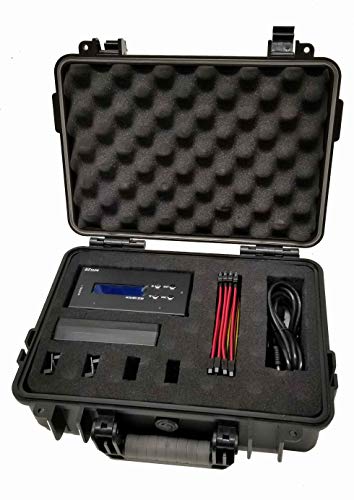
- Raw bit-stream forensic duplication
- MD5 and SHA-1 hash verification
- Six erase modes, including DoD options
Best For: IT teams and repair shops needing source protection and verification
USB Workflow Pick
StarTech 1-to-2 USB Duplicator

- Standalone USB duplication and erasing
- Sector-by-sector and file-level copy modes
- LCD monitoring with copy-and-compare
Best For: Technicians managing USB boot and storage media
High-Throughput Production Pick

- Up to 600 MB/s per channel
- SATA and IDE/PATA adapter support
- Logs, label printing, and protective case
Best For: Drive deployment and repair teams with recurring mixed-interface jobs
Best Multi-Drive Workstation – 4-Bay HDD/SSD Duplicator and Eraser
For small businesses handling frequent migrations, backups, or retired equipment, this StarTech.com unit is one of the most versatile hard drive duplicators for small businesses. Its four bays support standalone 1:3 cloning, drive erasure, and USB or eSATA docking for 2.5- and 3.5-inch SATA drives.
Best For: IT teams that need cloning, secure erasure, and drive-access functionality in one workstation.
Pros:
- Supports standalone cloning to up to three target drives.
- Works with 2.5- and 3.5-inch SATA HDDs and SSDs, plus included IDE adapters.
- Offers Quick Erase and NIST SP 800-88 Rev. 1 Purge Secure Erase modes.
- Functions as a USB or eSATA docking station and includes a two-year warranty.
Cons:
- Targets must be equal to or larger than the source drive.
- Its larger four-bay design may be more capability than occasional users need.
This is the strongest all-around choice for a small-business service desk that needs both deployment speed and data-sanitization options. The LCD menu and drive-status indicators also make recurring workflows easier to manage.
Best Touchscreen Simplicity – 1:1 SOHO Touch Duplicator
The EZ Dupe SOHO Touch is a straightforward option for small offices seeking hard drive duplicators for small businesses without adding a computer to the workflow. Its standalone touchscreen interface supports copying, comparing, erasing, and formatting SATA drives.
Best For: Small offices that prioritize simple, guided one-drive-at-a-time operation.
Pros:
- Operates as a complete standalone system with no computer required.
- Touchscreen controls and a bright LCD show operation details in real time.
- Supports copy, compare, erase, and format functions from the interface.
- Offers a claimed copy speed of up to 150 MB/s, or 9 GB/min.
Cons:
- Its 1:1 design handles one target drive at a time.
- The supplied notes identify SATA compatibility but do not specify support for IDE drives.
With its compact design and touch-based controls, this duplicator is well suited to occasional migrations and maintenance tasks. Businesses needing multiple simultaneous copies should consider a multi-bay alternative instead.
Best Fast Two-Drive Copier – Dual-Bay SATA Duplicator Dock
For businesses that want a fast, compact cloning dock, the StarTech dual-bay model is a practical contender among hard drive duplicators for small businesses. It performs standalone sector-by-sector copying of 2.5- and 3.5-inch SATA drives and can also connect to a computer as a USB-to-SATA dock.
Best For: IT staff needing rapid one-to-one SATA cloning with occasional drive-access duties.
Pros:
- Clones drives without a computer at speeds up to 28 GB/min.
- Supports 2.5- and 3.5-inch SATA HDDs and SSDs, including 4Kn drives.
- Tool-less, tray-less loading includes drive doors and eject buttons.
- USB 3.2 Gen 2 connectivity enables use as a docking station.
Cons:
- It duplicates one source to one target rather than multiple targets.
- The IDE adapter is sold separately.
- Sector-by-sector copying includes empty sectors, which may increase job time for sparsely used drives.
This dock is a strong fit when speed and simplicity matter more than multi-target production. Its dual use as a computer-connected SATA dock adds practical value for diagnostics and recovery work.
Best Basic Sanitization Value – Standalone HDD/SSD Duplicator
The Systor SYS101HS-DP keeps the workflow focused on essential copying and erasing tasks. For small businesses comparing hard drive duplicators for small businesses, it offers standalone operation, support for 2.5- and 3.5-inch SATA drives, and DoD 5220.22-M-compliant sanitization.
Best For: Small-business users who need simple drive duplication and documented-style media erasure without a computer.
Pros:
- Operates independently of a computer or software.
- Fits both 2.5- and 3.5-inch SATA drives without an adapter.
- Can copy data or an entire hard drive and erase HDDs or SSDs.
- Provides hot-swappable functionality and lifetime technical support.
Cons:
- Its listed transfer rate is up to 90 MB/s, slower than the fastest model here.
- The supplied specifications describe a 1:1 duplicator rather than a multi-target unit.
- It uses an older DoD 5220.22-M sanitization standard rather than the NIST option listed for the StarTech four-bay model.
This is a sensible choice for routine workstation refreshes and drive retirement when advanced multi-drive throughput is not essential. Its straightforward standalone design and broad drive-size support keep day-to-day use uncomplicated.
Best Standalone SATA Cloner – StarTech 1:1 SATA Duplicator
For small businesses that need reliable hard drive duplicators for small businesses, the StarTech SATDUP11 provides a standalone way to clone or erase 2.5-inch and 3.5-inch SATA HDDs and SSDs. It works without an operating system and supports sector-by-sector, system-and-file, and all-partitions duplication.
Best For: IT teams handling one-drive-at-a-time backups, deployments, recovery work, or secure SATA drive erasure.
Pros:
- Supports 2.5-inch and 3.5-inch SATA HDDs and SSDs of any capacity.
- Offers three duplication modes and four erase modes, including a three-pass overwrite option.
- Copy & Compare can verify a completed clone.
- Includes SATA cables, drive pads, multiple regional power cords, and a two-year warranty.
Cons:
- Only supports two drives at a time.
- Adapters for eSATA, mSATA, IDE, and M.2 SATA are sold separately.
The SATDUP11 is a focused choice for businesses that prioritize standalone SATA cloning and sanitization. Its verification and erase features make it more versatile than a basic copier, although larger deployment batches will require repeated cycles.
Best USB-C Drive Dock – ICY BOX Dual-Bay SATA Duplicator
The ICY BOX dual-bay dock is a convenient option for small businesses comparing hard drive duplicators for small businesses and wanting everyday computer connectivity as well. It accepts 2.5-inch and 3.5-inch SATA drives, connects over USB 3.0, and includes an offline cloning function for direct drive duplication.
Best For: Offices that need a tool-free dock for drive access, backups, data recovery, and occasional offline cloning.
Pros:
- Works with both 2.5-inch and 3.5-inch SATA HDDs and SSDs.
- Tool-free plug-and-play design requires no screws or drivers.
- USB 3.0 with UASP supports transfer speeds up to 5 Gbps.
- Compatible with Windows, macOS, and Linux and supports drives up to approximately 30TB.
Cons:
- USB-connected operation depends on a host computer for regular file transfers.
- The supplied notes identify offline cloning but do not specify multiple erase or verification modes.
This ICY BOX model is a practical hybrid between a drive dock and a duplicator. Choose it when your business values easy, recurring drive access alongside cloning; businesses needing dedicated sanitization controls may prefer a specialized standalone unit.
Best Multi-Drive USB Copier – Systor 1-to-7 USB Duplicator
Businesses duplicating USB media in batches may find the Systor SYS-USBD-7 more suitable than typical hard drive duplicators for small businesses. This standalone unit copies one USB source to as many as seven targets, supports synchronous and asynchronous modes, and requires no computer or software.
Best For: Small businesses, IT departments, and service providers producing multiple identical USB drives or sanitizing compatible USB media.
Pros:
- Copies to up to seven USB targets simultaneously.
- Standalone operation eliminates the need for a computer or software.
- Supports bit-by-bit duplication plus synchronous and asynchronous copy modes.
- USB 1.1, 2.0, and 3.0 flash drives are supported; USB Type-C drives can be used with an adapter.
Cons:
- Its listed transfer rate is up to 2GB per minute, or 33MB per second.
- It is designed primarily for USB media rather than internal SATA HDDs and SSDs.
- An adapter is required for USB Type-C drives.
The SYS-USBD-7 stands out when throughput comes from duplicating several USB drives at once rather than cloning internal hard disks. It is a strong fit for repeatable USB distribution workflows, but it is not the most flexible choice for SATA-based drive migrations.
Forensic Verification Pick – EZ Dupe 1-to-3 SATA Duplicator
For small businesses that need hard drive duplicators for small businesses with forensic-style verification, this EZ Dupe model combines standalone copying with source protection and hashing tools. It supports 2.5-inch and 3.5-inch SATA HDDs and SSDs, with listed speeds up to 300 MB/s depending on the drives used.
Best For: IT teams, repair shops, and organizations that need raw bit-stream duplication, source write blocking, and hash verification.
Pros:
- Supports 1-to-3 duplication of 2.5-inch and 3.5-inch SATA HDDs and SSDs.
- Forensic duplication preserves source data in a raw bit-stream format.
- Offers MD5 and SHA-1 hash calculations for verification.
- Includes six erase functions, including DoD 3-pass and 7-pass options.
Cons:
- Its listed 300 MB/s speed depends on the source and target drive capabilities.
- Connectivity and compatibility details are oriented toward SATA storage rather than a broad range of interfaces.
This is a strong choice when chain-of-custody-style controls and verification matter more than maximum throughput. Its standalone operation also avoids requiring a computer for duplication or erasing.
USB Workflow Pick – StarTech 1-to-2 USB Duplicator
For businesses creating or sanitizing USB media, this StarTech unit is a focused option among hard drive duplicators for small businesses. It works as a standalone 1-to-2 USB duplicator and eraser, supporting USB 3.0 and USB 2.0 flash drives without requiring a computer.
Best For: IT technicians managing boot drives, distributing USB content, or clearing multiple USB devices.
Pros:
- Copies or erases two USB drives at once in a standalone design.
- Supports system-and-file copying and sector-by-sector duplication.
- Provides quick erase, single-pass, and three-pass overwrite modes.
- LCD controls support drive information, performance monitoring, and error or bad-sector scans.
Cons:
- It is designed for USB flash drives and USB external storage, not direct SATA hard-drive duplication.
- External USB devices may require their own power source.
- Asynchronous copying requires source content under 64 MB.
This model makes sense for small offices whose duplication workload centers on USB installers, boot media, and removable-storage cleanup. Copy-and-compare verification adds a useful check after cloning.
High-Throughput Production Pick – EZ Dupe HD Pal Pro 1-to-3
For teams handling repeated drive migrations or backups, this deluxe EZ Dupe kit is one of the more capable hard drive duplicators for small businesses. It supports 1-to-3 duplication of 2.5-inch and 3.5-inch HDDs and SSDs, includes SATA and IDE/PATA adapters, and lists speeds up to 600 MB/s per channel.
Best For: Repair centers, deployment teams, and businesses that need multi-drive production, mixed interfaces, and project records.
Pros:
- Supports SATA and IDE/PATA drives in 2.5-inch and 3.5-inch formats.
- Offers four copy modes and eight erase modes, including secure and enhanced erase.
- Independent bandwidth design is intended to maintain speed while copying to multiple drives.
- Includes source write blocking, downloadable log files, label printing, and a rugged protective case.
Cons:
- The unit is a larger, specialized kit weighing about 2.5 pounds.
- Its one-year manufacturer warranty is shorter than the two-year warranty listed for the StarTech model.
- Label printing does not provide the same project detail as a downloadable log file.
This is the most production-oriented choice in the group. Its interface adapters, reporting features, and protective case are particularly useful when a small business duplicates drives regularly and needs organized project documentation.
How We Picked the Best Hard Drive Duplicators for Small Businesses
We selected models that address common small-business workflows: drive upgrades, system imaging, IT asset retirement, repair and recovery, evidence handling, and removable-media deployment. We compared the listed duplication ratios, advertised transfer speeds, supported interfaces, drive-size compatibility, erasure features, and practical differences between standalone copiers and USB-connected docks.
Advertised speeds are maximum or manufacturer-rated figures and can vary with the source drive, destination drive, file structure, interface, and verification settings. For business use, reliability and compatibility are usually more important than headline speed alone.
Quick Comparison
| Best For | What to Look For | Recommended Type |
|---|---|---|
| Occasional drive replacement | Simple controls and broad SATA support | 1:1 duplicator |
| Batch deployment | Multiple target bays and independent copying | 1:3 or 1:7 duplicator |
| Retiring company drives | Dedicated erase modes and status reporting | Duplicator/eraser |
| Mixed office media | USB, SATA, or legacy interface support | Multi-format system |
| Forensic or regulated work | HPA/DCO handling, verification, and controlled workflows | Forensic duplicator |
Key Buying Factors for Hard Drive Duplicators for Small Businesses
Drive Compatibility
Confirm whether the unit supports 2.5-inch and 3.5-inch SATA HDDs and SSDs. Some docks also require separate adapters for newer M.2 drives, USB media, IDE/PATA devices, or unusual enclosures. Check capacity limits and whether source and target drives can differ in size.
Copy Ratio and Throughput
A 1:1 unit is often sufficient for occasional IT maintenance, while a 1:3 or 1:7 model can reduce labor during fleet upgrades. Higher advertised speeds are useful only when the connected drives and workflow can sustain them. Consider verification time as part of the total job.
Erasure and Reporting
If your business retires or redeploys storage, choose a model with clear erase modes, progress indicators, and useful completion status. For compliance-sensitive work, document the selected standard and retain audit records separately; a basic LCD is not the same as a full reporting system.
Standalone Operation and Safety
Standalone units keep duplication independent from an operating system and reduce workstation bottlenecks. Look for write-protection behavior, clear source-and-target labeling, stable power, cooling, and safeguards against accidentally reversing the source drive.
Who Should Buy Which Hard Drive Duplicators for Small Businesses?
Choose a compact 1:1 duplicator if you handle occasional replacements or backups. Pick a multi-target SATA unit for managed-service providers, repair shops, and offices imaging several identical systems. A duplicator with erasure features is the better fit for businesses managing employee offboarding or hardware refreshes. For investigations, regulated recovery, or evidence preservation, prioritize forensic controls such as HPA/DCO support and verification over raw copy speed. If your main need is browsing or transferring files between drives, a dual-bay docking station may be more economical than a true duplicator.
