Finding the best multitrack recorders for lectures means balancing microphone quality, channel flexibility, battery life, storage, and portability. The right choice depends on whether you need isolated tracks for editing or simply dependable spoken-word recordings.
This roundup covers dedicated multitrack recorders alongside compact digital voice recorders, helping students, researchers, journalists, and instructors choose a practical setup for classrooms, meetings, and fieldwork.
Best 10 Multitrack Recorders for Lectures Picks for 2026
Best Flexible Pick

- Four XLR/TRS inputs with individual controls
- Up to 24-bit/96kHz WAV recording
- SD recording and multichannel USB interface
Best For: Lecture teams recording multiple speakers or panels
Best for Audio Projects

- Eight simultaneous playback tracks
- 64 V-Tracks for project organization
- Built-in stereo microphone and effects
Best For: Users creating organized, processed audio projects
Best Simple Pocketstudio

- Up to six-track recording
- Two built-in omnidirectional microphones
- Battery operated with 16-bit/44.1kHz WAV recording
Best For: Simple, portable lecture capture
Best Professional Field Setup
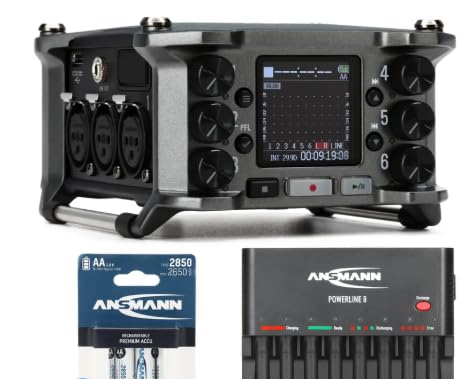
- Six XLR inputs and 14-track capability
- Time-code I/O for production workflows
- Bundle includes rechargeable batteries and charger
Best For: Professional crews recording lectures or panels with multiple microphones
Best Compact Lecture Recorder
EVISTR L357 64GB Voice Recorder

- 64GB storage with long recording capacity
- Adjustable gain and noise-reduction features
- Voice activation plus A-B and variable-speed playback
Best For: Students and teachers needing simple, high-capacity lecture recording
Best Multitrack Studio-Style Option
TASCAM DP-008EX 8-Track Recorder

- Eight-track digital recording
- Built-in stereo microphones and WAV support
- Portable operation with four AA batteries
Best For: Users who need separate tracks for complex audio setups
Best Budget Voice-Activated Pick

- Voice activation helps reduce silent sections
- MP3 and WAV recording with 8GB storage
- A-B repeat and variable-speed playback
Best For: Students wanting a compact, straightforward lecture recorder
Simple Playback Pick

- One-button recording and playback controls
- DSP noise reduction with voice activation
- Up to 30 hours of recording; 16GB storage
Best For: Students wanting a lightweight, easy-to-use lecture recorder
High-Capacity Choice

- 72GB storage with up to 10,860 hours capacity
- DSP 6.0 noise reduction and voice activation
- OTG transfers to compatible phones and tablets
Best For: Frequent recorders needing extensive storage and mobile transfers
Feature-Rich Organizer

- 128GB storage with up to 9,296 hours capacity
- Selectable MP3 and high-quality WAV formats
- Password protection and four-folder organization
Best For: Frequent users needing storage, format control, and file organization
Best Flexible Pick – Zoom H6
For multitrack recorders for lectures, the Zoom H6 is a versatile choice when you need several external microphones, portable operation, and high-resolution recording. It records up to 24-bit/96kHz WAV audio or MP3 files directly to SD cards and can also serve as a USB audio interface.
Best For: Lecture teams recording multiple speakers, panels, or classroom sessions with separate microphones.
Pros:
- Four XLR/TRS inputs with individual gain controls, pads, and phantom power.
- Records directly to SD cards up to 128GB.
- Includes stereo microphone capsules and supports multichannel USB audio.
- Battery powered and mountable to a DSLR or camcorder with an optional adapter.
Cons:
- Requires four AA batteries for portable use.
- The optional hot-shoe adapter is not included.
The H6 offers the strongest balance of input flexibility, audio quality, and portability in this group. Its multiple preamps and included capsules make it suitable for both straightforward lectures and more involved recording setups.
Best for Audio Projects – Boss BR-600
The Boss BR-600 is a compact multitrack recorder for lectures when you want a self-contained unit with built-in microphones, effects, and extensive track organization. It provides eight simultaneous playback tracks and 64 V-Tracks for managing takes or project variations.
Best For: Users who want built-in recording tools and substantial track storage for organizing lecture or voice projects.
Pros:
- Eight simultaneous playback tracks and 64 V-Tracks.
- Built-in stereo microphone and battery-powered operation.
- Includes vocal effects, pitch correction, and a guitar effects processor.
- Built-in drum machine with velocity-sensitive pads.
Cons:
- Uses CompactFlash media and includes only a 128MB card.
- Listed digital recording time is 2 hours and 16 minutes.
- Requires four 9V batteries for battery operation.
The BR-600 is more of a portable production workstation than a straightforward field recorder. Its built-in effects and track-management features may appeal to creators who plan to edit or build projects around recorded lecture material.
Best Simple Pocketstudio – Tascam DP-006
The Tascam DP-006 is a straightforward option among multitrack recorders for lectures, with built-in microphones and a compact, battery-operated design. It records up to six tracks, supports two-track simultaneous recording, and captures CD-quality 16-bit/44.1kHz WAV audio.
Best For: Portable lecture recording when simple controls and built-in microphones matter more than high-resolution audio.
Pros:
- Supports up to six tracks and six-track simultaneous playback.
- Includes two built-in omnidirectional condenser microphones.
- Two tracks can be recorded simultaneously.
- Includes a dedicated stereo master track.
Cons:
- Recording resolution is limited to 16-bit/44.1kHz.
- Uses a 4GB memory capacity.
- Listed recording time is up to nine hours.
The DP-006 keeps the recording workflow focused and portable. It is a practical fit for users who need basic multitrack capture from built-in microphones without the expanded input connectivity of a field recorder.
Best Professional Field Setup – Zoom F6
The Zoom F6 is designed for demanding multitrack recording setups, making it a strong choice among multitrack recorders for lectures with several professional microphones. It provides six XLR microphone inputs, 14-track capability, time-code I/O, and USB audio-interface functionality.
Best For: Professional lecture, panel, or event crews using multiple XLR microphones and field-recording accessories.
Pros:
- Six XLR microphone inputs and 14-track recording capability.
- Includes time-code I/O for compatible production workflows.
- Supports SD, SDHC, and SDXC cards.
- Bundle includes rechargeable AA batteries and an eight-bay charger.
Cons:
- Its professional connectivity may be more than needed for basic lectures.
- The supplied listing identifies a bundled configuration rather than the recorder alone.
The F6 is the most production-oriented option here. Its six XLR inputs, high track count, time-code connections, and rechargeable power bundle make it well suited to organized field teams rather than casual single-microphone recording.
Best Compact Lecture Recorder – EVISTR L357 64GB Voice Recorder
For shoppers comparing multitrack recorders for lectures, the EVISTR L357 is a compact voice recorder focused on straightforward classroom capture. Its built-in microphone, adjustable recording gain, noise-reduction features, and voice activation are designed to help record spoken content while limiting silent sections.
Best For: Students, teachers, and anyone who wants long recording capacity, playback controls, and simple USB file transfers.
Pros:
- 64GB storage can hold up to 4,660 hours at 32Kbps.
- Offers adjustable seven-level recording gain, PCM noise reduction, and MP3 or WAV recording.
- Supports voice activation, A-B repeat, variable-speed playback, and time-scheduled recording.
- Up to 32 hours of continuous recording and 35 hours of playback are listed.
Cons:
- This is a voice recorder rather than a dedicated multitrack studio recorder.
- Voice activation may omit quiet portions when the sound falls below its selected sensitivity.
- The supplied notes do not specify separate multitrack recording capabilities.
The L357 is a practical choice when lecture recording means capturing and reviewing a single spoken source. Its large capacity and playback tools are useful for long-term study, but buyers specifically needing multiple independent audio tracks should look elsewhere.
Best Multitrack Studio-Style Option – TASCAM DP-008EX 8-Track Recorder
Among multitrack recorders for lectures, the TASCAM DP-008EX is the most purpose-built for working with multiple recorded tracks. It provides eight-track digital recording, built-in stereo microphones, WAV support, and a portable battery-operated design, though its feature set is oriented toward music and songwriting rather than automatic lecture transcription or voice activation.
Best For: Users who need genuine multitrack recording for presentations, small sessions, or other setups where separate audio tracks matter.
Pros:
- Provides eight-track digital multitrack recording.
- Includes built-in stereo microphones and WAV recording.
- Portable design operates on four AA batteries.
- Includes a 2GB SD card and USB connectivity.
Cons:
- Its listed 2GB storage is much smaller than the 64GB voice recorder in this roundup.
- The supplied notes do not mention voice activation or dedicated lecture-focused controls.
- Six-and-a-half hours of listed digital recording time may be limiting for extended sessions.
The DP-008EX is the strongest match here for buyers who truly mean multitrack recording. For a single lecturer, it may be more equipment than necessary, but separate tracks and WAV recording make it more flexible for complex audio setups.
Best Budget Voice-Activated Pick – HoTiyan 8GB Digital Recorder
For basic multitrack recorders for lectures research, the HoTiyan H-10001 is a small voice recorder built around quick operation and voice-activated capture. It records in MP3 or WAV, includes a built-in microphone, and adds playback features that can help with reviewing classroom or meeting material.
Best For: Students and meeting attendees seeking an inexpensive, compact recorder with voice activation and repeat-playback functions.
Pros:
- Voice control can stop recording during quieter intervals to reduce unused space.
- Supports MP3 and WAV recording with a stated 8GB capacity.
- Includes A-B repeat, variable playback speed, password protection, and timestamped file names.
- Offers up to 20 hours of continuous recording on a full charge.
Cons:
- Its 8GB storage is considerably lower than the EVISTR model’s 64GB capacity.
- The supplied notes do not specify multitrack recording.
- The battery is listed for up to 20 hours of recording, which may require recharging during longer use.
The HoTiyan is a sensible low-cost option for recording and reviewing lectures without a complicated setup. It is better suited to single-source voice capture than true multitrack production, but voice activation and A-B repeat add useful study-oriented convenience.
Simple Playback Pick – Compact 16GB Lecture Recorder
For shoppers comparing multitrack recorders for lectures, this compact Sunlan model emphasizes straightforward controls, voice activation, and built-in playback. Its 16GB storage and up to 30 hours of recording time suit students who want a simple device for capturing classes, meetings, or interviews.
Best For: Students and users who prioritize simple one-button recording, portable storage, and convenient playback.
Pros:
- Simple REC, STOP, and PLAY controls are easy to operate.
- DSP noise reduction and a sensitive built-in microphone are designed for clearer speech capture.
- Voice-activated recording can reduce idle recording time and power use.
- Includes A-B repeat, music playback, and USB file-storage functionality.
Cons:
- Mono recording may be less suitable for users seeking stereo or multi-source capture.
- Storage is limited to 16GB compared with higher-capacity options.
- Playback time is listed at up to 7 hours, shorter than its recording capacity.
This is a practical entry-level choice when ease of use matters more than advanced recording controls. The small 35-gram design and USB connectivity make it convenient for carrying and transferring lecture files.
High-Capacity Choice – 72GB DSP Lecture Recorder
This NekSide model is a strong capacity-focused option for comparing multitrack recorders for lectures. It combines 72GB of storage, voice activation, DSP 6.0 noise reduction, and OTG transfer for moving recordings directly to compatible smartphones or tablets.
Best For: Users who record frequently and want extensive storage plus mobile-friendly file transfer.
Pros:
- 72GB of built-in storage is rated for up to 10,860 hours of audio.
- DSP 6.0 noise reduction is designed to reduce background noise and preserve speech detail.
- Voice activation can help limit recording of silence.
- OTG support enables direct transfers to compatible smartphones and tablets.
Cons:
- Recordings default to WAV; MP3 requires conversion through a computer.
- The listed headphone connection is Mini-USB rather than a standard 3.5mm jack.
- Its feature set may be more than needed for occasional note-taking.
Choose this recorder when long-term storage and flexible transfer options are priorities. It is suited to lectures, meetings, interviews, and personal memos, though buyers should plan for WAV-to-MP3 conversion if that format is required.
Feature-Rich Organizer – 128GB EVIDA Lecture Recorder
For buyers evaluating multitrack recorders for lectures, the EVIDA VR01 stands out for its combination of high storage capacity, selectable recording formats, and file-management features. It supports voice activation, password protection, bookmarks, A-B repeat, and four-folder organization for keeping lecture recordings orderly.
Best For: Students, teachers, and professionals who want extensive storage, adjustable recording quality, and organized file handling.
Pros:
- 128GB storage is rated for up to 9,296 hours of recording.
- Supports MP3 at 128 or 192kbps and WAV at 1536kbps.
- Six voice-activation sensitivity levels can help reduce silence and whispering.
- Includes password protection, bookmarks, A-B repeat, and four-folder file organization.
Cons:
- Its built-in microphone operates in mono rather than stereo.
- No headphone jack is listed in the specifications.
- Full-battery continuous recording is listed at up to 54 hours, despite the much larger storage capacity.
This is the most feature-oriented option in the group for users who value control over formats and file organization. Its 128GB capacity is generous, while the selectable voice-activation levels and password protection add practical convenience for regular lecture recording.
How We Picked the Best Multitrack Recorders for Lectures
We evaluated these recorders by looking at the features that matter most for spoken-word capture: microphone performance, input options, track count, storage, power, file handling, and ease of use. Dedicated multitrack units can record separate microphones or sources for more control in post-production, while voice recorders prioritize simplicity, long runtimes, and automatic recording.
We also considered portability. A recorder used in a lecture hall should be quick to start, easy to monitor, and compact enough to carry with notebooks or a laptop. Features such as voice activation, playback controls, USB transfer, and noise reduction can be especially useful for students and researchers.
Quick Comparison
| Recorder type | Best for | Main advantage | Potential limitation |
|---|---|---|---|
| Professional multitrack field recorder | Multiple microphones and serious editing | Separate tracks, better input control | More setup and higher cost |
| Pocketstudio multitrack recorder | Lecture notes plus songwriting or production | Standalone recording workflow | Less convenient for rapid start-and-stop use |
| Compact digital voice recorder | Students, interviews, and everyday lectures | Simple operation and lightweight design | Usually records a mixed or single source |
| Voice-activated recorder | Long meetings and unattended recording | Reduces silent sections and conserves storage | May miss quiet openings or soft speakers |
Key Buying Factors for Multitrack Recorders for Lectures
Track Count and Inputs
Choose a true multitrack recorder if you need separate channels for a lecturer, audience questions, room ambience, or panelists. XLR/TRS inputs are useful with external microphones, while built-in microphones are faster for a single speaker.
Microphone Quality and Placement
Even a capable recorder cannot overcome poor placement. Look for stereo microphones or an external-input option, and position the unit near the speaker rather than at the back of a large room. Headphone monitoring helps confirm that levels are usable.
Battery Life and Storage
Check the expected runtime, battery type, and whether the device supports removable storage. Long lectures and day-long conferences benefit from rechargeable or replaceable batteries, generous capacity, and a clear remaining-time display.
File Transfer and Controls
USB connectivity makes it easier to move recordings to a computer for transcription or archiving. Physical record, pause, and playback controls are often preferable in classrooms because they can be operated without navigating a complicated menu.
Automatic Features
Voice activation and noise-reduction modes can help with routine note-taking, but test them before an important lecture. Aggressive activation thresholds may cut off quiet words, and heavy processing can make voices sound unnatural.
Who Should Buy Which Multitrack Recorders for Lectures?
Choose a Professional Multitrack Recorder If…
You record panels, multiple speakers, or lectures for publication and need isolated tracks, external microphones, low-noise inputs, and detailed control during editing.
Choose a Pocketstudio If…
You want a standalone recorder for both lectures and music projects, and you are comfortable managing tracks, levels, and files manually.
Choose a Compact Voice Recorder If…
You mainly need straightforward recordings for review, transcription, or study. These models are typically the easiest to carry and operate.
Choose a Voice-Activated Model If…
You prioritize long recording sessions, hands-off operation, and storage efficiency. Confirm that its activation and playback features suit your lecture environment before relying on it.
