The best NAS enclosures make it easier to centralize files, automate backups, stream media, and expand storage without relying entirely on cloud services. The right model depends on more than drive bays: processor performance, networking, software, noise, and upgrade options all affect the experience.
We compare 10 two-bay and four-bay options for beginners, families, creators, remote workers, and technical users so you can match your storage goals with the hardware and features you actually need.
Best 10 Nas Enclosures Picks for 2026
Best Simple Private Cloud NAS
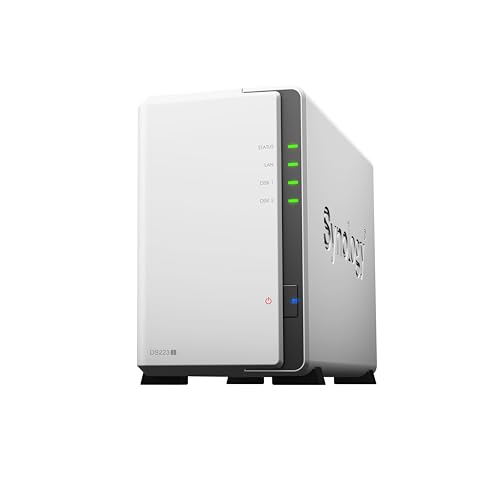
- Two-bay design for home storage
- Private cloud, syncing, and automated backups
- Supports multiple IP cameras and remote viewing
Best For: First-time NAS users prioritizing simple backups and sharing
Best Starter NAS

- Beginner-friendly two-bay private storage
- Automatic cross-platform backups and AI photo organization
- Supports up to 64TB, but no Docker or virtual machines
Best For: Personal users who want simple phone backups and private media storage
Best Advanced Home NAS – UGREEN DXP2800
For advanced home users comparing NAS enclosures, the UGREEN DXP2800 stands out as a flexible two-bay hub for backups, media libraries, and demanding applications. Its Intel N100 processor, 8GB DDR5 RAM, 2.5GbE networking, and dual M.2 NVMe slots support faster file handling and broader expansion than basic home models.
Best For: Creators, tech enthusiasts, and households managing 4K video, RAW photos, device backups, and multiple NAS applications.
Pros:
- Supports up to 80TB across two HDD bays and two M.2 NVMe SSD slots.
- 8GB DDR5 RAM, 2.5GbE networking, and an Intel N100 CPU suit heavier workloads.
- Supports Docker, virtual machines, media servers, AI photo organization, and compatible camera surveillance.
- Works across Windows, macOS, Android, iOS, web browsers, and compatible smart TVs.
Cons:
- Diskless design means HDDs and SSDs must be purchased separately.
- Its advanced features may be more than casual users need.
The DXP2800 is a strong choice when you want one of the more capable NAS enclosures for a growing digital library and app-heavy home setup. Choose compatible drives separately and plan around your preferred storage and performance requirements.
Best Simple Private Cloud NAS – Synology DS223j
The Synology DS223j is a straightforward two-bay option for shoppers seeking NAS enclosures focused on private cloud storage, file sharing, and backups. It provides multi-platform access and supports home security monitoring without adding the complexity of a higher-end system.
Best For: Home users who want centralized files, automated device backups, private cloud access, and basic IP-camera recording.
Pros:
- Provides private cloud access with ownership of locally stored data.
- Supports file sharing and syncing across platforms from anywhere.
- Offers automated backups for Macs, PCs, and mobile devices.
- Supports multiple IP cameras with remote viewing.
Cons:
- Diskless configuration requires separate drive purchases.
- Its two-bay design is better suited to home use than larger storage deployments.
The DS223j makes sense for buyers who value an approachable backup and sharing hub over advanced hardware expansion. Synology’s two-year warranty, support resources, and ongoing software updates add reassurance for first-time NAS owners.
Best High-Speed Creator NAS – UGREEN DXP2800 GT
Among NAS enclosures for creators and freelancers, the UGREEN DXP2800 GT is designed for high-speed workflows and self-hosted services. Its Ryzen Embedded R2514 processor, 10GbE networking, expandable memory, and SSD support make it a powerful foundation for large media libraries, backups, and multi-device access.
Best For: Creators, freelancers, and smart-home enthusiasts who need fast transfers, local surveillance storage, and Docker-based services.
Pros:
- 10GbE networking supports faster large-file transfers and backups.
- 8GB DDR4 RAM can be expanded to 64GB.
- Supports Docker, virtual machines, Plex, Emby, Jellyfin, Home Assistant, and other services.
- Supports up to 80TB using SATA drives, U.2 NVMe SSDs, and M.2 SSDs.
Cons:
- Drives are not included.
- Plex requires manual setup through Docker.
- ECC memory protection requires a compatible upgrade because the installed RAM is non-ECC.
The DXP2800 GT is one of the most performance-oriented NAS enclosures in this group, particularly for users editing or moving large files across a fast network. Its expansion options are compelling, but setup and component planning require more involvement.
Best Home and Office Backup NAS – Synology DS223
The Synology DS223 is a practical choice among NAS enclosures for centralizing files across home and office devices. Its two-bay format supports shared storage, automated backups, collaboration, and DIY surveillance in a compact tabletop design.
Best For: Homes, small offices, and teams that need shared files, device backups, version control, and camera monitoring.
Pros:
- Consolidates files from computers, phones, and external drives in one hub.
- Supports professional file sharing, syncing, and version control.
- Provides automated backups to cloud and external-drive destinations.
- Supports motion alerts, recording schedules, and remote camera viewing.
Cons:
- Diskless design requires separate storage drives.
- Two bays limit capacity and expansion compared with larger NAS systems.
The DS223 offers a balanced feature set for buyers who want dependable household or small-office storage without moving to a larger enclosure. Its collaboration and backup tools make it especially useful when several users or devices need access to the same data.
Best High-Speed Pick – UGREEN DXP4800 Plus
For families, creators, and small teams comparing nas enclosures, the UGREEN DXP4800 Plus stands out as a powerful four-bay option. It combines 10GbE networking, generous memory, broad device compatibility, and support for Docker and virtual machines.
Best For: Small offices, creative households, and users who need fast transfers, private cloud access, and substantial expandable storage.
Pros:
- Four bays support up to 144TB with compatible drives, while RAID options help with recovery if a drive fails.
- 10GbE networking and 10Gbps USB ports enable very fast backups and file transfers.
- Intel five-core CPU, 8GB DDR5 RAM, 128GB SSD, 4K HDMI, Docker, and virtual machine support provide strong flexibility.
- AI-powered photo organization, encryption, permissions, and apps for major operating systems support a private-cloud workflow.
Cons:
- Hard drives or SSDs are not included and must be purchased separately.
- Actual transfer speeds depend on the network, drives, CPU, router, and file sizes.
- The NAS uses wired Ethernet rather than Wi-Fi.
The DXP4800 Plus is a feature-rich nas enclosure for buyers who prioritize speed and expansion. Its hardware and software support are compelling, but the total cost rises after adding compatible storage drives.
Best Beginner Value – Yxk Zero1 2-Bay NAS
The Yxk Zero1 is a compact, approachable choice among nas enclosures for personal storage and home backups. Its two-bay design focuses on straightforward file access, remote sharing, phone backups, and data protection without requiring advanced technical knowledge.
Best For: Beginners, families, and home users consolidating photos, videos, and files into a private storage hub.
Pros:
- Simple private-cloud setup provides access through phone apps, desktop clients, and web browsers.
- 2.5GbE connectivity supports faster transfers than standard 1GbE, with 4K streaming capability.
- RAID modes, automated backups, snapshot recovery, encryption, and user permissions add practical protection.
- Compact, lightweight construction with thermal management and health monitoring suits tabletop placement.
Cons:
- Hard drives must be purchased separately.
- Two bays provide less expansion capacity than four-bay alternatives.
- Its plastic enclosure and entry-level positioning may be less suitable for demanding multi-user workloads.
The Zero1 makes sense when simplicity and private home storage matter more than maximum performance. It offers useful networking and backup features in a compact format, though its two-bay design limits future expansion.
Best for Creators and Teams – UGREEN DXP4800 GT
For demanding nas enclosures workloads, the UGREEN DXP4800 GT pairs a Ryzen Embedded processor with expandable memory, dual 10GbE, SSD support, and a broad application ecosystem. It is designed for creators, technology enthusiasts, offices, and users who want storage to serve as a media, surveillance, or self-hosting platform.
Best For: Creators handling large media files, office teams, and advanced users running backups, containers, virtual machines, or local surveillance.
Pros:
- Ryzen four-core, eight-thread processor, 8GB expandable DDR4 RAM, and dual 10GbE support demanding multitasking.
- Four SATA bays, U.2 NVMe compatibility in up to two bays, and two M.2 SSD slots support up to 144TB total capacity.
- Built-in SD slot and multiple 10Gbps USB ports simplify camera-media and other file transfers.
- UGOS Pro supports Docker, virtual machines, media servers, home automation, web hosting, and local surveillance workflows.
Cons:
- Storage drives are not included.
- Dual-10GbE aggregate performance requires compatible networking equipment and may vary by workload.
- Its extensive features may be more than casual home users need.
The DXP4800 GT is the strongest fit for buyers who want a nas enclosure that can grow beyond basic file storage. Its expansion options and creator-focused connections are impressive, but realizing the full benefit requires compatible drives and network hardware.
Best Starter NAS – UGREEN NAS DH2300
The UGREEN NAS DH2300 is a straightforward option for shoppers comparing nas enclosures for personal storage, phone backups, and private access to photos, videos, and documents. Its two-bay design, 4GB of RAM, and 1GbE connection keep the setup approachable for beginners, though storage drives must be purchased separately.
Best For: Beginners, personal users, and content creators who want a simple private backup and media-storage hub.
Pros:
- Supports automatic backups across Windows, macOS, iOS, and Android devices.
- AI photo tools can tag faces, locations, text, and objects while identifying duplicate or similar photos.
- Supports up to 64TB and offers transfer speeds of up to 125MB/s through its 1GbE port.
- Includes privacy features such as RAID modes, two-factor authentication, permission controls, and encrypted transfers.
Cons:
- Does not support Docker or virtual machines.
- Storage drives are not included.
- Wi-Fi requires an external USB adapter; wired Ethernet is recommended.
The DH2300 is a practical entry point into private storage, especially for households moving away from cloud subscriptions or scattered external drives. Its limits make it less suitable for advanced server workloads, but its simple backup and photo-management features fit everyday use well.
Best for Power Users – UGREEN NAS DXP4800 Pro
For demanding workloads, the UGREEN NAS DXP4800 Pro is one of the more capable nas enclosures in this lineup. Its Intel Core i3-1315U processor, expandable DDR5 memory, dual high-speed networking, and support for Docker and virtual machines make it suited to advanced home labs, offices, development, and media workflows.
Best For: IT professionals, developers, video editors, businesses, and power users running demanding applications or virtualization workloads.
Pros:
- Intel Core i3-1315U processor, 8GB DDR5 RAM expandable to 96GB, and Intel UHD Graphics support demanding multitasking.
- Dual 10GbE and 2.5GbE ports enable transfer speeds of up to 1.25GB/s.
- Supports Docker, virtual machines, four-bay RAID 0/1/5/10 configurations, and dual PCIe 4.0 M.2 SSDs.
- Tool-free drive trays, aluminum construction, multi-zone cooling, and a magnetic dust filter support easier maintenance and sustained operation.
Cons:
- Its advanced hardware and features may be more than beginners need.
- Maximum capacity claims depend on installing compatible HDDs and SSDs separately.
- Higher-end networking requires compatible network equipment to realize its full speed potential.
The DXP4800 Pro stands out when a NAS must do more than basic file storage. It offers substantial expansion and application flexibility, making the extra complexity worthwhile for users who need virtual machines, containers, fast transfers, or a scalable private workstation.
Best Family Storage NAS – UGREEN NAS DH4300 Plus
The UGREEN NAS DH4300 Plus is a useful middle ground among nas enclosures, combining a beginner-friendly four-bay design with private remote access, phone backups, and Docker support. Its 8GB of RAM, 2.5GbE port, and 4K HDMI output give home users and remote workers more headroom than a basic two-bay model.
Best For: Families, home media libraries, remote workers, and beginners who want expandable private storage with simple device access.
Pros:
- Four bays provide room for a large private media and backup library, with support for up to 128TB.
- Real-time phone photo and video backup includes AI search, recognition, custom learning, and duplicate-photo removal.
- Supports Docker, 2.5GbE networking, 8GB LPDDR4X RAM, and 4K HDMI video output.
- Works across Windows, macOS, Android, iOS, web browsers, and smart TVs, with NFC-assisted setup.
Cons:
- Does not support virtual machines.
- Storage disks are not included.
- Its four-bay capacity and feature set may be unnecessary for users needing only basic backups.
The DH4300 Plus is a strong choice for households that expect their storage needs to grow. It offers more capacity and connectivity than an entry-level enclosure while keeping setup and cross-device access approachable, though advanced virtualization users should consider a more powerful model.
How We Picked These Nas Enclosures
We evaluated these Nas Enclosures by focusing on the features that most affect long-term ownership: bay count, drive expansion, processor capability, memory, networking, backup tools, remote access, media workloads, ease of setup, and likely noise and power demands. We also considered the intended audience for each model, from first-time home users to creators and small teams managing larger libraries.
Because these are diskless systems, remember to budget for compatible NAS hard drives or SSDs. Drive cost, RAID configuration, and backup storage can significantly change the total price.
Quick Comparison
| Best For | Recommended Configuration | What to Prioritize |
|---|---|---|
| Basic home backups | 2-bay enclosure | Simple software, low noise, automated backup support |
| Families and remote workers | 2-bay or entry-level 4-bay | Personal cloud access, user accounts, and easy file sharing |
| Creators and media users | Higher-performance 2-bay or 4-bay | Fast networking, stronger CPU, SSD support, and expandable capacity |
| Small teams and power users | 4-bay performance model | RAID flexibility, application support, memory, and sustained transfers |
Key Buying Factors for Nas Enclosures
Bay Count and RAID
Two-bay systems are compact and affordable, but usable capacity is limited when configured for redundancy. Four-bay Nas Enclosures cost more yet provide better capacity planning, additional RAID options, and a smoother path for future upgrades. RAID protects against some drive failures; it is not a substitute for a separate backup.
Performance and Networking
For document backups and photo storage, entry-level hardware is often sufficient. Video libraries, large project files, virtual machines, and several simultaneous users benefit from a faster processor, more memory, and faster Ethernet. Check the complete network path, including your switch, router, client device, and cabling.
Software and Remote Access
Good NAS software should simplify user permissions, scheduled backups, synchronization, snapshots, and remote access. Look for mobile apps and computer backup tools that fit the devices in your household or organization. Remote access should be secured with strong passwords, updates, and multi-factor authentication where available.
Drive Compatibility, Noise, and Power
Verify supported drive capacities and file-system options before buying. NAS-rated hard drives are generally better suited to continuous operation. If the enclosure will sit in a bedroom, office, or living room, consider fan noise, vibration, idle power use, and whether SSDs are supported.
Who Should Buy Which Nas Enclosures?
Choose a two-bay beginner model if you mainly need centralized documents, phone-photo backups, and a personal cloud. Families and remote workers should look for straightforward sharing, reliable client backups, and enough capacity for several users. Creators should favor faster networking and stronger hardware, especially when moving large video or design files. Small offices, developers, and advanced users will usually benefit most from a four-bay model with better expansion, RAID flexibility, and application headroom.
Before ordering, estimate your current data, expected growth over three to five years, and the capacity needed for redundancy. Buying extra bays now can be cheaper and less disruptive than replacing a full two-bay system later.
