The right SSD enclosure can turn an unused internal drive into fast, portable storage for backups, file transfers, game libraries, and system cloning. Compatibility matters, though: NVMe and SATA M.2 drives use different interfaces, while 2.5-inch SATA drives require a separate enclosure type.
We selected 10 enclosures for Windows users across common drive formats, connection speeds, designs, and budgets. Use the buying guide below to narrow the list based on your SSD, computer ports, performance needs, and portability priorities.
Best 10 SSD Enclosures for Windows Picks for 2026
Best Overall NVMe Pick

- 10Gbps USB 3.2 Gen 2 interface
- Tool-free support for four M.2 sizes
- Includes USB-C and USB-A cables
Best For: Windows users with M.2 NVMe SSDs
Best Budget-Friendly NVMe Option
Xiaobi Tool-Free SSD Enclosure
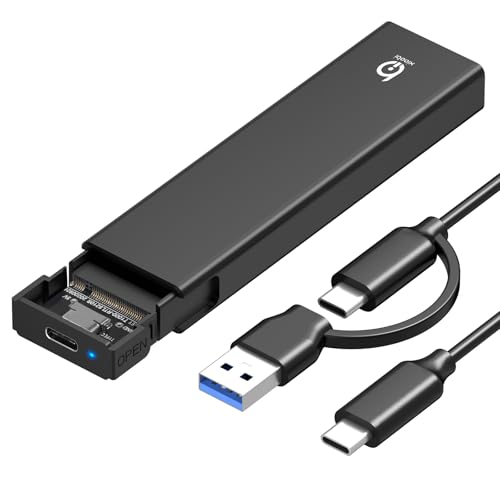
- USB 3.2 Gen 2 speeds up to 10Gbps
- Supports four standard M.2 NVMe sizes
- Aluminum body with thermal pad
Best For: Basic Windows NVMe drive transfers
Best for 2.5-Inch Drives

- Fits 2.5-inch SATA SSDs and HDDs
- Supports drives up to 6TB
- Tool-free and needs no extra power
Best For: Windows users reusing 2.5-inch SATA drives
Best Compact Design
FIDECO Sandwich-Style NVMe Enclosure

- 10Gbps USB 3.2 Gen 2 interface
- Tool-free sandwich-style installation
- USB-C cable includes USB-A adapter
Best For: Travelers using M.2 NVMe SSDs with Windows
Best High-Speed Hybrid
UGREEN 20Gbps M.2 NVMe/SATA Enclosure

- Supports NVMe and SATA M.2 SSDs
- Up to 20Gbps with USB 3.2 Gen 2x2
- Aluminum case with thermal pad
Best For: Windows users needing a versatile M.2 enclosure
Best 2.5-Inch Budget Pick
SABRENT Tool-Free SATA Enclosure

- Fits standard 2.5-inch SATA SSDs
- Tool-free, plug-and-play installation
- USB 3.0 supports up to 5Gbps
Best For: Simple reuse of a 2.5-inch SATA SSD
Best Complete M.2 Kit
SSK 10Gbps NVMe/SATA Enclosure

- Supports compatible NVMe and SATA M.2 drives
- Includes USB-C and USB-A cables
- Aluminum shell with thermal pads
Best For: Windows users connecting M.2 drives to varied USB ports
Best Dual-Protocol Pick
SABRENT Tool-Free M.2 SSD Enclosure

- Fits M.2 NVMe and SATA drives
- Tool-free 10Gbps USB-C design
- Slim aluminum case with thermal pad
Best For: Windows users with bare 2242, 2260, or 2280 M.2 SSDs
Best 2.5-Inch Value
BENFEI Tool-Free SATA Drive Enclosure

- Supports 2.5-inch SATA drives up to 6TB
- Tool-free plug-and-play installation
- Includes Type-C and Type-A cable options
Best For: Windows users repurposing 7mm or 9.5mm SATA SSDs
Best Rugged Design

- Supports M.2 NVMe and SATA drives
- Tool-free Q-Latch with 10Gbps USB-C
- Aluminum body with IP55 protection
Best For: Windows 10/11 users needing a more protective portable enclosure
Best Overall NVMe Pick – UGREEN 10Gbps M.2 Enclosure
For shoppers comparing ssd enclosures for windows, this UGREEN model is a well-rounded NVMe option. It supports USB 3.2 Gen 2 speeds up to 10Gbps, installs without tools, and includes both USB-C and USB-A cables for flexible computer connections.
Best For: Windows users who want a portable, tool-free enclosure for multiple-size M.2 NVMe drives.
Pros:
- Supports 2230, 2242, 2260, and 2280 M.2 NVMe SSDs up to 8TB.
- RTL9210 chipset provides UASP, TRIM, and protection against short circuits and over-current conditions.
- Aluminum housing, silicone thermal pad, protective case, and two cable options are included.
Cons:
- Does not support SATA NGFF or mSATA SSDs.
- Reaching 10Gbps requires a compatible USB-C 3.2 Gen 2 data cable and port.
This is a strong all-purpose choice when you need broad NVMe size support, useful accessories, and a durable travel-friendly design. Just verify that your SSD uses the NVMe protocol.
Best Budget-Friendly NVMe Option – Xiaobi Tool-Free SSD Enclosure
This Xiaobi enclosure keeps the essentials simple for anyone choosing among ssd enclosures for windows. Its USB 3.2 Gen 2 interface is rated up to 10Gbps, while the tool-free buckle design makes installing a compatible NVMe drive straightforward.
Best For: Windows users seeking an affordable, plug-and-play enclosure for standard M.2 NVMe SSDs.
Pros:
- Supports M-Key and B+M Key NVMe drives in 2230, 2242, 2260, and 2280 sizes.
- Aluminum housing and silicone thermal pad help manage heat during transfers.
- Works with Windows, macOS, and Linux without requiring drivers or software.
Cons:
- Not compatible with SATA NGFF, mSATA, or SSDs with heatsinks.
- Actual transfer speeds depend on the SSD, USB port, computer, and system specifications.
Its broad size compatibility and simple installation make it practical for routine storage expansion or drive access. Confirm your SSD is a bare NVMe model before buying.
Best for 2.5-Inch Drives – UGREEN USB-C SATA Enclosure
Unlike M.2-only models, this UGREEN enclosure is designed for 2.5-inch SATA drives, making it a useful alternative in a roundup of ssd enclosures for windows. It accepts SATA SSDs or HDDs, uses USB-C, and requires no separate power supply.
Best For: Windows users repurposing or accessing a 2.5-inch SATA SSD or hard drive.
Pros:
- Supports most 2.5-inch SATA I, II, and III SSDs and HDDs up to 6TB.
- USB 3.1 Gen 2 and UASP support provide up to 6Gbps SATA transfer performance.
- Tool-free installation works with Windows, macOS, Linux, consoles, TVs, and routers.
Cons:
- It does not support M.2 NVMe, M.2 SATA, or mSATA drives.
- The included USB-C-to-USB-C cable requires an adapter or alternate cable for USB-A-only devices.
This is the right format when your spare drive is a conventional 2.5-inch SATA model rather than an M.2 SSD. Its aluminum body and built-in chipset also suit portable backup and recovery tasks.
Best Compact Design – FIDECO Sandwich-Style NVMe Enclosure
FIDECO offers a compact approach for shoppers looking at ssd enclosures for windows. This sandwich-style NVMe enclosure supports common M.2 sizes, uses USB 3.2 Gen 2 for up to 10Gbps theoretical speeds, and includes a USB-C cable with an attached USB-A adapter.
Best For: Travelers and Windows users who want a small NVMe enclosure with flexible cable connectivity.
Pros:
- Supports M-Key and M+B Key NVMe SSDs in 2230, 2242, 2260, and 2280 formats.
- Tool-free sandwich design helps position the thermal pad against the drive.
- Works with Windows, macOS, and Linux and supports UASP and TRIM.
Cons:
- Does not support M.2 SATA SSDs.
- A new SSD must be initialized before a computer can recognize it.
The small design and combined USB-C/USB-A cable make this a convenient travel companion. It is especially appealing if you want easy installation without carrying separate adapters.
Best High-Speed Hybrid – UGREEN 20Gbps M.2 NVMe/SATA Enclosure
For shoppers comparing SSD enclosures for Windows, the UGREEN 20Gbps enclosure stands out for supporting both PCIe NVMe and SATA M.2 drives. It accepts 2230, 2242, 2260, and 2280 sizes up to 8TB, although reaching its top transfer rate requires a USB 3.2 Gen 2×2 port.
Best For: Windows users who want one compact enclosure for compatible NVMe and SATA M.2 SSDs.
Pros:
- Supports PCIe NVMe and SATA M.2 SSDs in four common sizes.
- Up to 20Gbps over USB 3.2 Gen 2×2.
- Aluminum body, thermal pad, UASP, and TRIM support.
- Plug-and-play design with no separate power supply.
Cons:
- 20Gbps performance requires a compatible USB 3.2 Gen 2×2 interface.
- Does not support mSATA drives.
- SSD is not included.
This is a flexible pick if you have different M.2 drive types or want room for future upgrades. Its speed advantage is most useful with a matching host port, while the included USB-C cable and thermal design add practical convenience.
Best 2.5-Inch Budget Pick – SABRENT Tool-Free SATA Enclosure
The SABRENT EC-UASP is a straightforward choice among SSD enclosures for Windows when your drive is a standard 2.5-inch SATA SSD. Its tool-free installation, USB 3.0 connectivity, and broad Windows support make it useful for basic storage upgrades and drive reuse.
Best For: Windows users with a 2.5-inch SATA SSD who want simple, tool-free installation.
Pros:
- Tool-free design makes drive installation quick.
- Supports USB 3.0 speeds up to 5Gbps and is backward compatible with USB 2.0 and 1.1.
- Supports UASP SATA III and plug-and-play operation.
- Compatible with Windows and Mac systems.
Cons:
- Only supports 2.5-inch SATA drives, not M.2 SSDs.
- USB 2.0 connections reduce transfer speeds to up to 480Mbps.
- Plastic enclosure construction may be less robust than aluminum alternatives.
This enclosure is best suited to an existing notebook-size SATA SSD rather than a high-performance NVMe setup. It keeps the process uncomplicated and includes the USB 3.0 cable needed to connect the drive.
Best Complete M.2 Kit – SSK 10Gbps NVMe/SATA Enclosure
The SSK M.2 enclosure is a practical middle ground for SSD enclosures for Windows, supporting compatible NVMe and SATA M.2 drives through a USB 3.2 Gen 2 interface. It includes both USB-C and USB-A cables, thermal pads, and installation tools, making it convenient for connecting the enclosure to different Windows computers.
Best For: Windows users who need broad M.2 compatibility and both USB-C and USB-A connection options.
Pros:
- Supports NVMe PCIe and SATA M-Key/B+M Key M.2 SSDs.
- Up to 10Gbps through USB 3.2 Gen 2, with backward compatibility to 5Gbps.
- Includes USB-C and USB-A cables, thermal pads, and a screwdriver.
- Aluminum shell, UASP, TRIM, and plug-and-play operation.
Cons:
- Does not support PCIe AHCI, mSATA, Wi-Fi, or capture-card devices.
- Supports 2242, 2260, and 2280 sizes, not 2230.
- SSD is not included and may need formatting before use.
With its dual-cable package and improved RTL9210B controller, this SSK model is a convenient option for mixed Windows setups. Check your SSD type and size before buying, especially if you have a less common M.2 drive.
Best Dual-Protocol Pick – SABRENT Tool-Free M.2 SSD Enclosure
For shoppers comparing SSD enclosures for Windows, the SABRENT EC-SNVE is a flexible choice for bare M.2 drives. It supports both NVMe and SATA formats, uses USB 3.2 Type-C at up to 10Gbps, and installs without tools.
Best For: Windows users who need a compact enclosure for M.2 NVMe or SATA SSDs in 2242, 2260, or 2280 sizes.
Pros:
- Supports both M.2 NVMe and SATA SSDs.
- Tool-free installation takes seconds.
- USB 3.2 Type-C supports up to 10Gbps transfers.
- Slim aluminum build includes a thermal pad and an 8-inch Type-C cable.
Cons:
- SSD is not included.
- Does not fit 2.5-inch SATA, mSATA, or drives with pre-installed heatsinks.
This is a practical, portable option when you want one enclosure to accommodate two common M.2 protocols. Confirm your drive has no heatsink and that your computer has a compatible USB port.
Best 2.5-Inch Value – BENFEI Tool-Free SATA Drive Enclosure
The BENFEI enclosure is a straightforward option among SSD enclosures for Windows when you have a standard 2.5-inch SATA drive. Its tool-free design, UASP support, and included USB Type-C/Type-A cable make it useful for upgrades, file transfers, or repurposing an older SSD.
Best For: Windows users transferring or reusing 2.5-inch SATA SSDs or hard drives up to 6TB.
Pros:
- Supports 2.5-inch SATA I/II/III drives up to 6TB.
- Tool-free, plug-and-play installation.
- Supports UASP and transfer rates up to 6Gbps.
- Includes USB Type-C and Type-A connectivity plus an 18-month warranty.
Cons:
- Only supports 2.5-inch drives, not M.2 SSDs.
- Designed for drives 7mm or 9.5mm thick.
Choose this model if your drive is a conventional 2.5-inch SATA device rather than an M.2 module. It offers broad operating-system compatibility and simple installation, but its SATA interface sets a lower speed ceiling than a comparable NVMe setup.
Best Rugged Design – ASUS Cobble M.2 SSD Enclosure
The ASUS Cobble adds extra protection to the usual feature set, making it a notable option among SSD enclosures for Windows. It supports M.2 NVMe and SATA drives, offers USB-C 10Gbps performance, and combines tool-free swapping with an aluminum body and IP55 water and dust resistance.
Best For: Windows 10/11 users who want a portable M.2 enclosure with added resistance to dust and water.
Pros:
- Supports both NVMe and legacy SATA M.2 SSDs.
- Tool-free Q-Latch design enables quick drive changes.
- USB-C 3.2 Gen 2×1 delivers up to 10Gbps.
- Aluminum construction includes cooling and IP55 protection.
Cons:
- SSD is not included.
- Its larger listed dimensions and 180g weight may be less convenient than slimmer enclosures.
The Cobble is a strong fit for users who carry an enclosure between locations or devices and value physical protection. Check that your M.2 drive falls within the supported 2230–2280 sizes before buying.
How We Picked These SSD Enclosures for Windows
We focused on enclosure compatibility, advertised USB bandwidth, installation convenience, construction, and practical Windows use. The lineup includes cases for M.2 NVMe drives, M.2 SATA drives, and 2.5-inch SATA SSDs or hard drives. We also considered tool-free designs, USB-C connectivity, UASP support, thermal management, key-notch support, and durability features.
Advertised speeds are interface limits rather than guaranteed file-transfer results. Actual performance depends on the installed SSD, USB port, cable, controller, file sizes, and thermal conditions.
Quick Comparison
| Drive Type | Best For | Typical Connection | What to Check |
|---|---|---|---|
| M.2 NVMe | Fast backups, editing, and portable applications | USB 3.2 Gen 2 or faster | NVMe support and M-key compatibility |
| M.2 SATA | Repurposing older M.2 drives | USB 3.2 Gen 2 | SATA or dual-protocol support |
| 2.5-inch SATA | Older SSDs, hard drives, and inexpensive storage | USB 3.0 or USB-C | Drive thickness, power, and UASP support |
| Dual NVMe/SATA M.2 | Flexible drive reuse | USB-C, sometimes 20Gbps | Supported keys and protocol switching |
Key Buying Factors for SSD Enclosures for Windows
Drive and Key Compatibility
Confirm both the physical size and protocol before buying. Most M.2 enclosures support 2280 drives, but shorter 2230, 2242, or 2260 modules may need mounting support. M-key generally indicates NVMe, while B-key and B+M-key drives may be SATA or NVMe depending on the model. A dual-protocol enclosure offers more flexibility, but verify the manufacturer’s compatibility list.
USB Speed and Connector
A 10Gbps USB 3.2 Gen 2 enclosure is a strong choice for most Windows PCs and can deliver substantially better performance than USB 3.0. A 20Gbps model can be worthwhile if the computer has a matching USB 3.2 Gen 2×2 port. USB-C describes the connector, not necessarily the speed, so check both specifications.
Cooling, Security, and Installation
Aluminum bodies can help spread heat, while thermal pads improve contact between the SSD and enclosure. Tool-free covers make drive swaps easier, but screw-mounted designs may feel more secure for permanent use. For travel, consider shock resistance, cable quality, and water or dust protection where available.
Who Should Buy Which SSD Enclosures for Windows?
- Choose an NVMe-only enclosure if you have a modern M.2 PCIe SSD and want straightforward, high-speed portable storage.
- Choose a dual NVMe/SATA M.2 enclosure if you are unsure which M.2 protocol you own or plan to reuse several drives.
- Choose a 2.5-inch SATA enclosure for an older laptop SSD, a spare hard drive, or the lowest-cost way to create external storage.
- Choose a 20Gbps model only when your Windows computer and cable support the same standard.
- Choose a rugged or sealed design if the enclosure will travel frequently or be used outside a controlled office environment.
Before installation, back up important data and safely eject the drive in Windows. A newly installed SSD may also need initialization and formatting in Disk Management before it appears in File Explorer.
