USB duplicators with erase functions make it easier to copy data to multiple flash drives and sanitize used media without relying on a computer. They are useful for IT teams, manufacturers, educators, repair shops, and organizations handling repeat deployment or secure disposal tasks.
This roundup compares 10 standalone duplicators across different port counts, transfer speeds, erase capabilities, and workloads, from compact 1:2 units to high-volume 1:199 systems.
Best 10 USB Duplicators with Erase Functions Picks for 2026
Compact Erase Station

- Standalone one-to-two USB duplication
- Quick, single-pass, and three-pass erase modes
- LCD monitoring with copy-and-compare verification
Best For: Small IT workloads and portable USB sanitizing
Seven-Port Workhorse

- Copies to up to seven drives
- Standalone operation without computer or software
- Supports synchronous and asynchronous copying
Best For: Recurring multi-drive duplication batches
Touchscreen Convenience
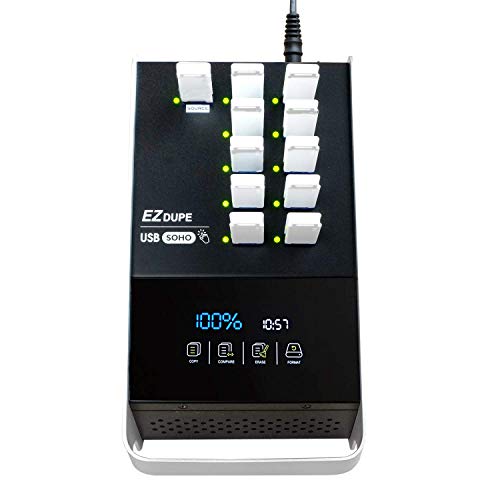
- Duplicates up to ten USB flash drives
- Touchscreen controls for copy and erase
- Includes compare, format, and one-touch erase functions
Best For: User-friendly office and daily batch duplication
High-Volume Sanitizer

- Duplicates up to 23 USB drives
- Quick, full, and DoD three-pass erase modes
- 100 MB/s USB 3.0 transfer rate with verification
Best For: High-volume Type-A USB duplication and sanitizing
Compact Secure Choice
Vinpower 1-to-3 USB Duplicator
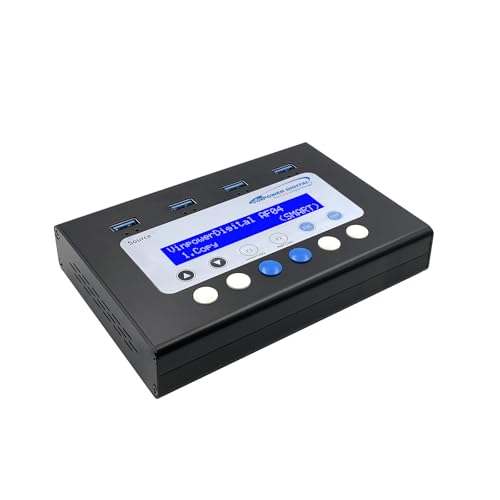
- Standalone copying without a PC
- DoD 5220.22-M USB erasing
- Smart, Raw, and error-skip modes
Best For: Small offices and routine secure USB reuse
Best for Everyday Use
Acumen Disc 1-to-7 USB 3.0 Tower
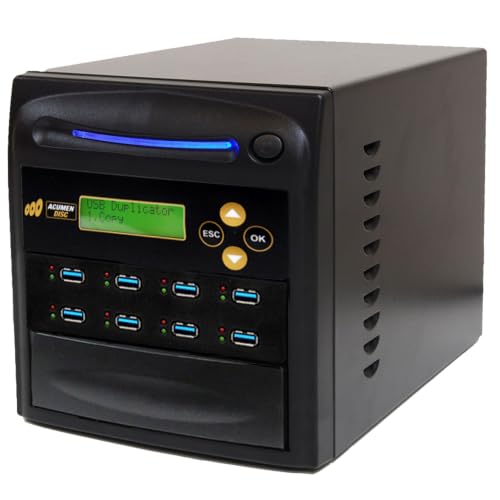
- Copies up to seven drives
- Three erase modes, including DoD 3-pass
- Copy-and-compare verification
Best For: High-volume Type-A USB duplication and sanitization
Seven-Port Standalone Option
Vinpower 1-to-7 USB Eraser Cloner

- Seven-port duplication capacity
- Standalone hardware workflow
- Combines copying, erasing, and cloning
Best For: Larger-batch standalone USB duplication
Best High-Capacity Pick
63-Port USB 3.0 Duplicator and Eraser

- Duplicates up to 63 Type-A drives
- Offers three erase modes, including DoD 3-pass
- Standalone copy-and-compare operation
Best For: High-volume USB duplication and sanitization
Best Compact Option
StarTech 1:5 USB Duplicator and Eraser

- Handles up to five USB drives
- Includes quick, single-pass, and 3-pass erase
- Provides LCD monitoring and Copy and Compare
Best For: Technicians with moderate duplication workloads
Best Maximum-Capacity Tower
199-Port USB Duplicator and Eraser

- Duplicates up to 199 Type-A drives
- Provides four erase modes, including 7-pass
- Supports standalone verification and asynchronous copying
Best For: Extremely large USB duplication batches
Compact Erase Station – StarTech 1:2 USB Duplicator
For buyers seeking usb duplicators with erase functions in a compact format, the StarTech USBDUP12 combines one-to-two duplication with several sanitizing options. It operates without a computer and includes an LCD menu for monitoring drive activity and errors.
Best For: IT technicians and small teams that need to clone or erase a few USB drives at a time.
Pros:
- Supports system/file copying and sector-by-sector duplication.
- Offers quick erase, single-pass, and three-pass overwrite modes.
- Copy-and-compare verification, error scanning, and asynchronous copying are included.
Cons:
- Limited to two target drives per duplication cycle.
- Asynchronous copying requires source content under 64 MB.
- External USB storage may need its own power source.
This is a practical choice when portability, verification, and flexible erase modes matter more than high-volume output. Its 1.5 GB/min rate and two-port layout suit smaller workloads.
Seven-Port Workhorse – Systor 1:7 USB Sanitizer
The Systor SYS-USBD-7 is a strong option among usb duplicators with erase functions when you need to process up to seven drives simultaneously. Its standalone design supports synchronous and asynchronous copying without requiring a computer or software.
Best For: Businesses and technicians producing multiple identical USB drives in recurring batches.
Pros:
- Duplicates to as many as seven USB drives at once.
- Supports USB 1.1, 2.0, and 3.0 flash drives.
- Offers synchronous and asynchronous copy modes with hot-swappable operation.
Cons:
- The supplied notes do not specify individual erase modes or overwrite standards.
- USB Type-C drives require an adapter.
- Its 33 MB/s transfer rate is slower than the fastest model in this roundup.
Choose this model primarily for its seven-target capacity and straightforward standalone workflow. It is well suited to repeat duplication jobs, but buyers needing documented erase controls may prefer a model with explicitly listed sanitizing modes.
Touchscreen Convenience – EZ Dupe SOHO Touch 1:10
The EZ Dupe SOHO Touch brings an accessible touchscreen interface to usb duplicators with erase functions. It handles up to ten USB 2.0, 3.0, or 3.1 thumb drives and provides dedicated copy, compare, format, and one-touch erase controls.
Best For: Offices and production environments that value simple controls and high-capacity USB batch duplication.
Pros:
- Supports duplication to as many as ten USB drives.
- Touchscreen menu simplifies copy, compare, format, and erase tasks.
- Supports all file formats, file sizes, and drive capacities on USB flash media.
Cons:
- The listed transfer speed is 35 MB/s.
- The supplied notes do not identify multi-pass or DoD erase modes.
- Its compatibility is described for USB flash media rather than broader external storage.
This model emphasizes ease of use over specialized sanitization detail. The touchscreen and ten-port capacity make it appealing for daily duplication, while buyers with formal erase-standard requirements should confirm whether its erase function meets their policy.
High-Volume Sanitizer – Acumen Disc 1:23 USB 3.0
For demanding workloads, the Acumen Disc AD23-USB100 combines 23 target ports with USB 3.0 transfer speeds of up to 100 MB/s. Among usb duplicators with erase functions, it stands out for listing quick, full, and DoD three-pass erase modes alongside copy-and-compare verification.
Best For: Organizations that need high-volume Type-A USB duplication and clearly specified sanitizing options.
Pros:
- Supports duplication to up to 23 USB drives at once.
- Offers quick erase, full erase, and DoD three-pass erase.
- Provides synchronous and asynchronous modes plus real-time copy-and-compare.
- Supports USB Type-A generations from 1.0 through 3.2 and future generations as specified.
Cons:
- Only USB-IF-compliant Type-A flash media is supported directly.
- Type-C drives require a separate USB-C-to-USB-A adapter.
- It does not work with hardware-encrypted or protected USB devices.
This is the strongest fit for large-scale duplication and policy-driven erasure, provided your media is compatible. Its tower form and 23-port capacity target production environments rather than occasional home use.
Compact Secure Choice – Vinpower 1-to-3 USB Duplicator
If you need usb duplicators with erase functions but do not want to connect a computer, the Vinpower USBMiniDup offers standalone copying and DoD-standard erasing in a compact format. Its Smart Copy and Raw Copy modes cover both file-level duplication and bit-by-bit cloning.
Best For: Small businesses, IT teams, educators, and offices handling routine USB duplication and secure drive reuse.
Pros:
- Standalone operation helps keep copying separate from computer viruses and ransomware.
- Supports Smart Copy and Raw Copy for flexible duplication.
- DoD 5220.22-M erasing helps prepare drives for reuse, recycling, or disposal.
- Read Error Skip can bypass damaged sectors on aging media.
Cons:
- Its 1-to-3 capacity is smaller than the seven-target alternatives.
- Supplied notes do not specify a transfer-speed rating.
This is a practical choice when compact size, standalone use, and secure erasure matter more than maximum batch volume.
Best for Everyday Use – Acumen Disc 1-to-7 USB 3.0 Tower
For buyers comparing usb duplicators with erase functions for larger batches, the Acumen Disc AD07-USB100 provides up to seven simultaneous copies and three erase modes. It operates standalone, supports copy-and-compare verification, and is rated for transfer speeds up to 100MB per second.
Best For: Organizations that regularly clone, verify, and sanitize multiple USB Type-A flash drives.
Pros:
- Duplicates up to seven drives at up to 100MB per second, depending on media.
- Offers Quick Erase, Full Erase, and DoD 3-pass erase modes.
- Copy-and-compare technology checks duplication results in real time.
- Standalone operation includes a bright LCD and simple four-key controls.
Cons:
- Supports USB Type-A flash media; USB-C drives require a separate adapter.
- Does not work with hardware-encrypted or protected USB memory devices.
- Its tower form weighs 11 pounds, making it less portable.
With seven ports and multiple sanitization choices, this model is better suited to repeat production or IT workflows than occasional personal use.
Seven-Port Standalone Option – Vinpower 1-to-7 USB Eraser Cloner
The Vinpower 1-to-7 Standalone USB Eraser Cloner is aimed at shoppers seeking usb duplicators with erase functions and a larger duplication capacity. The supplied product information identifies it as a standalone seven-port USB duplicator, eraser, and cloner for users who want a dedicated hardware workflow.
Best For: Buyers who need seven-port standalone USB duplication and erasure in a dedicated Vinpower unit.
Pros:
- Seven-port design supports larger batches than compact three-port models.
- Standalone format avoids requiring a connected computer.
- Combines USB duplication, erasing, and cloning functions.
Cons:
- The supplied notes do not provide erase-standard, speed, or copy-mode details.
- Compatibility information is not specified.
This model is worth considering when port count is the priority, but shoppers should confirm supported media, erasure standards, and operating details before purchase.
Best High-Capacity Pick – 63-Port USB 3.0 Duplicator and Eraser
If you need USB duplicators with erase functions for high-volume copying, the Acumen Disc AD63-USB100 provides up to 63 Type-A ports and rated transfer speeds of up to 100MB per second. Its standalone design supports quick or full copying, verification, and three erase modes without a computer.
Best For: Businesses, technicians, and production environments that need to duplicate or sanitize many USB drives at once.
Pros:
- Copies to as many as 63 USB drives simultaneously.
- Includes quick erase, full erase, and DoD 3-pass erase modes.
- Copy-and-compare verification helps check completed duplicates.
- Standalone operation, LCD status display, and support for asynchronous copying.
Cons:
- Supports USB Type-A flash media only; Type-C drives need an adapter.
- Does not work with hardware-encrypted or protected USB devices.
- Its 23-pound tower is less convenient for portable use.
The AD63-USB100 is the strongest choice here for throughput and scale. Confirm that your media is USB-IF-compliant Type-A storage before buying, and remember that actual speeds depend on the connected drives.
Best Compact Option – StarTech 1:5 USB Duplicator and Eraser
The StarTech USBDUP15 is a practical choice among USB duplicators with erase functions when you need a smaller five-port unit. It works without a computer, supports USB 3.0 and 2.0 flash media, and provides quick erase plus single-pass and 3-pass overwrite options.
Best For: IT professionals and technicians who regularly create boot drives, share small batches of data, or wipe several USB devices.
Pros:
- Duplicates or erases up to five USB drives independently of a computer.
- Supports file-level and sector-by-sector copying across several formats.
- Includes Copy and Compare, drive scanning, and LCD status monitoring.
- Asynchronous mode lets users replace finished drives without stopping a copy job.
Cons:
- Its 1.5GB-per-minute rate is slower than the larger Acumen models.
- Asynchronous copying is limited to source content under 64MB.
- Some external USB storage devices may require their own power source.
This StarTech model balances useful erase controls with a compact five-port design. It is better suited to moderate workloads than large-scale production, but its monitoring and verification features add practical safeguards for technicians.
Best Maximum-Capacity Tower – 199-Port USB Duplicator and Eraser
For very large batches, the Acumen Disc AD199-USB combines up to 199 USB ports with copying and erase functions. This standalone USB duplicator supports system-and-file or whole-drive copying, real-time comparison, and four erase choices, including DoD 3-pass and 7-pass modes.
Best For: Organizations that need to process extremely large quantities of USB Type-A media in a dedicated desktop or production setup.
Pros:
- Supports duplication to as many as 199 drives.
- Offers quick, full, DoD 3-pass, and 7-pass erase modes.
- Supports synchronous and asynchronous operation with copy-and-compare verification.
- Standalone controls include a four-key interface and real-time LCD information.
Cons:
- The listed 35MB-per-second transfer rate is slower than the AD63-USB100.
- Supports USB Type-A media and requires an optional adapter for Type-C drives.
- Its 55-pound desktop form factor is not intended for easy relocation.
The AD199-USB prioritizes maximum port count over compactness and top transfer speed. It makes sense when batch size is the main concern, provided you have the workspace and compatible Type-A media required for this tower.
How We Picked the Best USB Duplicators with Erase Functions
We focused on standalone USB duplicators that combine drive-to-drive copying with a dedicated erase or sanitization mode. The selection includes compact models for occasional jobs and high-port systems for production environments. We compared duplication ratios, advertised transfer speeds, USB compatibility, controls, display information, and the practical fit for different batch sizes.
Advertised speeds are useful for comparison, but real-world performance depends on source and target drive speed, file size, filesystem, capacity, and the number of drives running simultaneously. Erase terminology also varies, so verify the specific sanitization method and compliance requirements before purchase.
Quick Comparison
- Small batches: 1:2 and 1:3 models require less space and are easier to justify for occasional copying or secure reuse.
- Regular office or shop use: 1:5 and 1:7 systems balance throughput, footprint, and cost.
- Higher-volume production: 1:10, 1:23, and 1:63 units reduce handling time when many drives must be prepared at once.
- Large-scale deployment: The 1:199 Acumen Disc model is designed for unusually high-volume duplication, although its larger capacity may be excessive for most small teams.
Key Buying Factors for USB Duplicators with Erase Functions
Port Count and Workflow
The duplication ratio determines how many target drives can be processed per cycle. More ports can improve productivity, but they also increase the unit’s footprint, power needs, and upfront cost. Choose based on your typical batch size rather than the maximum number you might use occasionally.
Copy and Erase Modes
Look for independent copy and erase functions, plus clear status reporting for failed or incomplete drives. If sanitization is important, check whether the unit offers a simple quick erase, full overwrite, or a documented method suitable for your organization’s policy. Confirm whether source and target capacities must match.
Speed and Drive Compatibility
Compare the advertised gigabytes-per-minute rating, but prioritize compatibility with the USB media you actually use. USB 3.0 support can help with newer drives, while older USB 2.0 media may remain the performance bottleneck. Check supported capacities and file systems before ordering.
Controls and Monitoring
An LCD or touchscreen can make standalone operation easier by displaying progress, capacity checks, and error states. Simple button controls may be sufficient for occasional use, while a touchscreen can reduce training time in shared workspaces.
Who Should Buy Which USB Duplicators with Erase Functions?
Choose a compact StarTech or Vinpower unit for occasional cloning, small deployment batches, or limited desk space. A 1:5 or 1:7 model is a practical middle ground for offices, schools, service counters, and small production teams. Choose a 1:10 or 1:23 system when recurring batches justify faster throughput. The 1:63 or 1:199 Acumen Disc models make the most sense for manufacturers, distributors, and organizations preparing large quantities of identical drives. Before buying, confirm the required erase standard, target-drive capacity, warranty terms, and available power and workspace.
