A coding gift can turn curiosity into hands-on play, whether a child prefers solving puzzles, building robots, or making music and art. Match the project to their age, interests, and the devices you already have.
Christmas Gift Ideas for Kids Who Love Coding
1. VANLINNY Programmable Robotic Arm Kit
For Hands-On Robotics
VANLINNY Programmable Robotic Arm Kit

- A 4-DOF arm kit with electronic programming and a remote control.
- The arm and excavator can rise and fall, move at multiple angles, and grab objects.
- Listed for ages 8–14, with robotics and construction as its theme.
Best For: Kids ages 8+ fascinated by mechanisms and automation.
2. Freenove BBC micro:bit Super Starter Kit
For Code-and-Circuit Beginners
Freenove BBC micro:bit Super Starter Kit

- Includes a BBC micro:bit V2 board and 192 components.
- Offers both block-based coding and Python code.
- The 266-page digital tutorial guides 38 projects; no paper tutorial is included.
Best For: Older beginners ready to connect code with simple circuits.
3. EggTailz Smart Robot Car Kit
For Moving Robot Projects
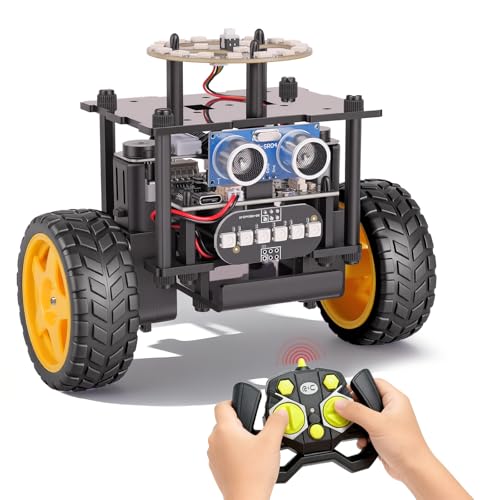
- A DIY robot car kit with obstacle detection and avoidance.
- Offers autonomous cruising and remote-control modes, including turns and 360-degree rotation.
- The listing describes illustrated and video assembly instructions for ages 8+.
Best For: Kids interested in how robots move and react to obstacles.
4. 16×16 Programmable LED Pixel Screen
For Pixel Art Creators
16×16 Programmable LED Pixel Screen

- A 16×16 RGB display with app-based tools for drawing, GIFs, and scrolling messages.
- Also includes clock, alarm, timer, stopwatch, and music-sync functions.
- Can sit on a desk or mount on a wall.
Best For: Kids who enjoy pixel art, visual effects, and creative tech.
5. Osmo Coding Kit
For Playful First Coding
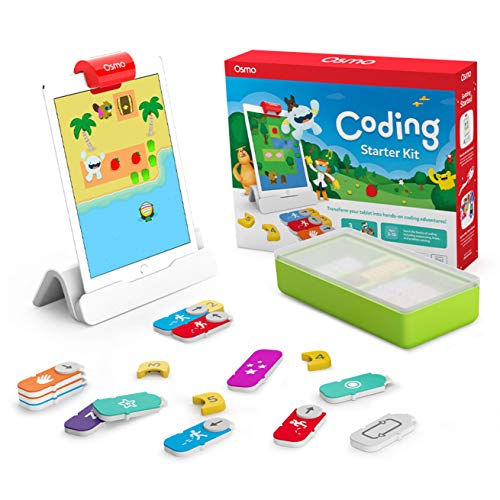
- Includes an Osmo base, reflector, 31 coding blocks, and three coding apps.
- Activities cover coding adventures, music-making, and coding puzzles.
- Requires a compatible iPad, which is not included; the listing says gameplay needs no Wi-Fi.
Best For: Young beginners who enjoy combining physical pieces with an iPad.
6. Makeblock Codey Rocky Coding Robot
For a Robot That Reacts
Makeblock Codey Rocky Coding Robot

- The panda-shaped robot features sound effects and expressive emotions.
- Kids can start with Scratch-style block coding and progress to Python.
- The listing describes beginner coding, remote control, and robotics projects.
Best For: Kids who want to program and interact with a friendly robot.
7. TINA2S Mini 3D Printer Starter Kit
For Designing Real Objects
TINA2S Mini 3D Printer Starter Kit

- The kit includes an assembled mini printer, 10 meters of PLA filament, and a microSD card with model designs.
- Features auto-leveling, a 2.4-inch LCD, and a flexible magnetic build plate.
- The listing describes compatibility with Mac, Windows, and Linux.
Best For: Older kids and beginners curious about designing and making objects.
8. ButterflyEdufields 40-in-1 STEM Robotics Kit
For Gadget Builders
ButterflyEdufields 40-in-1 STEM Robotics Kit

- Includes more than 100 parts for 40+ projects, such as a doorbell and drawing robot.
- The plug-and-play kit uses sensors, motors, wires, and other components without soldering.
- Instructions and concept manuals are included; the listing says to avoid Duracell AA batteries.
Best For: Curious kids who want to build interactive gadgets.
9. Piper Computer Kit
For Building a First Computer

- Includes components to build a computer, including a Raspberry Pi, 7-inch screen, speaker, and rechargeable battery.
- StoryMode guides kids through wiring and electronics challenges.
- Eleven projects introduce drag-and-drop coding, with preloaded Python for further learning.
Best For: Kids curious about computers, electronics, and coding projects.
10. ACEBOTT Smart Robot Car Kit with Camera
For Exploring by Rover
ACEBOTT Smart Robot Car Kit with Camera

- The robot car includes a 3-megapixel camera for live video and snapshots on a smartphone.
- Compatible with Arduino and Scratch, with 16 story-based assembly and coding tutorials.
- Its 4WD mecanum wheels support forward, sideways, and turning movement.
Best For: Kids interested in robotics, exploration, and remote control.
11. Snap Circuits Extreme SC-750 Kit
For Exploring Electronics
Snap Circuits Extreme SC-750 Kit

- The kit offers more than 750 experiments using 80 parts.
- Projects include a sound-activated switch, AM radio, and adjustable light controller.
- Parts snap together without tools; a PC interface cable and software are included.
Best For: Kids who want to understand the electronics behind computers and robots.
12. Code Piano Jumbo STEM Coding Toy
For Music-Making Coders
Code Piano Jumbo STEM Coding Toy

- The circuit board has built-in buttons and a jumbo speaker for tunes and sound effects.
- Online projects introduce typed C++ coding through music activities.
- Works with Mac, Windows, or Chromebook computers and requires internet access; it is not compatible with phones or tablets.
Best For: Children who enjoy both music and technology.
13. LEGO Boost Creative Toolbox 17101
For Building and Programming
LEGO Boost Creative Toolbox 17101

- The set has 847 pieces for building and rebuilding five models.
- Models include a robot, cat, guitar, autobuilder, and rover, with color, distance, and tilt sensors.
- A tablet or phone and six AAA batteries are required and not included.
Best For: Kids who enjoy constructing models as much as programming them.
14. Makeblock mBot Coding Robot Kit
For a First Programmable Robot
Makeblock mBot Coding Robot Kit
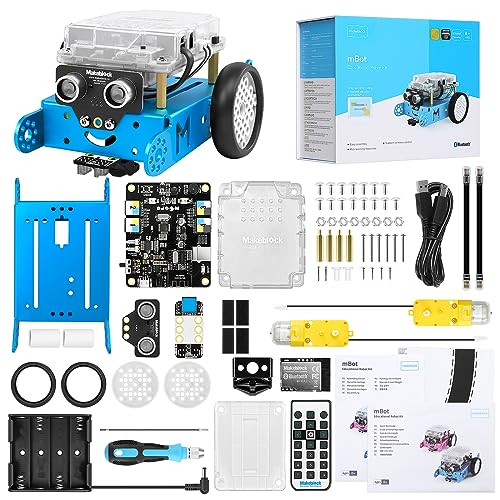
- The robot introduces electronics and programming with Scratch and Arduino.
- Features include line-following and obstacle-avoidance play.
- The kit includes building instructions and coding lessons; four AA batteries and the remote's CR2025 battery are not included.
Best For: Kids ready to turn code into a moving robot.
15. Pitsco Education Echo Programmable Drone
For Coding Flight Paths
Pitsco Education Echo Programmable Drone

- The indoor educational drone supports manual flight and coding with block coding or Scratch through supported apps.
- Includes a 720p camera for photos, video, and live Wi-Fi viewing on a connected device.
- The kit includes a controller, smartphone mount, battery, charger, prop guards, spare propellers, and storage box.
Best For: Older kids interested in flight and coding challenges.
16. The Official Scratch Coding Cards
For Quick Coding Challenges
The Official Scratch Coding Cards

- The 76-card deck features Scratch 3.0 activities for games, stories, music, and animations.
- Each card presents a project on one side and code-block instructions on the other.
- Activities introduce sequencing, conditionals, and variables.
Best For: Kids ages 7–10 who like bite-sized creative activities.
17. Learning Resources Code & Go Mouse Mania
For Family Coding Game Nights
Learning Resources Code & Go Mouse Mania

- Players use coding cards to plan commands and move pieces across a board.
- The screen-free game is designed for 2–4 players.
- Gameplay practices sequencing, logic, and problem-solving.
Best For: Elementary-age kids who enjoy puzzles and playing together.
18. Learning Resources Code & Go Robot Mouse Set
For a Screen-Free First Robot
Learning Resources Code & Go Robot Mouse Set
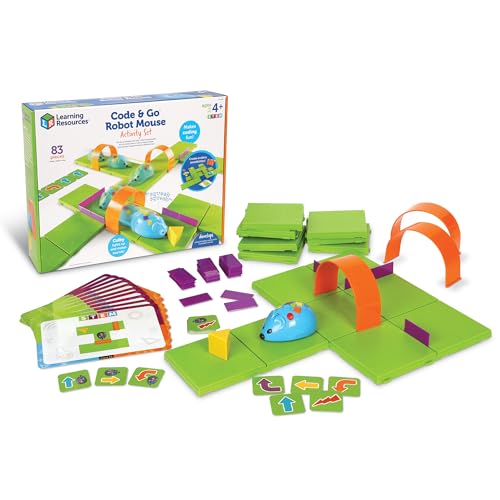
- Children program Colby the mouse with buttons and coding cards to navigate mazes.
- Includes 16 maze grids, walls, tunnels, 30 coding cards, and 10 activity cards.
- Designed for ages 4+; requires three AAA batteries, not included.
Best For: Young children who learn by arranging pieces and moving objects.
How to Choose Coding Christmas Gift Ideas for Kids
Coding Christmas gift ideas for kids work best when the project matches the child’s age, interests, and comfort with instructions. A gift can introduce sequencing through a simple maze or open up longer projects with a robot, computer, or electronics kit.
Start with the child’s preferred kind of play
For screen-free play, consider the Code & Go games, robot mouse set, or Scratch Coding Cards. They build logic and sequencing through cards, pieces, and challenges. Check the intended age range: the robot mouse set starts at age 4, while the board game and cards suit elementary-age learners.
Children who want immediate movement may enjoy a robot car or interactive coding robot. For more ambitious projects, look at the Piper computer kit, micro:bit set, or electronics kits. These involve assembly and may suit children who like following steps, experimenting, and returning to a project over several sessions. The 3D printer and programmable drone are options for kids with specific interests in making objects or coding flight paths.
Match the challenge to their experience
A young beginner may benefit from physical coding blocks or simple command cards, which make the order of instructions visible. Older beginners might be ready for block-based coding alongside sensors, motors, or circuits. Kits that introduce Python, Arduino, or typed C++ offer a path toward more advanced coding, but consider whether the child is interested in learning through a computer as well as hands-on play.
Look closely at what a kit actually teaches. Some provide guided activities; others emphasize building, remote control, or creative output. A camera-equipped rover, for example, adds exploration, while a pixel display centers on art and messages. Pick the activity the child is most likely to return to after the initial build.
Check the full setup and household budget
The listed price is only one part of the gift’s cost. Check what is included and what may be needed separately: the Osmo kit requires a compatible iPad, LEGO Boost needs a compatible phone or tablet and AAA batteries, and the robot kits may require batteries. The Code Piano works with computers but not phones or tablets, and its online projects require internet access. Confirm compatibility with devices already at home before choosing.
For a fuller budget, account for consumables and future additions too. The 3D printer listing specifies filament compatibility, while the ACEBOTT rover’s optional modular add-ons are sold separately. A larger kit can offer many projects, but a compact card deck or board game may be a better fit when storage, setup, or shared play matters more than technical range.
Personalize the gift and plan the setup
Personalize around what the child already likes: music suggests the Code Piano, visual creativity points toward the pixel display, and storytelling may suit Scratch activities. If they enjoy family projects, choose something adults can assemble or explore alongside them. For younger children, plan to help with instructions and keep small components organized after play.
For Christmas, allow time to check compatibility, gather any required batteries or devices, and understand the first setup steps. If the gift is being bought close to the holiday, a card deck or board game can be easier to start without device setup. For a more involved kit, confirm that the required computer, tablet, or internet connection is available and consider wrapping a note about the first project you can build together.
