Finding a useful gift for an esports fan is easier when you start with how they play: at a desk, on the move, with a team, or on stream. This list covers gear for several setups and budgets, from small desk upgrades to complete gaming computers.
Christmas Gift Ideas for Esports Players
1. FLEXISPOT EN1 Electric Standing Desk
A Sit-Stand Setup Upgrade
FLEXISPOT EN1 Electric Standing Desk

- 48-by-30-inch seamless desktop offers room for monitors, writing, and gaming.
- Electric height adjustment includes four memory presets.
- Steel frame and one-piece engineered-wood top support a dedicated work and play area.
Best For: Esports fans building a gaming and study workspace.
2. Razer Viper V3 HyperSpeed Wireless Gaming Mouse
A Lightweight Aim Companion
Razer Viper V3 HyperSpeed Wireless Gaming Mouse

- 82-gram wireless design is made for quick, consistent swipes.
- Optical sensor supports up to 30,000 DPI and tracks across a range of surfaces.
- Includes a wireless dongle and one AA battery; listed battery life is up to 280 hours.
Best For: Competitive PC players who prioritize precise mouse movement.
3. MOUNTUP Adjustable Single Monitor Arm
A Flexible Screen Positioner
MOUNTUP Adjustable Single Monitor Arm
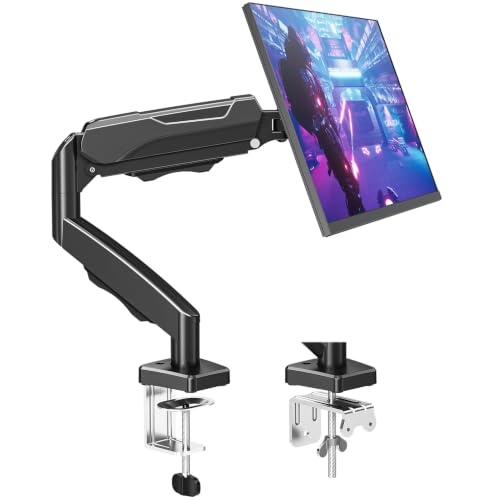
- Supports compatible monitors from 17 to 32 inches and 4.4 to 19.8 pounds.
- Arm tilts, swivels, rotates, and extends for adjustable screen placement.
- Includes C-clamp and grommet mounting options for compatible desks.
Best For: Players who want to reposition a desk monitor and free up surface space.
4. EMEET NOVA 4K Autofocus Webcam
A Clearer On-Camera Upgrade
EMEET NOVA 4K Autofocus Webcam

- Supports up to 4K at 30 frames per second; default resolution is 1080p.
- PDAF autofocus, automatic light adjustment, and two built-in microphones support calls or streaming.
- USB-A connection and privacy cover; compatible systems include Windows, macOS, and Android TV.
Best For: Players who stream, make team content, or join video calls.
5. FIFINE AmpliGame AM8 USB/XLR Microphone
A Voice-Ready Streaming Mic
FIFINE AmpliGame AM8 USB/XLR Microphone

- Dynamic cardioid microphone connects by USB or XLR; XLR cable is sold separately.
- USB mode includes tap-to-mute, headphone monitoring, gain control, and RGB lighting.
- Desk stand, windscreen, and 3/8-inch and 5/8-inch threads are included.
Best For: Streamers and players who want a dedicated microphone for voice chat or recording.
6. AOC Wireless Gaming Headset
A Team-Chat Headset

- Offers 2.4GHz USB dongle, Bluetooth 6.0, and 3.5mm wired connections.
- Detachable, adjustable microphone supports team communication and solo listening.
- Battery life is listed up to 45 hours, or 20 hours with RGB lighting on.
Best For: Players who coordinate with teammates across compatible devices.
7. EasySMX X15 Wireless Gaming Controller
A Multi-Device Controller
EasySMX X15 Wireless Gaming Controller

- Connects by 2.4G wireless, Bluetooth, or USB-C, with compatibility listed for PC, Steam, Switch, Android, and iOS.
- Hall effect joysticks and triggers are designed to avoid stick drift.
- Two programmable back buttons and a 1000mAh battery with up to 20 hours of playtime.
Best For: Esports fans who also play racing, sports, platform, or controller-friendly games.
8. ANYLUV Blue-Light Gaming Glasses
A Screen-Time Accessory
ANYLUV Blue-Light Gaming Glasses
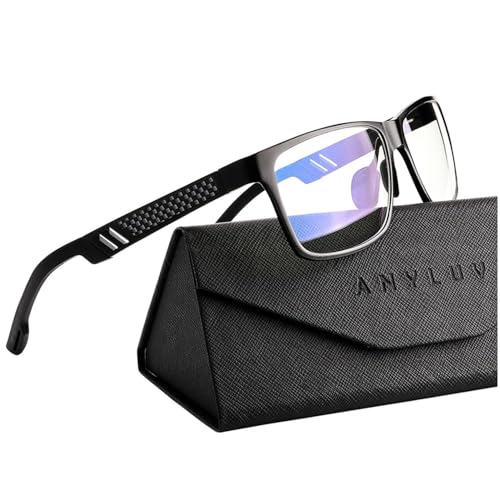
- Medium, full-rim frame uses an Al-Mg metal frame and polycarbonate lenses.
- Low color-distortion lenses are described as filtering 45% of blue light.
- Includes a triangular folding box for storage or gifting.
Best For: Players who like computer accessories and spend time at a screen.
9. AREYLO Large Stitched Gaming Mouse Pad
A Roomy Desk Mat
AREYLO Large Stitched Gaming Mouse Pad

- 31.5-by-15.7-inch surface accommodates a keyboard and mouse.
- Non-slip rubber base and stitched edges help keep the mat in place and resist fraying.
- Waterproof coating can be wiped clean with a damp cloth.
Best For: Players who want a broad, consistent mouse surface.
10. MSI Codex Z2 Gaming Desktop
A Full Gaming PC Upgrade

- Built with an AMD Ryzen 7 8700F processor and NVIDIA GeForce RTX 5070 graphics.
- Includes 32GB DDR5 memory and a 2TB SSD.
- Windows 11 Home, four system cooling fans, and configurable RGB lighting are listed.
Best For: Players whose current computer struggles with demanding games or streaming.
11. Acer Predator Helios Neo 16 AI Gaming Laptop
A High-Refresh Laptop
Acer Predator Helios Neo 16 AI Gaming Laptop

- Pairs an Intel Core Ultra 9 275HX processor with NVIDIA GeForce RTX 5070 Ti Laptop graphics.
- 16-inch WQXGA display is listed with 240Hz refresh and G-SYNC.
- Includes 16GB DDR5 memory, a 1TB Gen 4 SSD, and Killer Wi-Fi 6E.
Best For: Esports fans who need a gaming setup they can carry between home, school, or travel.
12. RK Royal Kludge R75 Mechanical Gaming Keyboard
A Compact Customizable Keyboard
RK Royal Kludge R75 Mechanical Gaming Keyboard

- 75% wired layout retains arrow and function keys while leaving more desk space.
- Hot-swappable PCB supports compatible 3-pin or 5-pin switches; tactile brown switches are included.
- Volume knob, detachable USB-C cable, and customizable RGB backlighting are included.
Best For: Players who want a compact keyboard with customization options.
How to Choose Esports Christmas Gift Ideas
Esports Christmas gift ideas work best when they match the player’s setup, games, and daily habits. A thoughtful choice can improve comfort, communication, or convenience without requiring you to guess what they need for competition.
Start with how they play
Consider whether they primarily play on a desktop, laptop, or console, and whether they use a mouse and keyboard or a controller. A wireless mouse, mechanical keyboard, or controller serves a different style of play. For someone who streams or joins frequent calls, a webcam, microphone, or headset may see regular use. If you are unsure about their preferred controls, a desk mat or monitor arm can be a useful workspace update with fewer game-specific assumptions.
For a larger gift, ask what limits their current setup. A new computer makes the most sense when their existing one struggles with the games they play or with streaming at the same time. Compare the computer’s operating system, processor, graphics, memory, and storage with the player’s requirements. A desktop is a more stationary upgrade; a gaming laptop adds portability for school or travel. Check that the recipient has room for the equipment and any required peripherals.
Match the desk and equipment
Measure the available space before choosing a desk, monitor arm, or large desk mat. The standing desk in this list measures 48 by 30 inches, while the extended mouse pad measures 31.5 by 15.7 inches. A monitor arm needs a compatible VESA pattern, monitor weight, and desk edge or grommet opening. Check those details against the screen and desk the recipient already owns.
For audio and video gifts, check the connection and platform. The headset offers a USB dongle, Bluetooth, and a 3.5mm cable, but console support depends on connection type. The microphone supports USB and XLR; XLR use requires a separate cable and audio interface or mixer. The webcam uses USB-A and lists compatibility with specific computer systems. If you cannot check the recipient’s device, include a gift receipt when possible.
Set a budget that feels right
Small accessories can make thoughtful gifts without replacing a major part of the setup. A mouse pad or glasses can be a modest personal add-on; a mouse, headset, controller, or keyboard is a more involved gear choice. A monitor arm or desk changes the workspace, while a gaming desktop or laptop is a substantial purchase. Set your budget first, then choose the item that solves a real need rather than paying for features the player may not use.
Personal preferences matter, too. Some players care about keyboard size, switch feel, lighting, or mouse shape. Others value a clear microphone, flexible screen placement, or the ability to move between devices. If you can, notice what they already use and what they have mentioned wanting to change. Avoid duplicating a device they recently upgraded.
Plan timing and last-minute choices
Order early enough to allow for shipping, setup, and compatibility questions, especially for larger equipment. Keep the product details available so you can compare ports, dimensions, and supported devices before the gift is wrapped. For a last-minute gift, choose something that fits a known setup and is straightforward to connect, or give a printed note explaining the selected upgrade. A specific promise about delivery is never necessary; the goal is to make the gift easy to understand and useful when it arrives.
