College gaming setups often share space with coursework, dorm life, and travel. These gift ideas include gaming gear and practical desk accessories that can support both play and study.
Christmas Gift Ideas for College Students Who Game
1. ELABEST X100 Ergonomic Gaming Chair
Comfort for Long Desk Sessions
ELABEST X100 Ergonomic Gaming Chair

- Has adjustable lumbar support, a headrest, and flip-up armrests.
- Includes a two-position footrest and a reclining mechanism.
- Breathable mesh design suits gaming, studying, and home-office use.
Best For: A student who spends long stretches gaming or studying at a desk.
2. KTC 27-Inch QHD 144Hz Gaming Monitor
A Bigger, Smoother View
KTC 27-Inch QHD 144Hz Gaming Monitor

- 27-inch QHD display with a 144Hz refresh rate.
- HDMI and DisplayPort connections support compatible PCs, consoles, and laptops.
- Tilt adjustment and a headphone output fit gaming and desk work.
Best For: A PC gamer who also uses a desktop display for coursework.
3. EPOMAKER x Aula F75 Wireless Mechanical Keyboard
Compact Keyboard With Customization
EPOMAKER x Aula F75 Wireless Mechanical Keyboard

- 75% layout keeps the keyboard footprint compact for smaller desks.
- Connects over Bluetooth, 2.4GHz wireless, or USB-C.
- Hot-swappable sockets and a media control knob add customization.
Best For: A student who games on PC and wants a compact typing setup.
4. Univivi 36-Inch Under-Desk Cable Tray
A Tidy Desk Upgrade
Univivi 36-Inch Under-Desk Cable Tray

- 36-inch fabric tray holds and hides cables and power adapters beneath a desk.
- Installs with clamps or screws, depending on the desk and setup.
- Built-in ties help keep items in place; check desk clearance before buying.
Best For: A student looking to organize cables around a gaming or study desk.
5. Razer Basilisk V3 X HyperSpeed Wireless Mouse
Wireless Control for PC Gaming
Razer Basilisk V3 X HyperSpeed Wireless Mouse

- Offers HyperSpeed wireless and Bluetooth connectivity.
- Features nine customizable controls and an 18,000 DPI optical sensor.
- Includes Chroma RGB lighting and an AA battery.
Best For: A PC gamer who wants a wireless mouse for games and everyday work.
6. EasySMX X05Pro Wireless Gaming Controller
Controller Play With a Charging Dock
EasySMX X05Pro Wireless Gaming Controller

- Works with PC, Nintendo Switch, Android, and iOS through supported connections.
- Includes a magnetic charging dock and built-in receiver storage.
- Hall Effect sticks, programmable back buttons, and rumble support gameplay features.
Best For: A student who prefers a controller for compatible PC or Switch games.
7. Acer USB 3.0 HDMI Capture Card
A Starter Tool for Game Streaming
Acer USB 3.0 HDMI Capture Card

- Supports 4K HDMI input and up to 1080p at 60Hz output.
- Has a microphone input for commentary while capturing or streaming.
- Works with listed consoles, computers, and apps such as OBS; a USB 3.0 port is required.
Best For: A gamer interested in recording or streaming compatible gameplay.
8. HUANUO FlowLift Pro Monitor Arm
More Flexible Monitor Positioning
HUANUO FlowLift Pro Monitor Arm

- Fits compatible 13–32-inch monitors weighing 4.4–15.4 pounds with VESA 75×75 or 100×100 support.
- Offers tilt, swivel, and rotation adjustments.
- Designed for wood desks 0.59–3.54 inches thick; check desk and monitor fit first.
Best For: A student with a compatible monitor who wants to free desk space.
9. Dimmable LED Desk Lamp With USB Ports
Focused Light for Study Hours
Dimmable LED Desk Lamp With USB Ports

- Provides three color temperatures and five brightness levels.
- Flexible gooseneck lets the light point where needed.
- Includes USB-A and USB-C output ports; ports do not support fast charging.
Best For: A student who studies or reads at a desk in the evening.
10. 12-Outlet Surge Protector With Six USB Ports
Power for a Busy Setup
12-Outlet Surge Protector With Six USB Ports

- Provides 12 AC outlets, three USB-A ports, and three USB-C ports.
- Has 1.7-inch outlet spacing for many larger adapters.
- Includes surge protection and a flat 45-degree plug; check plug type and electrical needs.
Best For: A student with several desk or entertainment devices to plug in.
11. Acer Wireless Gaming Headset With Flip-to-Mute Mic
Wireless Audio for Multiplayer
Acer Wireless Gaming Headset With Flip-to-Mute Mic

- Supports 2.4GHz wireless and Bluetooth connectivity.
- The boom microphone flips up to mute.
- Listed compatibility includes PS5, PS4, PC, Nintendo Switch, and Steam Deck.
Best For: A student who plays multiplayer games or chats with teammates.
12. Lenovo Legion 21L Gaming Laptop Backpack
Campus Carry for Gaming Gear
Lenovo Legion 21L Gaming Laptop Backpack
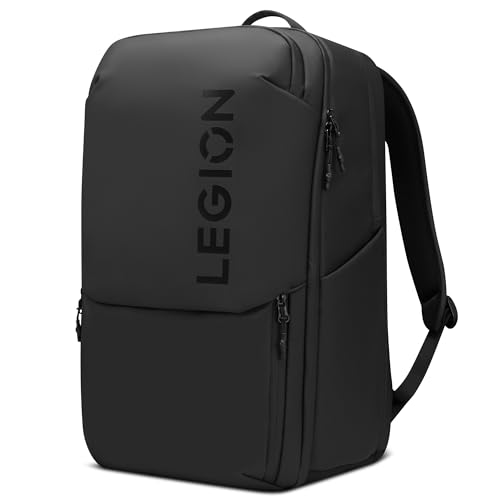
- 21-liter capacity includes three main compartments and 19 specialized pockets.
- Fits laptops up to 17 inches and has a separate tablet pocket.
- Water-resistant material, water bottle pockets, and a luggage strap support campus travel.
Best For: A student who carries a gaming laptop and accessories between campus and home.
13. TP-Link AX1800 Wi-Fi 6 Router
A Network Upgrade for Gaming and Study

- Dual-band Wi-Fi 6 supports a combined AX1800 bandwidth rating.
- Four antennas and beamforming are designed to extend reliable coverage.
- Requires a separate modem and an internet service plan; speeds depend on the plan and conditions.
Best For: A student who manages the home network used for gaming and coursework.
How to Choose Gaming Christmas Gift Ideas for College Students
Gaming Christmas Gift Ideas for College Students should fit the recipient’s actual setup, shared-space constraints, and the games they play. Start by identifying where they game—at a desk with a PC, on a console, or while moving between campus and home—then choose one upgrade that solves a real need.
Match the gift to the setup
Compatibility is the first check for gear. A monitor needs to connect to the student’s computer or console, and the KTC display lists HDMI and DisplayPort inputs. For a monitor arm, confirm screen size, weight, VESA pattern, and desk construction before choosing: the HUANUO model specifies a 13–32-inch screen, a 4.4–15.4-pound weight range, VESA 75×75 or 100×100 support, and a suitable wood desk thickness. The EasySMX controller lists PC, Switch, Android, and iOS support, while the Acer headset lists PS5, PS4, PC, Switch, and Steam Deck. Check the recipient’s exact device and connection needs rather than relying on a broad “gaming” label.
A keyboard, mouse, or headset is a personal gift because layout, hand feel, and wearing comfort vary. If you can, ask which style or platform they use. The compact F75 keyboard may make sense for a small desk, while the Basilisk mouse has programmable controls and dual wireless modes. For a student who shares a room, a headset with a flip-to-mute microphone can be useful for multiplayer chat and quieter late-night play.
Consider dorm space and daily use
In a dorm or shared apartment, practical accessories can improve both gaming and coursework. A desk lamp with adjustable brightness and color temperature supports reading and assignments, and its USB ports offer convenient device connections, though they do not support fast charging. A cable tray can help contain cords under a desk, but check desk clearance and whether clamps or screws suit the furniture. The power strip offers many outlets and USB ports, but verify that its North American plug and outlet arrangement fit the student’s location and needs.
A backpack is a strong choice for a student who carries a laptop across campus. Confirm the laptop’s dimensions, not just its advertised screen size, and consider whether the student also needs space for a charger, tablet, water bottle, and books. The Lenovo bag lists a 21-liter capacity, dedicated laptop and tablet compartments, and multiple pockets. A chair is a larger, more personal present; make sure the recipient has room for it and that the desk setup can accommodate its footprint.
Set a budget by solving one problem
Small accessories can be thoughtful without requiring a full setup overhaul. A lamp, cable tray, or controller may address a specific annoyance. Mid-sized upgrades such as a keyboard, mouse, headset, or backpack can refresh a daily-use item. Larger choices like a monitor or chair are best when you know what the student needs and have checked their space and compatible equipment. If budget is limited, choose the single item most likely to get used every week instead of assembling a bundle of mismatched gear.
Plan for compatibility and timing
Ask for model details or a photo of the existing setup before buying connection-dependent gifts. Confirm available desk space, ports, monitor mounting holes, and the student’s preferred gaming platform. For a router, check who controls the internet equipment: the TP-Link model needs a separate modem, and a dorm network may not allow a personal router. Also remember that network performance depends on the internet plan and local conditions.
For holiday timing, settle on the choice early enough to confirm fit and compatibility. If those details are uncertain, favor a flexible everyday item, such as a backpack after checking laptop size, or ask the student to help select a peripheral. For a last-minute decision, choose a gift tied to a known need and a setup detail you can verify; compatibility matters more than choosing a more elaborate device.
