The right desk gift can make everyday work more comfortable, organized, or adaptable. This collection includes options for home offices, study spaces, and people who work on the move.
Productivity Christmas Gift Ideas for Focused Work
1. ELABEST X100 Ergonomic Mesh Office Chair
A More Supportive Desk Seat
ELABEST X100 Ergonomic Mesh Office Chair

- Adjustable lumbar support, headrest, and flip-up arms let the recipient tailor the chair to their setup.
- A reclining mechanism and extendable footrest offer options for work and rest breaks.
- Breathable mesh and rolling casters suit a home office or gaming workspace.
Best For: Someone who spends long stretches at a desk and wants more seating adjustments.
2. Smart Pen and Reusable Digital Notebook
Handwritten Notes, Ready to Sync
Smart Pen and Reusable Digital Notebook

- The smart pen captures handwriting and syncs notes to the Noteorius app.
- Notes can be sent to services including Google Drive, OneNote, Evernote, Dropbox, and Notion.
- The reusable writing surface can be cleared and used again; the notebook itself does not need charging.
Best For: A student or professional who likes writing by hand and organizing notes digitally.
3. INNOCN 34-Inch Ultrawide Monitor
More Room for Open Projects
INNOCN 34-Inch Ultrawide Monitor

- The 21:9 WQHD display offers space for side-by-side documents, timelines, or coding references.
- Picture-in-picture and picture-by-picture modes can show two connected devices at once.
- The stand adjusts in height and tilt, and the monitor includes two HDMI ports and DisplayPort.
Best For: A multitasker, editor, or programmer who works across several windows.
4. ErGear Electric Standing Desk, 48 × 24 Inch
A Desk That Changes Position
ErGear Electric Standing Desk, 48 × 24 Inch

- Electric height adjustment ranges from 28.35 to 46.46 inches for sitting or standing setups.
- Four memory presets let the user save preferred desk heights.
- The steel frame and engineered-wood top suit a home office, study, or gaming workspace.
Best For: A remote worker or student who wants sitting and standing options.
5. Nelko Bluetooth Thermal Label Printer
A Handy Tool for Shipping and Sorting
Nelko Bluetooth Thermal Label Printer

- Prints thermal labels in several sizes, including 4 × 6 inches, without ink or toner.
- Connects through the NELKO app over Bluetooth on supported devices or by USB on listed computer systems.
- Can print shipping, mailing, price, barcode, and name-tag labels.
Best For: A small-business owner or home organizer who regularly prints labels.
6. HUANUO Dual Monitor Desk Mount
A Flexible Two-Screen Setup
HUANUO Dual Monitor Desk Mount

- Supports two monitors from 13 to 32 inches, within the stated weight and VESA limits.
- Arms tilt, swivel, rotate, and raise screens to help adjust viewing position.
- C-clamp or grommet mounting and built-in cable management help clear desk space.
Best For: A dual-screen user whose monitors and desk meet the mount’s compatibility requirements.
7. Huepar Bluetooth Laser Measuring Tool
Measure and Record Room Plans
Huepar Bluetooth Laser Measuring Tool

- Measures distances up to 395 feet with stated accuracy of up to ±1/16 inch.
- Bluetooth pairing with the Huepar app supports saving measurements, notes, photo marking, and floor-plan drafting.
- Modes include distance, area, volume, angle, and Pythagorean calculations.
Best For: A DIY enthusiast or home planner measuring rooms, furniture, or project spaces.
8. Univivi 36-Inch Under-Desk Cable Tray
A Tidy Home for Desk Cords
Univivi 36-Inch Under-Desk Cable Tray

- The 36-inch fabric tray holds and conceals adapters, sockets, and cables under a desk.
- Choose clamp-on or screw-fixed installation, subject to desk clearance and fit.
- Built-in ties help keep items in place, and the tray can unfold for access.
Best For: Someone who wants to organize cables beneath a desk without changing equipment.
9. ProtoArc K310 Pro Quiet Mechanical Keyboard
A Quieter Feel for Daily Typing
ProtoArc K310 Pro Quiet Mechanical Keyboard

- Low-profile linear red switches provide a smooth mechanical typing feel with quieter operation.
- Connects to as many as three devices using Bluetooth or the USB receiver.
- The full-size keyboard has adjustable backlighting, macro customization, and USB-C charging.
Best For: A writer, programmer, or desk worker who types throughout the day.
10. TOZO HT3 Noise-Cancelling Headphones
Listening Space for Focus Sessions
TOZO HT3 Noise-Cancelling Headphones

- Hybrid active noise cancellation is designed to reduce surrounding sound, with a dedicated microphone for calls.
- Bluetooth, 3.5 mm AUX, and USB-C provide multiple connection options.
- The foldable over-ear design has breathable cushions and supports connection to two devices.
Best For: A hybrid worker or student who wants headphones for calls, study, and travel.
11. ProtoArc EM11 NL Vertical Mouse
A Different Shape for Mouse Work
ProtoArc EM11 NL Vertical Mouse

- The vertical shape positions the hand in a more upright grip; the maker recommends a 1–2 week adjustment period.
- Connects with Bluetooth or a USB-A receiver and supports up to three devices.
- Rechargeable design includes quiet left and right clicks and three DPI settings.
Best For: A computer-heavy user with small to medium hands curious about a vertical mouse.
12. Adjustable LED Desk Lamp with Swing Arm
Task Lighting That Adjusts to the Desk
Adjustable LED Desk Lamp with Swing Arm
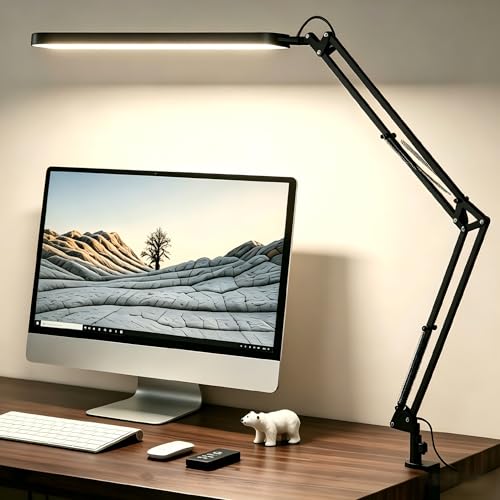
- The swing arm and rotatable head help direct light toward a work surface or reading area.
- Five color modes and 11 brightness levels offer different lighting settings.
- Memory function recalls the last brightness and color setting; a 45-minute timer is included.
Best For: A student or professional who reads or works at a desk in the evening.
13. tounee Adjustable Aluminum Tablet Stand
A Hands-Free Reference Screen
tounee Adjustable Aluminum Tablet Stand
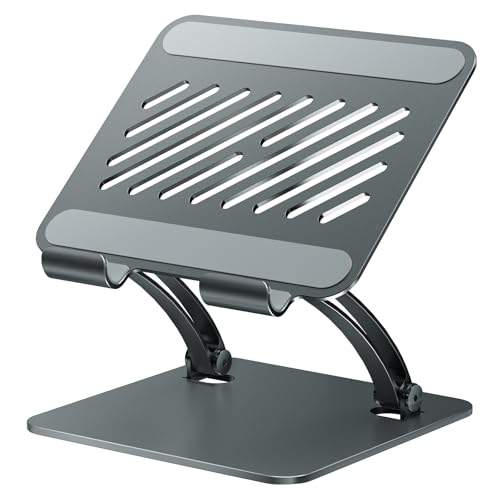
- Height and angle adjustments suit tasks such as reading, drawing, or video calls.
- Designed for tablets, e-readers, and portable monitors from 4.7 to 16.9 inches; it is not for laptops.
- The all-metal stand folds flat and has silicone pads on its base and device holder.
Best For: A reader or researcher who refers to a tablet while working.
14. reMarkable Paper Pure with Marker Plus
A Focused Space for Notes and Documents
reMarkable Paper Pure with Marker Plus

- The 10.3-inch black-and-white paper tablet supports handwriting, document markup, and sketching.
- Tags, folders, and note templates help organize written work.
- Apps and plugins can send documents and web articles from services including Google Drive and Dropbox.
Best For: A meeting-heavy professional or reader who wants a portable place for notes and documents.
15. Plugable 15.6-Inch USB-C Portable Monitor
An Extra Screen for Work on the Move
Plugable 15.6-Inch USB-C Portable Monitor

- The 15.6-inch IPS display includes a folding cover that serves as a stand.
- Two USB-C ports support data and peripherals; pass-through power can provide up to 85W charging to a host with a suitable 100W charger.
- The host and cable need video-capable USB-C, USB4, or Thunderbolt support for display use.
Best For: A traveler or hybrid worker with a compatible laptop or other USB-C device.
How to Choose Productivity Christmas Gift Ideas for Focused Work
Productivity Christmas gift ideas work best when they solve a real friction point in the recipient’s workday, such as a crowded desk, scattered notes, poor lighting, or limited screen space. Start by noticing how and where they work before choosing a larger or more specialized item.
Match the gift to the workday
For someone who spends most of the day at a fixed desk, consider what affects comfort and organization. The chair, standing desk, lamp, monitor mount, and cable tray each address a different part of the setup. A chair offers several adjustments; a standing desk changes working height; a lamp directs task light; and a cable tray gets adapters and cords off the desktop. Think about the recipient’s actual space and habits: a desk accessory is useful only if it fits the furniture and gets used.
For someone who works across rooms or travels, portability matters more. The portable monitor is designed for a mobile setup, while the tablet stand folds for storage and transport. A smart notebook or paper tablet may suit a person who captures ideas in meetings and prefers handwriting. If the person already uses a note-taking app, check whether the smart notebook’s app connections fit their system.
Check compatibility before buying
Desk and screen gifts have practical fit requirements. Before choosing the dual monitor mount, check both screens’ sizes, weights, and VESA hole patterns, as well as the desk material, thickness, and underside clearance. For the standing desk, consider whether its footprint fits the room and whether the recipient has help available for assembly.
The portable monitor requires a host device and cable that support video over USB-C, USB4, or Thunderbolt; a USB-C connector alone does not guarantee display compatibility. For the vertical mouse, the maker recommends checking hand length and allows time to adjust to its shape. For the tablet stand, confirm that the device falls within its supported size range. These checks are quick ways to make a useful gift feel considered.
Choose a budget that fits the recipient
The list ranges from compact desk accessories to substantial equipment. Smaller additions such as a lamp, tablet stand, or cable tray can refresh an existing workspace without replacing its main tools. A keyboard, headphones, or notebook can be a more personal everyday upgrade. A chair, standing desk, or large monitor is a larger commitment, so make sure the recipient has room and would welcome that kind of change. If several people are contributing, a shared gift can make a major workspace item more manageable.
Personalization can be as simple as choosing based on the recipient’s routine: quiet typing for a shared room, a second screen for spreadsheet work, or a reusable writing surface for handwritten thinkers. Avoid assuming that a productivity tool will suit everyone; some people prefer paper, a single screen, or an established desk arrangement.
Plan timing and last-minute choices
Order larger or compatibility-sensitive items early enough to confirm dimensions and device support, and to leave room for assembly. For a later decision, choose something with a straightforward fit, such as a lamp or cable organizer, after checking the desk setup. A digital note-taking product may also be a good fit when the recipient’s preferred workflow is clear. Check current retailer details for delivery estimates and return terms, since those can change. A brief note explaining why you chose the gift can make even a practical workspace item feel personal.
