Robotics gifts can turn curiosity into hands-on play, whether a child wants to build a machine, program its movements, or solve coding puzzles. This list includes options for young beginners and older makers.
Robotics Christmas Gift Ideas for Kids
1. STEM Robotic Arm Building Kit
For the Little Engineer

- Builds one robotic arm model from 1,029 pieces.
- Includes step-by-step instructions.
- Offers app and remote control.
Best For: Ages 8–16 who enjoy building and exploring mechanical movement
2. Interactive Robot Dog with Coding
3. Drawing Robot with 150 Cards
For Creative Tech Time

- Includes 150 step-by-step drawing cards.
- Comes with markers, drawing pens, and a reusable board.
- Features built-in music.
Best For: Young children who like drawing activities with a technology twist
4. Smart Robot Car Kit
For Budding Car Builders
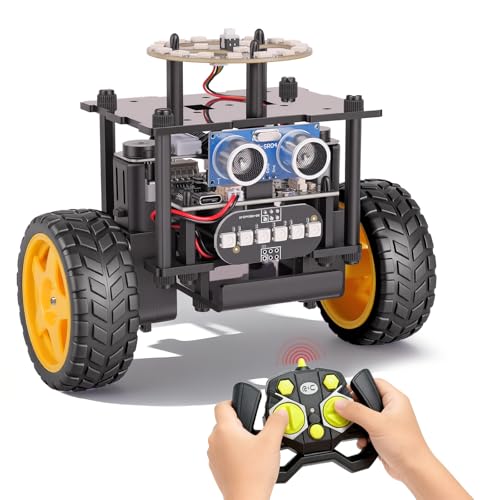
- Builds into a self-balancing, two-wheel robot car.
- Offers auto-go and remote-control modes.
- Uses radar for obstacle avoidance in both modes.
Best For: Ages 8+ who enjoy assembling and steering robot vehicles
5. Robotic Mechanical Hand STEM Toy
A Hands-On Mechanism Project
Robotic Mechanical Hand STEM Toy

- Builds a mechanical hand using the included instructions.
- Designed as a screen-free activity.
- Made for children ages 8 and up.
Best For: Kids curious about mechanisms and engineering projects
6. 13-in-1 Solar Robot Kit
For Solar-Powered Builds

- Can be assembled into 13 different robot designs.
- The robots can move on land or water.
- Uses a solar-powered engine.
Best For: Ages 8–12 who want to explore solar power through building
7. ELEGOO Conqueror Robot Tank Kit
For Advanced Robot Missions
ELEGOO Conqueror Robot Tank Kit
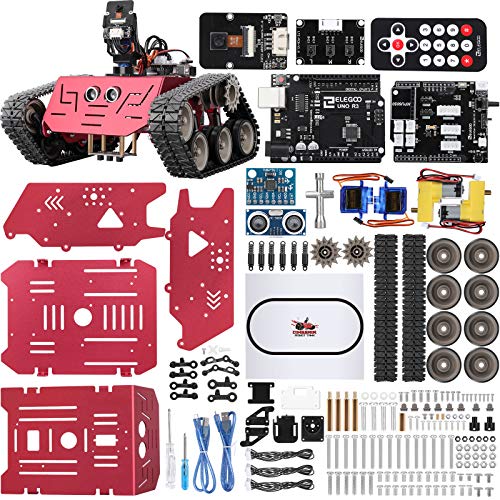
- Builds a tracked robot with an UNO R3 control system.
- Includes camera-based first-person-view driving and sensors.
- Supports visual block coding and Arduino IDE.
Best For: Ages 10+ ready for coding and electronics projects
8. Snap Circuits Classic SC-300
For Circuit Curiosity

- Offers more than 300 electronics projects.
- Uses color-coded pieces that snap onto a grid.
- No soldering or tools are needed.
Best For: Ages 8+ interested in the electronics behind robotics
9. 3Doodler Start+ 3D Pen Set
For Inventive Robot Designs
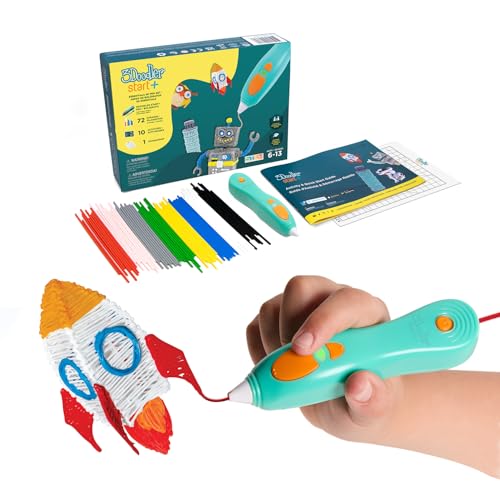
- Includes a 3D pen, doodle pad, filament, and activity guide.
- Comes with 10 stencils and mixed-color plastic strands.
- Designed for screen-free STEM play for ages 6+.
Best For: Young makers who want to draw robot parts and structures in 3D
10. Ruko 1088 Programmable Robot
A Responsive Robot Companion

- Offers app, remote, voice-command, and gravity-sensor controls.
- Includes songs, stories, and programmable expressions.
- Can play music as a Bluetooth speaker when connected to a phone.
Best For: Ages 4–9 who want a moving, interactive robot
11. ELEGOO UNO R3 Smart Robot Car Kit V4
For Camera-Guided Coding
ELEGOO UNO R3 Smart Robot Car Kit V4

- Includes a camera for live first-person-view video.
- Supports line tracking and ultrasonic obstacle avoidance.
- Uses Arduino IDE for coding movement and sensors.
Best For: Older kids interested in coding a robot car with a camera
12. Makeblock mBot Coding Robot
A First Programmable Robot

- Builds into a robot car with line-following and obstacle-avoidance functions.
- Supports learning with Scratch and Arduino.
- Includes coding cards and access to Makeblock apps and software.
Best For: Ages 8–12 taking their first steps in robotics and coding
13. Sphero BOLT Coding Robot Ball
For Active Coding Play

- Programs movement, lights, and its LED matrix through an app.
- Supports Draw, Blocks, Python, and JavaScript coding.
- Uses sensors to detect light, direction, and speed.
Best For: Ages 8+ who like movement-based play and visual coding
14. 5-in-1 Robotics Building Kit
Construction Crew in One Box

- 430 blocks build one of five vehicle or robot models.
- Models can be driven with the included remote or a smartphone app.
- Includes step-by-step building instructions.
Best For: Ages 6–10 who like construction vehicles and rebuilding models
15. ELEGOO ESP-32 and Sensor Kit Bundle
For Sensor-Powered Projects
ELEGOO ESP-32 and Sensor Kit Bundle

- Combines an ESP-32 starter kit with a 37-in-1 sensor kit.
- Includes more than 35 components and 30+ project tutorials in the starter kit.
- Supports experiments with motion, light, sound, and line tracking.
Best For: Older students and makers who want to build responsive electronics projects
16. Code & Go Mouse Mania Board Game
A Screen-Free Coding Challenge
Code & Go Mouse Mania Board Game

- Players use coding cards to guide pieces around a board.
- Includes obstacles and target-reaching challenges.
- Designed for 2–4 players.
Best For: Ages 5–8 who enjoy puzzles and learning coding sequences together
How to Choose Robotics Christmas Gift Ideas for Kids
Robotics Christmas gift ideas for kids work best when the project matches a child’s interests, patience, and current comfort with building or coding. A toy that invites a satisfying first success can make a stronger gift than one with more features than the child is ready to use.
Match the gift to the child
Start with the kind of play they already enjoy. A child who likes drawing may respond to the drawing robot or 3D pen, while someone who builds with blocks may prefer the robotic arm, solar robot kit, or construction set. For children who like movement and pretend play, consider the robot dog, humanoid robot, or robot ball. The Code & Go board game offers an introduction to coding logic through shared tabletop play without requiring a device.
Age guidance helps narrow the options, but also consider the child’s experience and attention span. A younger beginner may enjoy a game or interactive robot that responds quickly. Building kits often ask for more patience: choose one with instructions and a level of assembly that feels approachable. Some kits specifically mention adult guidance or family assembly, which can turn a challenging build into a shared activity.
Choose a useful level of complexity
Think about how much the child wants to do after opening the gift. A robot with voice or remote controls can offer immediate play. A programmable car, microcontroller bundle, or Arduino-compatible tank kit gives curious makers room to work with code, sensors, and movement. For an electronics foundation, Snap Circuits introduces projects with snap-together components and no soldering. These options suit different interests, so look at the actual activities and controls rather than choosing by the word “robotics” alone.
Check what the project depends on before deciding. Some products use an app, Bluetooth, or a compatible phone; others are controlled by a remote or work as a board game. Battery needs also vary. The mBot listing notes that its robot requires four AA batteries and its remote requires a CR2025 battery, while the smart robot car kit notes AA batteries for its remote. If the child will use a kit with a computer or device, check that the family has a suitable one and is comfortable setting it up.
Set a budget around the experience
Prices are not provided here, so compare current listings before buying and set a spending limit based on the kind of experience you want to give. A simple coding game or introductory drawing activity may suit a modest gift budget. Larger, multi-part builds and sensor kits may make sense when the recipient is eager for a longer project or can revisit it over time. Include any separate batteries or compatible devices in your budget if required, and check the listing for what is included before checkout.
Personalization can come from choosing a theme the child already loves: animals, construction vehicles, drawing, or space-age machines. For a more individual touch, pair the gift with time to build together or a notebook where they can sketch designs and record coding ideas. This keeps the gift focused on their interests without adding another toy.
Plan for Christmas timing
For a hands-on kit, leave room before Christmas for delivery and for checking the package contents. During busy holiday periods, availability and shipping estimates can change, so use the retailer’s current information rather than assuming a specific arrival date. For last-minute decisions, a locally available board game or a simple interactive toy may be easier to arrange than a complex kit, but confirm stock and pickup timing directly. If the gift needs batteries, a computer, or app setup, check those details early so the recipient can begin enjoying it during the holiday break.
