Find a gift for the gamer who wants a new way to play, a more capable setup, or a little more comfort at their desk. This collection covers PC and console gear, streaming tools, and upgrades for shared spaces.
Christmas Gift Ideas for Gamers
1. MECHREVO Aurora 16X Gaming Laptop
Portable PC Gaming Upgrade
MECHREVO Aurora 16X Gaming Laptop

- Pairs an Intel Core i7-14650HX processor with dedicated GeForce RTX 5060 graphics.
- The 16-inch 2560 × 1600 IPS display has a 180Hz refresh rate.
- Includes 512GB SSD storage and Windows 11 Home.
Best For: PC gamers who want a gaming setup they can move between rooms or take on trips
2. UGREEN NAS DXP2800 2-Bay Storage Hub
A Home for Game Clips and Media
UGREEN NAS DXP2800 2-Bay Storage Hub

- Centralizes files, media libraries, and backups from multiple devices.
- Supports up to 80TB across two HDD bays and two M.2 NVMe slots; drives are sold separately.
- Offers 2.5GbE networking and compatibility with Windows, macOS, Android, and iOS.
Best For: Gamers who record gameplay or manage a large media library
3. ErGear 48 × 24-Inch Electric Standing Desk
A More Flexible Gaming Station
ErGear 48 × 24-Inch Electric Standing Desk

- Electric height adjustment ranges from 28.35 to 46.46 inches.
- Four memory presets let users save preferred desk heights.
- The black desk has a steel frame and a 48 × 24-inch surface.
Best For: PC gamers creating a dedicated play and work station
4. OHAYO 60W Bluetooth Computer Speakers
Desktop Sound for Game Nights
OHAYO 60W Bluetooth Computer Speakers

- The stereo pair offers Bluetooth 5.3, RCA, AUX, and USB inputs.
- Front-panel volume control makes adjustments easy to reach.
- Compact bookshelf design suits desktops and small rooms.
Best For: PC gamers who prefer room audio over a headset
5. EPOMAKER × Aula F75 Wireless Mechanical Keyboard
A Customizable Compact Keyboard
EPOMAKER × Aula F75 Wireless Mechanical Keyboard

- The 75% layout saves desk space while retaining essential keys.
- Connects by Bluetooth, 2.4GHz wireless, or USB-C.
- Hot-swappable sockets, a control knob, and RGB lighting support a personalized setup.
Best For: PC gamers who value a compact keyboard and customizable controls
6. STREONOR S15 Stream Controller
One-Touch Setup Control
STREONOR S15 Stream Controller

- Fifteen customizable LCD keys can trigger shortcuts, app actions, and OBS controls.
- Three non-touch panels can show supported system information such as CPU temperature or memory use.
- Designed for Windows 10 or later and macOS Big Sur or later; Linux is not supported.
Best For: Streamers and gamers who want quick access to setup controls
7. FIFINE AmpliGame AM8 USB/XLR Microphone
A Clearer Voice for Streams
FIFINE AmpliGame AM8 USB/XLR Microphone

- The dynamic microphone offers USB and XLR connections; an XLR cable is sold separately.
- USB mode includes tap-to-mute, headphone monitoring, and controllable RGB lighting.
- Its cardioid pickup is designed to focus on voice and reject off-axis noise.
Best For: Streamers and gamers who want a dedicated voice microphone
8. AJAZZ AJ139 V2 MC Wireless Gaming Mouse
Lightweight Mouse with Charging Dock
AJAZZ AJ139 V2 MC Wireless Gaming Mouse

- The 66-gram mouse supports adjustable sensitivity up to 12,000 DPI.
- Choose Bluetooth, 2.4GHz wireless, or USB-C wired connection.
- A magnetic charging base includes RGB lighting.
Best For: PC gamers who want a lightweight mouse with flexible connectivity
9. CyberPowerPC Gamer Master Gaming Desktop
A Ready-to-Use PC Upgrade
CyberPowerPC Gamer Master Gaming Desktop

- Includes an AMD Ryzen 7 8700F processor and GeForce RTX 5060 Ti 8GB graphics.
- The configuration includes 16GB DDR5 memory, a 1TB NVMe SSD, and Windows 11 Home.
- Wi-Fi 6, Bluetooth 5.3, RGB lighting, a keyboard, and a mouse are included.
Best For: PC gamers ready to upgrade to a desktop gaming system
10. ASUS ROG Xbox Ally Gaming Handheld
PC Games Away from the Desk
ASUS ROG Xbox Ally Gaming Handheld

- Runs Windows 11 and supports game libraries including Xbox, Steam, and Epic Games.
- The 7-inch display has a 120Hz refresh rate; storage is 1TB SSD with 16GB memory.
- Contoured grips and a 60Wh battery support portable play.
Best For: Gamers who want access to PC games while away from their desk
11. LG 55-Inch OLED evo C6 4K Smart TV
A Big-Screen Gaming Display
LG 55-Inch OLED evo C6 4K Smart TV

- The 55-inch OLED screen has 4K resolution and self-lit pixels.
- Gaming features listed include 0.1ms response time, VRR, NVIDIA G-Sync, and AMD FreeSync Premium.
- Includes four HDMI ports and the webOS smart platform.
Best For: Console gamers upgrading their living-room display
12. BenQ TH685P 1080p Gaming Projector
Room-Filling Gaming Projection
BenQ TH685P 1080p Gaming Projector

- Projects a 1080p image and supports 4K inputs.
- Game mode supports 8.3ms low latency at 1080p/120Hz.
- The built-in 5-watt speaker and tabletop design suit a flexible room setup.
Best For: Gamers who want large-screen play in a room without a fixed TV setup
13. Logitech G920 Racing Wheel and Pedals
A More Involved Racing Setup
Logitech G920 Racing Wheel and Pedals

- Force feedback and 900-degree rotation bring wheel movement into compatible racing games.
- The set includes pressure-sensitive brake pedals with adjustable pedal faces.
- Designed for Xbox Series X|S, Xbox One, and PC.
Best For: Racing-game fans who want a wheel-and-pedal setup for Xbox or PC
14. Logitech G733 LIGHTSPEED Wireless Headset
Wireless Audio for Team Play
Logitech G733 LIGHTSPEED Wireless Headset

- LIGHTSPEED wireless audio and a listed range of up to 20 meters support untethered play.
- The headset includes a microphone with Blue VO!CE features and PRO-G drivers.
- Compatible with PC, PS5, PS4, and Nintendo Switch.
Best For: Gamers who play online with friends or teammates
15. Meta Quest 3 512GB VR Headset
Untethered Virtual Reality

- Standalone VR and mixed-reality features let users play without a PC connection.
- Includes 512GB storage, 8GB RAM, and Touch Plus controllers.
- The listing includes GOLF+ content and describes a three-month game catalog trial.
Best For: Gamers curious about VR titles and mixed-reality play
16. SANSUI 27-Inch WQHD Gaming Monitor
Sharper, Smoother Desktop Play
SANSUI 27-Inch WQHD Gaming Monitor
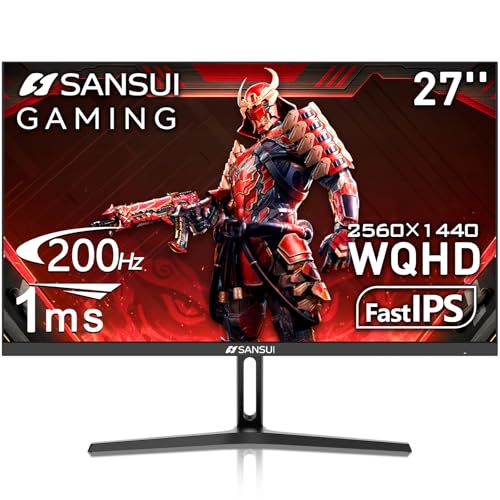
- The 27-inch IPS monitor has 2560 × 1440 resolution and a listed 180Hz refresh rate.
- Adaptive Sync, 1ms response time, and HDR are among its gaming features.
- Includes two HDMI 2.0 ports, two DisplayPort 1.2 ports, and a DP cable.
Best For: PC gamers seeking a sharper, high-refresh desktop display
17. Samsung T9 Portable SSD 2TB
Portable Space for Game Libraries

- Provides 2TB of external storage in a portable SSD format.
- USB 3.2 Gen 2×2 connectivity supports listed speeds up to 2,000MB/s.
- Compatible with gaming consoles, PCs, Macs, tablets, and iPhone 15/16.
Best For: PC and console gamers who need portable storage for games and files
18. Quntis Monitor Light Bar with Remote
Desk Lighting That Saves Space
Quntis Monitor Light Bar with Remote

- The USB-powered light bar offers dimming and color temperature adjustment by remote.
- Its clamp is designed for many 17–32-inch flat, curved, and irregular monitors.
- An ambient light sensor supports auto-dimming, and a two-hour timer is included.
Best For: Gamers who use a desk setup after dark
19. GameSir G7 Pro Wireless Xbox Controller
Custom Controls for Xbox and PC
GameSir G7 Pro Wireless Xbox Controller

- Licensed for Xbox Series X|S and Xbox One, with 2.4GHz wireless connection.
- Four remappable buttons and switchable trigger modes allow control customization.
- Includes a charging station and magnetic swappable faceplate.
Best For: Xbox and PC gamers who prefer controller play
How to Choose Tech Christmas Gift Ideas for Gamers
When comparing tech Christmas gift ideas for gamers, start with how and where the recipient actually plays. A useful upgrade fits their platform, space, and habits; the most expensive item on the list may not be the best match.
Start with their gaming platform
Check whether they mainly play on PC, Xbox, PlayStation, Nintendo Switch, or across several systems. Some gifts are platform-specific: the Logitech G920 is listed for Xbox and PC, while the GameSir G7 Pro is licensed for Xbox and also supports PC. The Logitech G733 headset lists compatibility with PC, PlayStation 5 and 4, and Nintendo Switch. For a laptop, desktop, or controller, verify the exact model and connection requirements against the recipient’s current setup before buying.
For a PC gamer, a mouse, keyboard, monitor, microphone, or storage drive can be a focused upgrade. A full desktop or laptop is a larger change, so check the available desk space, monitor connections, and the recipient’s willingness to replace or move their current system. A handheld can suit someone who wants PC games away from their desk, while a VR headset is best for a person who is already curious about immersive play.
Match the gift to their setup
Think about the room as well as the game. A monitor is a natural fit for a desk; a television or projector can suit shared living-room play. Before choosing a display, consider its size, placement, and the devices that will connect to it. Check the computer or console’s output ports and whether the recipient has room for a projector image or a larger television.
Desk accessories need a little measuring. Compare a light bar’s monitor range and clamp design with the screen, and check that a standing desk will fit the room and the recipient’s preferred working height. A NAS enclosure can organize recordings and media across devices, but the DXP2800 listing says storage drives are sold separately. A portable SSD is a simpler gift when the goal is extra external storage; check the device’s available connection and supported storage options.
Set a budget around the kind of upgrade
Small accessories such as a light bar, mouse, microphone, or controller can make a focused gift without replacing the whole setup. Speakers, headsets, keyboards, and monitors provide a more noticeable change while still complementing existing equipment. Desks, projectors, handhelds, VR headsets, and gaming computers are bigger purchases that deserve closer checks on compatibility and space. Compare the complete setup cost: a NAS needs drives, and a desk or projector may require room adjustments or other equipment the recipient does not already have.
Personal touches can make a practical gift feel considered. Choose a color that suits their setup, or select gear that supports their favorite way to play, such as racing peripherals for a racing-game fan or a streaming control pad for someone who creates content. Avoid guessing at specialized preferences like keyboard feel or mouse shape if you can check discreetly.
Plan the timing and setup
For a last-minute decision, favor an accessory that works with equipment the recipient already owns and has a clear connection type. Before ordering, confirm the current model, operating system, ports, desk dimensions, and platform compatibility. For more involved gifts, leave time to check the space and arrange setup. A computer, display, desk, or VR headset may need updates, configuration, or a suitable place to use it, so an early conversation can prevent a surprise that is difficult to fit into their setup. If the exact match is uncertain, choose a compatible accessory only after checking the recipient’s devices, or consider giving the gift with a plan to select the configuration together.
