Jewelry design demands fine detail, clean edges, and reliable repeatability, making resin printing a strong choice for prototypes, masters, and small production runs. The best printer depends on more than headline resolution: calibration, resin compatibility, dimensional accuracy, and post-processing workflow all matter.
We selected 10 models spanning beginner-friendly machines, fast professional printers, and high-resolution systems. Use the comparison and buying advice below to match your design process, workspace, and production goals with the right option.
Best 10 Resin Printers for Jewelry Design Picks for 2026
Large-Format Detail Pick

- Large 190 × 120 × 200 mm build volume
- 4K detail with 50-micron XY accuracy
- Wi-Fi, heater, and air purifier included
Best For: Batch jewelry work and larger resin models
Fastest High-Resolution Option

- 14K LCD with fine 16.8 × 24.8 micron XY resolution
- Up to 170 mm/h with high-speed resin
- Automatic filling and temperature-controlled vat
Best For: Fine-detail designs and faster production cycles
Most Convenient Workflow
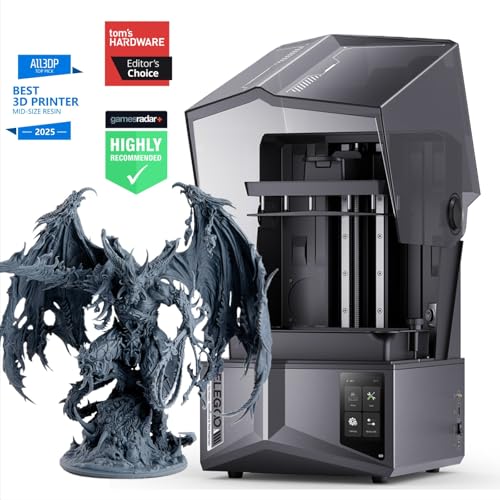
- 12K LCD with 19 × 24 micron XY resolution
- Auto-leveling removes a common setup task
- AI camera, sensors, and Wi-Fi control
Best For: Hands-off jewelry prototyping and monitored workflows
Professional Precision Pick

- High-contrast amber screen supports crisp, fast curing
- One-click slicing repairs models and generates supports
- Force sensing and ≤2 micron Z-axis repeat accuracy
Best For: Professional studios needing controlled, repeatable prints
Best High-Resolution Pick

- 16K display with 14×19μm pixel size
- Factory pre-leveling and smart resin workflow
- Heating supports printing down to 0°C/32°F
Best For: Highly detailed jewelry models and demanding prototypes
Best Fast Printing Option

- 10K screen with 17×17μm pixels
- Print speeds up to 120mm/h
- Five intelligent inspections for added monitoring
Best For: Detailed designs where speed and operational checks matter
Best Beginner-Friendly Choice

- Automatic leveling simplifies setup
- One-click self-check checks printer status
- 6.6-inch 4K monochrome LCD screen
Best For: Beginners learning resin printing for everyday jewelry models
Most Versatile

- 14K detail with dual-color/-material capability
- Low-force wave release supports easier demolding
- AI checks and intelligent leveling simplify setup
Best For: Multi-material jewelry designers who want guided operation
Best for Production Speed

- Print speeds reach up to 150 mm/h
- Heated resin tank supports preheating to 30°C
- AI camera and Wi-Fi enable remote monitoring
Best For: Batch production and multi-printer jewelry workflows
Best for Large Detailed Models
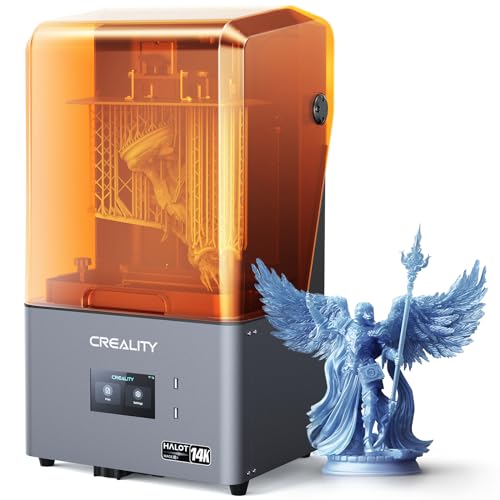
- 14K resolution highlights jewelry and miniature details
- Up to 150 mm/h speed with Dynax+ mode
- Remote printing and activated-carbon odor filtration
Best For: Detailed jewelry models needing a spacious build area
Large-Format Detail Pick – Sonic XL 4K
For jewelry designers who need room for batches or larger models, the Phrozen Sonic XL 4K is a practical option among resin printers for jewelry design. Its 4K monochrome screen, 50-micron XY accuracy, and 10-micron minimum layer height are designed to preserve fine detail.
Best For: Jewelry makers who want a large build area, batch production, and flexible connectivity.
Pros:
- 190 × 120 × 200 mm build volume supports batches and larger pieces.
- 4K LCD, 50-micron XY accuracy, and 10-micron minimum layers target detailed prints.
- Wi-Fi, USB, Ethernet, and microSD connectivity provide convenient workflow options.
- Includes a heater and air purifier.
Cons:
- Bed leveling is manual, even though the process is described as easy.
- At 42.9 pounds, it is relatively heavy and requires dedicated space.
- The printer is also oriented toward dental workflows, which may mean features beyond a jewelry-only setup.
The Sonic XL 4K stands out when build volume and production flexibility matter as much as detail. It is a strong fit for designers printing multiple jewelry models at once, provided they are comfortable with manual leveling.
Fastest High-Resolution Option – Photon Mono M7 Pro
The Anycubic Photon Mono M7 Pro combines very high resolution with rapid print speeds, making it a compelling choice among resin printers for jewelry design. Its 14K screen is rated for 16.8 × 24.8 micron XY resolution and can reproduce holes as small as 0.3 mm.
Best For: Designers prioritizing fine features, faster turnaround, and automated resin handling.
Pros:
- 14K monochrome LCD delivers 13,312 × 5,120 resolution and fine XY detail.
- Reaches up to 170 mm/h with high-speed resin and 130 mm/h with standard resin.
- Temperature-controlled resin vat helps maintain printing conditions.
- Automatic resin filling and one-key recycling simplify material management.
Cons:
- The headline 170 mm/h speed depends on high-speed resin and a 0.1 mm layer test.
- The supplied notes do not specify the build volume.
- Its many detection and automation features may be more than occasional users need.
With its combination of 14K resolution and speed, the M7 Pro is well suited to detail-focused jewelry workflows where reducing print time matters. Verify the available build area for your intended models before buying.
Most Convenient Workflow – ELEGOO Saturn 4 Ultra
The ELEGOO Saturn 4 Ultra focuses on reducing setup and monitoring work while retaining high resolution. For resin printers for jewelry design, its 12K LCD, automatic leveling, inclined release technology, and built-in camera make it a practical choice for repeatable detail-oriented printing.
Best For: Jewelry designers who want automatic setup, remote monitoring, and safeguards against common print problems.
Pros:
- 12K LCD and 19 × 24 micron XY resolution support detailed models.
- Auto-leveling eliminates manual build-plate leveling.
- AI camera, mechanical sensors, and smart alerts help monitor print quality and hardware.
- Wi-Fi transfer and cluster printing support remote and multi-machine workflows.
Cons:
- The supplied notes do not state a print speed or build volume.
- Its monitoring and network features may be unnecessary for simple one-off printing.
- At 21.57 inches in one listed dimension, it needs substantial workspace clearance.
The Saturn 4 Ultra is especially appealing when convenience and reliable operation are priorities. Its automatic leveling and monitoring tools can make repeated jewelry prototyping less hands-on, while the 12K screen provides the detail expected for intricate models.
Professional Precision Pick – Reflex RS Turbo
The Reflex RS Turbo is built around controlled, high-speed resin printing and precise motion. Its high-contrast amber screen, automatic leveling, force sensing, and stated ≤0.05 mm printing tolerances make it an advanced candidate among resin printers for jewelry design.
Best For: Professional jewelry studios seeking precision, automated preparation, and detailed print diagnostics.
Pros:
- Amber screen provides a stated 566:1 contrast ratio for crisp detail and fast curing.
- One-click slicing can repair model defects and generate supports automatically.
- Force sensors detect fine resin residue and can pause a print, with diagnostics after each job.
- C5 ball-screw Z-axis is rated for ≤2 micron repeat positioning accuracy.
Cons:
- At 50.6 pounds, it is the heaviest printer in this selection.
- The supplied notes do not specify screen resolution, build volume, or exact print speed.
- Its advanced controls and professional support focus may be excessive for casual users.
The Reflex RS Turbo is aimed at users who value process control as much as visual detail. Its combination of automated preparation, force-based safeguards, and precise motion is most compelling for demanding studio workflows rather than occasional hobby printing.
Best High-Resolution Pick – UniFormation GK3T
For jewelry designers who need extremely fine surface detail, the UniFormation GK3T stands out among resin printers for jewelry design with its 16K display and 14×19μm pixel size. Its pre-leveling, resin heating, and workflow-focused features also make it practical for repeat production.
Best For: Detailed jewelry models, intricate prototypes, and users who want a high-resolution printer with automated workflow features.
Pros:
- 16K resolution and 14×19μm pixels support exceptionally fine detail.
- Factory pre-leveling, smart resin feeding, and a quick-release build plate simplify operation.
- Built-in heating supports resin fluidity in temperatures as low as 0°C/32°F.
- Remote monitoring and control are available through the smartphone app or slicing software.
Cons:
- At 52.8 pounds, it is relatively heavy and requires substantial workspace.
- Its advanced features may be more than beginners need for basic prints.
The GK3T is a strong choice when detail quality and stable operation matter most. Consider its larger footprint and weight before setting it up in a small studio.
Best Fast Printing Option – ANYCUBIC Photon Mono 4 Ultra
The ANYCUBIC Photon Mono 4 Ultra is a capable option among resin printers for jewelry design when you want detailed models without giving up printing speed. Its 10K screen, controlled COB light source, and intelligent inspections support consistent day-to-day use.
Best For: Designers seeking a balance of fine detail, faster print speeds, and automated checks for common printing issues.
Pros:
- 7-inch 10K screen uses 17×17μm pixels for detailed prints.
- Print speeds can reach up to 120mm/h with ACF film and the Intelligent Release Algorithm.
- COB lighting and Fresnel lenses provide a light angle within 3° and at least 90% uniformity.
- Five intelligent inspections help monitor resin, failed prints, and printer condition.
Cons:
- Its 10K resolution is lower than the 16K resolution of the UniFormation model in this roundup.
- The supplied notes do not mention built-in resin heating for cold-room printing.
Choose the Photon Mono 4 Ultra if you value efficient production and automated monitoring alongside fine detail. Its compact 8.8-pound weight may also suit studios that need to move equipment frequently.
Best Beginner-Friendly Choice – ELEGOO Mars 5
The ELEGOO Mars 5 is a straightforward entry point for jewelry makers exploring resin printers for jewelry design. Automatic leveling, one-click self-checks, and mechanical safety detection reduce setup friction, while the 4K screen handles everyday detailed printing.
Best For: Beginners and hobbyist jewelry designers who prioritize simple setup, safety features, and reliable everyday operation.
Pros:
- Automatic leveling avoids repeated manual leveling.
- One-click self-checks can identify printer issues before printing begins.
- Mechanical sensing detects foreign objects, resin problems, and leveling failures.
- The 6.6-inch 4K monochrome LCD screen provides 4098×2560 resolution.
Cons:
- Its 35×35μm pixel size offers less fine resolution than the 10K and 16K options here.
- The supplied notes do not mention remote monitoring or built-in resin heating.
The Mars 5 makes sense when ease of use is more important than maximum resolution. It is a practical starting point for learning resin workflows and producing everyday jewelry-related models.
Most Versatile – ANYCUBIC Photon P1
For jewelry designers seeking resin printers for jewelry design with added creative flexibility, the ANYCUBIC Photon P1 combines 14K detail with a dual-color/-material platform. Its stable motion system, low-force release technology, and assisted calibration are aimed at dependable results for intricate models and larger builds.
Best For: Designers who want dual-material or dual-color assembled creations and guided setup features.
Pros:
- Dual kits can reduce resin costs for small models and support dual-color or dual-material prints.
- 14K resolution, precise light control, and over 92% illumination uniformity support sharp model details.
- Intelligent leveling, resin detection, and AI-assisted build-plate checks help simplify operation.
- Wave release technology reduces release force by over 60% compared with smooth NFEP films.
Cons:
- The dual-kit setup may be more capability than needed for single-material workflows.
- At 22 pounds and over 33 inches wide, it requires a dedicated workspace.
The Photon P1 is a feature-rich choice when jewelry work involves intricate details, frequent calibration, or multi-material experimentation. Its automation and release system may be especially useful for creators prioritizing repeatable handling.
Best for Production Speed – ELEGOO Saturn 4 Ultra 16K
The ELEGOO Saturn 4 Ultra 16K is a strong option among resin printers for jewelry design when throughput and process monitoring matter. Its heated resin tank, tilt-release technology, 16K MSLA resolution, and network controls support faster, more automated print workflows.
Best For: Studios and creators producing detailed jewelry models in batches or managing multiple printers.
Pros:
- 16K MSLA printing and a 211.68 × 118.37 × 220 mm build volume suit detailed models and larger batches.
- Tilt-release technology enables speeds up to 150 mm/h by reducing Z-axis movement.
- Built-in heating can preheat resin to 30°C, helping maintain a suitable printing temperature.
- AI camera monitoring, Wi-Fi control, and cluster printing support remote workflow management.
Cons:
- At 41.3 pounds, it is the heaviest printer in this group and is less convenient to move.
- Its extensive automation and network features may be unnecessary for occasional users.
Choose the Saturn 4 Ultra when productivity is as important as fine detail. Temperature management, anomaly detection, power-resume support, and Wi-Fi control make it well suited to a more organized jewelry-printing setup.
Best for Large Detailed Models – Creality HALOT-MAGE S
For makers comparing resin printers for jewelry design, the Creality HALOT-MAGE S emphasizes fine detail, a larger 10.1-inch 14K print area, and faster production modes. Its uniform light source, release film, remote controls, and odor-reduction features make it practical for detailed jewelry and miniature work.
Best For: Professionals and hobbyists who want a larger detailed build area with speed-focused operation.
Pros:
- 14K resolution and a 10.1-inch display are designed to reproduce fine jewelry and miniature details.
- Dynax+ mode can reach up to 150 mm/h for faster printing.
- Integral Light Source 3.0 provides strong, uniform UV exposure for consistent layer curing.
- HALOT OS supports remote printing, while the activated-carbon purifier helps reduce odors.
Cons:
- The Smart Resin Pump is optional rather than included as standard.
- The printer’s larger footprint may require considerable desk space.
The HALOT-MAGE S balances high-resolution output with speed and convenience features. It is a compelling fit for users who need detailed jewelry models, a spacious print area, and remote workflow tools without moving to the heaviest machine in this selection.
How We Picked the Best Resin Printers for Jewelry Design
We evaluated these printers by focusing on the requirements that matter most for jewelry work: XY resolution, exposure consistency, dimensional accuracy, build-platform stability, print speed, software usability, and maintenance. We also considered build volume, connectivity, monitoring features, temperature management, and whether the printer is practical for beginners or better suited to an experienced studio.
Resolution is only one part of the result. A well-calibrated printer with dependable exposure control can produce more usable rings, settings, and intricate patterns than a higher-resolution machine with inconsistent leveling or difficult software.
Quick Comparison
| Priority | Look For | Best Fit |
|---|---|---|
| Maximum fine detail | 12K, 14K, or 16K mono LCD and stable exposure control | Intricate motifs, prongs, textures, and small masters |
| Faster production | High-speed exposure, reliable release, and strong platform adhesion | Multiple prototypes or repeated batches |
| Large designs | Greater build volume and a rigid platform | Bangles, larger models, or grouped prints |
| Easy starting point | Automatic leveling, guided setup, and accessible replacement parts | New users and occasional designers |
Key Buying Factors for Resin Printers for Jewelry Design
Detail and Dimensional Accuracy
High pixel counts can help preserve tiny features, but check the printer’s actual XY resolution and exposure uniformity. Jewelry models need sharp edges and predictable dimensions, especially when a printed master will be molded or cast. Calibration, resin profile quality, and support placement remain essential.
Build Volume and Platform Design
A larger build area lets you print several pieces at once, but it also increases resin use and can make failed prints more costly. Choose enough room for your typical batch rather than automatically buying the largest machine. A stable, easy-to-level platform is particularly valuable for thin rings and small components.
Speed, Release, and Reliability
Advertised speed is usually a best-case figure. Real throughput depends on layer height, resin, model geometry, lift settings, and post-processing. Features such as smart release systems, temperature control, monitoring cameras, and stable Z-axis mechanics can be more useful than speed alone.
Resin, Safety, and Cleanup
Confirm that the printer supports the casting, wax-like, tough, or standard resins you plan to use. Resin printing requires ventilation, gloves, eye protection, washing, and UV curing. Budget for a wash-and-cure setup, replacement films, spare screens or vats, and dependable consumables.
Who Should Buy Which Resin Printers for Jewelry Design?
Beginners: Choose a compact model with guided setup, automatic leveling, and straightforward slicer support. Lower operating complexity makes it easier to learn supports and exposure settings.
Designers focused on intricate detail: Prioritize a high-resolution 12K, 14K, or 16K machine with consistent optics and a stable motion system. Use validated resin profiles instead of relying solely on factory defaults.
Studios and small businesses: Consider faster printers with larger platforms, dependable monitoring, Wi-Fi, and good replacement-part availability. Batch capacity and uptime usually matter more than a small resolution advantage.
Large or varied work: A larger-format printer is useful when models cannot be comfortably nested on a smaller platform. Compare its footprint, resin consumption, and ventilation needs before buying.
