Moving large video projects, photo libraries, game files, and backups requires more than a convenient USB case. The right enclosure must match your SSD type, connection standard, sustained speed, cooling needs, and workflow.
These 10 options cover fast 40Gbps NVMe models, versatile SATA adapters, tool-free 2.5-inch cases, and high-capacity multi-drive enclosures. Use the guide below to narrow the choices by performance, compatibility, portability, and budget.
Best 10 SSD Enclosures for Large Files Picks for 2026
Best Active-Cooling Pick
ACASIS 40Gbps M.2 NVMe Enclosure

- Built-in fan helps manage heat
- USB4 and Thunderbolt compatibility
- Supports four M.2 drive sizes
Best For: Sustained NVMe workloads and large-file transfers
Best High-Capacity Multi-Bay Pick
ORICO 5-Bay All-Flash Enclosure

- Up to 40TB across five bays
- Seven configurable RAID modes
- USB, SD, and TF expansion
Best For: Creators building expandable multi-drive storage
Best Silent Portable Pick
UGREEN 40Gbps M.2 NVMe Enclosure
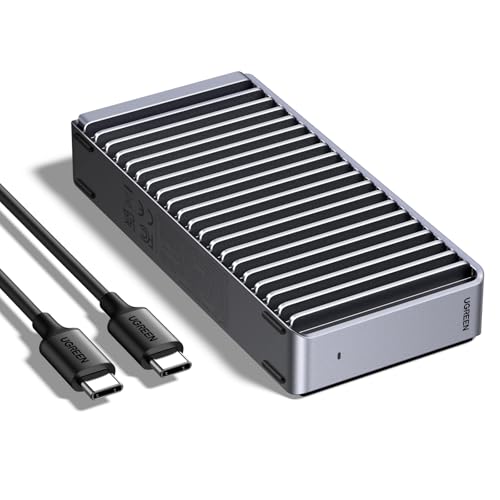
- Fanless fin-based cooling
- Up to 3600MB/s with compatible hardware
- Supports NVMe drives up to 8TB
Best For: Quiet, portable high-speed NVMe storage
Best for Sustained NVMe Transfers

- Tool-free installation for common NVMe sizes
- Aluminum-assisted cooling for long transfers
- USB-C 10Gbps; NVMe only
Best For: Portable NVMe upgrades, cloning, and large file workloads
Best for 2.5-Inch SATA Drives

- Fits 2.5-inch SATA SSDs and HDDs
- UASP support with up to 6Gbps SATA speed
- Tool-free and bus-powered design
Best For: SATA backups, upgrades, and portable data recovery
Best for Mixed M.2 Compatibility
Dual-Protocol 10Gbps Enclosure

- Supports compatible NVMe and SATA M.2 SSDs
- Includes USB-C and USB-A cables
- Aluminum shell with thermal pads
Best For: Users switching between supported M.2 drive types
Best High-Speed 2.5-Inch Pick
Cable Matters Aluminum USB-C Enclosure

- 10Gbps USB-C connectivity
- Supports 2.5-inch SATA SSDs and HDDs
- Aluminum housing helps dissipate heat
Best For: Fast backups and testing for 2.5-inch SATA drives
Best Budget SATA Option
SABRENT Tool-Free USB 3.0 Enclosure

- Tool-free 2.5-inch drive installation
- USB 3.0 speeds up to 5Gbps
- Supports UASP and older USB ports
Best For: Simple, affordable 2.5-inch SATA storage
Most Versatile M.2 Pick
VCOM Dual-Protocol 10Gbps Enclosure

- Supports NVMe and SATA M.2 SSDs
- Fits 2230 through 2280 sizes
- Includes cooling hardware and two cables
Best For: Portable transfers with varied M.2 drives
Best Active-Cooling Pick – ACASIS 40Gbps M.2 NVMe Enclosure
For demanding transfers, video editing, and backups, this ACASIS enclosure is one of the more performance-focused ssd enclosures for large files. Its USB4/Thunderbolt compatibility, active cooling, and support for several M.2 sizes are designed to help maintain fast, stable operation under sustained workloads.
Best For: Power users with an M.2 NVMe drive who need active cooling and high-speed Mac or PC connectivity.
Pros:
- Built-in fan and engineered ventilation help limit thermal throttling.
- 40Gbps connectivity with tested read/write speeds up to 2805/2734 MB/s under the stated test conditions.
- Supports M.2 2230, 2242, 2260, and 2280 drives, plus USB4 and Thunderbolt 3/4 systems.
Cons:
- Requires an NVMe M.2 SSD; the enclosure does not provide storage by itself.
- The fan must be activated with its switch and may not suit buyers seeking completely silent operation.
This is a strong choice when sustained performance matters more than simplicity. Its active cooling and broad compatibility make it especially practical for large project files, though buyers should verify that their host and SSD support the expected speeds.
Best High-Capacity Multi-Bay Pick – ORICO 5-Bay All-Flash Enclosure
When a single external drive is not enough, the ORICO five-bay enclosure offers a scalable approach to ssd enclosures for large files. It supports multiple 2.5-inch drives, several RAID modes, and a combined capacity of up to 40TB, while also adding USB and memory-card expansion.
Best For: Video editors, photographers, and creators managing multiple 2.5-inch SSDs or HDDs.
Pros:
- Five bays support up to 40TB total, with up to 8TB per drive.
- Seven RAID modes provide options for performance, redundancy, or flexible drive use.
- Includes two 10Gbps USB ports plus SD and TF 3.0 card slots.
Cons:
- Designed for 2.5-inch drives and does not support 3.5-inch drives.
- Its 5Gbps SATA transfer rate is lower than the enclosure’s 10Gbps PSSD interface capability.
The ORICO is more of a compact storage system than a simple portable enclosure. It makes sense for users who need organized, expandable capacity and RAID flexibility, especially in photo or video workflows.
Best Silent Portable Pick – UGREEN 40Gbps M.2 NVMe Enclosure
The UGREEN 40Gbps enclosure is a compact option for turning an NVMe drive into fast external storage. Its fanless fin design, USB4 and Thunderbolt compatibility, and support for drives up to 8TB make it a useful contender among ssd enclosures for large files, provided the host and cable can support its top speed.
Best For: Travelers and desktop users who want fast, quiet external NVMe storage.
Pros:
- ASM2464PD-based design reaches up to 3600MB/s with compatible Thunderbolt 4 equipment.
- Fanless double-sided fins provide cooling without fan noise.
- Supports M.2 2230, 2242, 2260, and 2280 NVMe drives up to 8TB.
Cons:
- It supports NVMe drives only, not SATA NGFF or mSATA SSDs.
- An SSD is not included, and thicker drives may require a thinner thermal pad.
- Maximum speed depends on compatible Thunderbolt 4 cables and devices.
This is a good fit for buyers prioritizing quiet operation and portability without giving up high-speed connectivity. Check the drive thickness, interface, and host capabilities before expecting the advertised performance.
Best 3.5-Inch Expansion Pick – WAVLINK 4-Bay SATA Enclosure
For large archives and high-volume transfers, the WAVLINK four-bay enclosure provides a substantial capacity ceiling and broad SATA drive support. Its 10Gbps USB-C connection, independent bay switches, and temperature-controlled fans make it a practical desktop solution for ssd enclosures for large files.
Best For: Desktop users needing up to four SATA drives for media libraries, backups, or project storage.
Pros:
- Four bays support 3.5-inch or 2.5-inch SATA HDDs and SSDs, with capacity up to 4x22TB.
- USB 3.2 Type-C reaches up to 10Gbps for large-file transfers.
- Fans activate at 48°C, and each bay has an independent power switch for flexible use.
Cons:
- 2.5-inch drives require separate 2.5-to-3.5-inch mounting brackets.
- It is a larger desktop enclosure rather than a pocketable portable option.
- HDMI video output requires a host USB-C port that supports video output.
The WAVLINK is best viewed as a capacity-first desktop dock. It offers more room and drive flexibility than single-drive enclosures, while the cooling and independent switches are useful for longer, heavier storage sessions.
Best for Sustained NVMe Transfers – Tool-Free 10Gbps Enclosure
The SABRENT EC-PNVO is a practical pick for anyone comparing ssd enclosures for large files and using an M.2 NVMe drive. Its tool-free design, USB 3.2 Gen 2 connection, and aluminum-assisted cooling are suited to upgrades, cloning, backups, and extended transfers.
Best For: NVMe users who want a quick, portable enclosure for large file transfers and demanding workloads.
Pros:
- Tool-free flip-open installation supports 2230, 2242, 2260, and 2280 NVMe SSDs.
- USB-C 10Gbps connectivity supports transfers up to 1250 MB/s under suitable conditions.
- Thermal pad and aluminum top help transfer heat during longer workloads.
- Supports NVMe drives up to at least 8TB and needs no external power.
Cons:
- Supports M.2 NVMe drives only; M.2 SATA SSDs are not compatible.
- Maximum performance depends on the host device, cable, and SSD.
This enclosure stands out when sustained NVMe performance and easy drive access matter more than broad SATA compatibility. Confirm that your SSD is NVMe before buying.
Best for 2.5-Inch SATA Drives – USB-C SATA Enclosure
The UGREEN 2.5-inch enclosure is a sensible option for shoppers seeking ssd enclosures for large files from SATA-based SSDs or hard drives. It combines a USB-C interface, UASP support, tool-free installation, and an aluminum shell for portable storage and backups.
Best For: Owners of 2.5-inch SATA SSDs or HDDs who need a portable enclosure for file storage, system upgrades, or data recovery.
Pros:
- Supports most 2.5-inch SATA I, II, and III SSDs and HDDs up to 6TB.
- UASP and SATA III support provide up to 6Gbps drive-side transfer speed.
- Tool-free, plug-and-play setup requires no drivers or extra power supply.
- Aluminum construction helps dissipate heat without a cooling fan.
Cons:
- Designed for 2.5-inch SATA drives, not M.2 NVMe SSDs.
- Actual transfer speeds are limited by the SATA drive and connected device.
Choose this model when you already have a 2.5-inch SATA drive and want straightforward USB-C access. Its broad operating-system and device compatibility adds flexibility for backups and recovery tasks.
Best for Mixed M.2 Compatibility – Dual-Protocol 10Gbps Enclosure
The SSK SHE-C325 PRO is useful for buyers comparing ssd enclosures for large files who may work with either M.2 NVMe or SATA drives. Its USB 3.2 Gen 2 interface, included cables, thermal pads, and support for M-Key and B+M Key connectors make it a flexible portable option.
Best For: Users who need one enclosure for compatible M.2 NVMe and SATA SSDs in 2242, 2260, or 2280 sizes.
Pros:
- Supports compatible M.2 PCIe NVMe and SATA M-Key/B+M Key SSDs.
- USB 3.2 Gen 2 supports up to 10Gbps and includes USB-C and USB-A cables.
- Aluminum shell and included thermal pads help with portability and heat management.
- UASP and TRIM support can improve performance and SSD longevity.
Cons:
- Does not support M.2 PCIe AHCI drives, mSATA, Wi-Fi cards, or non-M.2 drives.
- Supports 2242, 2260, and 2280 sizes, but not 2230.
- The SSD is not included and may need formatting before use.
This is the most versatile choice of the three for compatible M.2 drive types, especially when both USB-C and USB-A connections are useful. Check the SSD protocol and keying carefully before installation.
Best High-Speed 2.5-Inch Pick – Cable Matters Aluminum USB-C Enclosure
If you need an SSD enclosure for large files and use a 2.5-inch SATA drive, this Cable Matters model offers USB-C connectivity with transfer rates up to 10Gbps. Its aluminum housing also helps protect the drive and dissipate heat, while the tool-free design makes installation straightforward.
Best For: 2.5-inch SATA SSD or HDD users who want fast USB-C backups, drive testing, or extra storage for a Windows or Mac computer.
Pros:
- Supports 2.5-inch SATA SSDs and HDDs up to 9.5mm thick.
- USB 3.1 transfer rates up to 10Gbps, with Thunderbolt 3 compatibility.
- Aluminum housing assists with heat dissipation and protects the drive.
- Supports UASP, TRIM, and S.M.A.R.T. with compatible systems and drives.
Cons:
- Limited to one 2.5-inch SATA drive.
- Does not support M.2 drives.
Choose this enclosure when your large-file workflow uses a conventional 2.5-inch SATA SSD or hard drive and you have a compatible USB-C port. It is a practical balance of speed, portability, and drive accessibility.
Best Budget SATA Option – SABRENT Tool-Free USB 3.0 Enclosure
For straightforward storage expansion, this SABRENT enclosure is a simple choice for 2.5-inch SATA SSDs and hard drives. It uses USB 3.0 for speeds up to 5Gbps, installs without tools, and remains compatible with older USB 2.0 and 1.1 ports.
Best For: Users who want an easy, affordable enclosure for a 2.5-inch SATA drive and routine file transfers.
Pros:
- Tool-free installation makes drive setup quick.
- Supports 2.5-inch SATA and SATA II drives.
- USB 3.0 supports transfer rates up to 5Gbps.
- UASP support helps optimize compatible SSD performance.
Cons:
- Slower than 10Gbps USB enclosures for very large file transfers.
- Designed for 2.5-inch SATA drives, not M.2 SSDs.
This is a sensible pick when compatibility and ease of installation matter more than maximum throughput. For an SSD enclosure for large files, its USB 3.0 ceiling is adequate for many everyday transfers but less suited to minimizing wait times.
Most Versatile M.2 Pick – VCOM Dual-Protocol 10Gbps Enclosure
This VCOM enclosure is built for large-file work with compatible M.2 drives, supporting both NVMe and SATA protocols. USB 3.2 Gen 2 provides up to 10Gbps for NVMe drives, while the aluminum shell, heatsink, and thermal pad help manage heat during use.
Best For: Users with M.2 NVMe or SATA SSDs who want one portable enclosure for drive upgrades, file transfers, and cross-device access.
Pros:
- Supports M.2 NVMe M-Key and M.2 SATA M+B-Key drives.
- Fits 2230, 2242, 2260, and 2280 SSD sizes.
- Offers up to 10Gbps with NVMe and up to 6Gbps with SATA.
- Includes USB-A-to-USB-C and USB-C-to-USB-C cables.
Cons:
- Actual speed depends on the SSD protocol and host port.
- Supports one M.2 drive at a time.
Among these options, this is the most flexible for mixed M.2 hardware. Its dual-protocol support and included cables simplify switching between drives and devices, while the cooling design is useful for sustained transfers.
How We Picked These SSD Enclosures for Large Files
We focused on the specifications that matter when transferring large files repeatedly: interface bandwidth, drive compatibility, thermal management, construction, ease of installation, and capacity support. The selection includes USB 3.2 Gen 2 models rated up to 10Gbps, USB4-class 40Gbps NVMe enclosures, SATA adapters, and a multi-bay enclosure for users managing several drives.
Advertised speeds are theoretical maximums. Actual performance depends on the SSD, host computer, cable, operating system, file sizes, and thermal conditions. A fast enclosure cannot make a slower SATA SSD perform like an NVMe drive.
Quick Comparison
| Best For | Recommended Type | What to Prioritize |
|---|---|---|
| Maximum transfer speed | 40Gbps M.2 NVMe enclosure | USB4 or Thunderbolt compatibility and cooling |
| Everyday external storage | 2.5-inch SATA enclosure | UASP support, tool-free installation, and a durable cable |
| Mixed SSD compatibility | NVMe/SATA M.2 enclosure | Clear M-key and B+M-key support details |
| Several large drives | Multi-bay enclosure | Drive capacity, cooling, power, and independent-drive operation |
| Video editing on a budget | 10Gbps NVMe or SATA enclosure | Sustained performance and dependable heat control |
Key Buying Factors for SSD Enclosures for Large Files
Drive and Interface Compatibility
Confirm whether your drive is M.2 NVMe, M.2 SATA, or 2.5-inch SATA. NVMe and SATA M.2 drives are not automatically interchangeable, even when they use similar physical dimensions. Also check the required key type, such as M-key or B+M key, before buying.
Real-World Speed
A 10Gbps USB connection is generally sufficient for many external SSD workflows, while 40Gbps models can offer substantially higher throughput with a compatible host. Check the computer’s USB-C capabilities rather than relying on the connector shape alone. Use the included or a certified high-bandwidth cable for top performance.
Cooling and Sustained Transfers
Large-file workloads can expose thermal throttling quickly. Aluminum shells help dissipate heat, while thermal pads, heatsinks, and active fans can improve sustained performance. A compact fan-equipped enclosure may be preferable for long video exports or frequent backups.
Capacity, Power, and Usability
Check maximum supported capacity and whether the enclosure needs separate power. Bus-powered cases are portable, but multi-drive units commonly require an external adapter. Tool-free designs simplify drive swaps; secure screws may provide better long-term stability.
Who Should Buy Which SSD Enclosures for Large Files?
Choose a 40Gbps NVMe enclosure if you regularly move huge files and have a compatible USB4 or Thunderbolt-capable computer. A 10Gbps NVMe model is a sensible balance for most creators and professionals. For an existing 2.5-inch SATA SSD or HDD, a simple USB-C SATA enclosure offers affordable portable storage without unnecessary NVMe expense.
Users with both M.2 NVMe and SATA drives should select a clearly labeled dual-protocol enclosure and verify the drive-key requirements. If your workflow involves multiple 3.5-inch or 2.5-inch drives, a powered multi-bay enclosure is more practical than several small cases. Finally, prioritize cooling and a reliable cable over headline speed when transfers are long, frequent, or business-critical.
