The right enclosure can turn a spare SSD into a fast external drive for Mac backups, file transfers, media libraries, or storage upgrades. The key is matching your SSD type, Mac ports, and desired transfer speed.
Our roundup covers 10 SSD enclosures for Mac, from affordable 2.5-inch SATA cases to high-speed 40Gbps NVMe models and adapters designed for select Apple SSDs.
Best 10 SSD Enclosures for Mac Picks for 2026
Best Overall

- Tool-free installation for M.2 NVMe drives
- Supports 2230–2280 sizes and up to 8TB
- Includes USB-C and USB-A cables
Best For: Everyday Mac NVMe storage and backups
Best Budget SATA Option
SABRENT 2.5-inch SATA Enclosure

- Tool-free case for 2.5-inch SATA drives
- USB 3.0 supports up to 5Gbps
- Compatible with Mac OS X and later
Best For: Repurposing older 2.5-inch SATA SSDs
Best for Heavy Workloads

- USB4 with Thunderbolt 4 and 3 compatibility
- Built-in fan for active cooling
- Supports M.2 drives up to 2280
Best For: Video editing and sustained high-speed transfers
Best for Older Mac SSDs

- Made for select 12+16-pin MacBook SSDs
- USB-C 3.2 Gen 2x2 up to 20Gbps
- Includes adapter, cable, screwdriver, and thermal pad
Best For: Reusing SSDs from compatible 2013–2017 MacBooks
Best High-Speed Pick
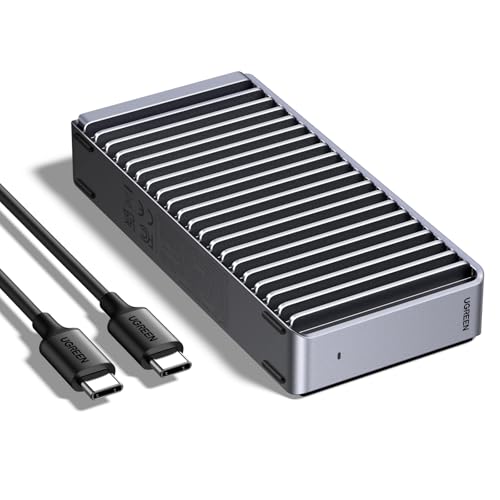
- Up to 3,600MB/s with compatible Thunderbolt 4 equipment
- Fits M.2 NVMe drives from 2230 through 2280
- Passive double-sided fin cooling with no fan
Best For: Mac users seeking maximum external NVMe performance
Best Tool-Free Option

- Flip-open installation requires no screws or tools
- Supports M.2 NVMe sizes 2230 through 2280
- USB 3.2 Gen 2 delivers up to 10Gbps
Best For: Frequent drive swapping, cloning, and portable storage
Best with Extra Features
BENFEI 2.5-Inch SATA Enclosure

- 2.5-inch SATA support up to 6TB
- USB up to 5Gbps with UASP
- Tool-free Type-C/Type-A design
Best For: Budget-conscious Mac users with 2.5-inch SATA SSDs
Best Versatile M.2 Pick
SABRENT Tool-Free NVMe & SATA Enclosure

- Supports M.2 NVMe and SATA drives
- USB 3.2 Type-C up to 10Gbps
- Tool-free aluminum design with thermal pad
Best For: Mac users with multiple bare M.2 drive types
Best Portable NVMe Pick

- Supports NVMe M.2 drives from 2230 to 2280
- USB 3.2 Gen 2 up to 10Gbps
- Compact tool-free sandwich-style design
Best For: Mac users seeking a portable enclosure for NVMe SSDs
Best Overall – UGREEN 10Gbps NVMe Enclosure
For shoppers comparing ssd enclosures for mac, the UGREEN USB-C M.2 NVMe enclosure is a practical choice for compatible NVMe drives. Its USB 3.2 Gen 2 interface supports transfers up to 10Gbps, while the tool-free design makes installation straightforward.
Best For: Mac users who want a compact, tool-free enclosure for an M.2 NVMe SSD.
Pros:
- Supports M-key and B&M-key NVMe drives in 2230, 2242, 2260, and 2280 sizes.
- USB-C connectivity, with USB-C and USB-A cables included.
- Aluminum construction, silicone case, thermal pad, and RTL9210 protection features.
- Compatible with macOS and drives up to 8TB.
Cons:
- Does not support SATA NGFF or mSATA SSDs.
- 10Gbps performance requires a compatible USB-C 3.2 Gen 2 data cable and host port.
The UGREEN is a well-rounded option when you need broad NVMe size support, simple installation, and portable protection without moving up to a higher-speed Thunderbolt enclosure.
Best Budget SATA Option – SABRENT 2.5-inch SATA Enclosure
The SABRENT EC-UASP is a straightforward pick among ssd enclosures for mac if you have a standard 2.5-inch SATA SSD. It uses USB 3.0 for transfers up to 5Gbps and has a tool-free, plug-and-play design.
Best For: Mac users repurposing a 2.5-inch SATA SSD or notebook drive in an inexpensive external case.
Pros:
- Tool-free installation with no drivers required.
- Supports standard 2.5-inch SATA and SATA II drives.
- UASP support helps optimize compatible SATA III SSDs.
- Works with Mac OS X and later, plus USB 2.0 and 1.1 ports.
Cons:
- USB 3.0 tops out at 5Gbps, below newer USB-C and USB4 enclosures.
- Plastic construction is less robust than aluminum alternatives.
This enclosure makes sense for older SATA-based drives and basic file storage. It is not the right fit for an M.2 NVMe SSD, but it keeps installation and connectivity simple.
Best for Heavy Workloads – ACASIS 40Gbps NVMe Enclosure
For demanding users evaluating ssd enclosures for mac, the ACASIS TBU405 Pro combines USB4 and Thunderbolt compatibility with active cooling. Its built-in fan and aluminum heat-dissipation design are intended to help maintain performance during sustained workloads.
Best For: MacBook and iPad Pro users handling large transfers, video editing, or other demanding NVMe workloads.
Pros:
- 40Gbps USB4 enclosure compatible with Thunderbolt 4, Thunderbolt 3, and USB 3.x.
- Built-in cooling fan helps reduce thermal throttling during heavy use.
- Supports M.2 sizes 2230, 2242, 2260, and 2280.
- Supplied testing reached up to 2805/2734 MB/s with a Samsung 980 Pro on a MacBook.
Cons:
- Maximum performance depends on a compatible USB4 or Thunderbolt connection and SSD.
- The fan must be activated with its switch.
The ACASIS is the performance-focused choice here. It costs more in complexity than a basic 10Gbps enclosure, but active cooling and high-bandwidth connectivity are valuable for sustained transfers.
Best for Older Mac SSDs – Jorkar MacBook SSD Enclosure
The Jorkar enclosure fills a specialized need among ssd enclosures for mac: it is designed for 12+16-pin SSDs removed from select 2013–2017 MacBook Air and MacBook Pro models. Its USB-C 3.2 interface can support up to 20Gbps when both the drive and computer support that standard.
Best For: Owners of compatible 2013–2017 MacBook SSDs who want to reuse or access the original internal drive externally.
Pros:
- Designed for specific 12+16-pin MacBook Air and MacBook Pro SSDs.
- USB-C 3.2 Gen 2×2 interface supports up to 20Gbps with compatible hardware.
- Aluminum case supports heat dissipation in a compact 70g design.
- Includes USB-C cable, screwdriver, adapter, thermal pad, and manual.
Cons:
- Not compatible with all SATA or third-party SSDs.
- Compatibility is limited to specified MacBook models and SSD pin layouts.
- Some Macs may need a hub or docking station if USB power is insufficient.
This is a useful recovery and reuse accessory, but compatibility should be verified before purchase. It is a targeted solution rather than a general-purpose NVMe or SATA enclosure.
Best High-Speed Pick – UGREEN 40Gbps NVMe Enclosure
For Mac users who want exceptionally fast portable storage, this UGREEN enclosure is a strong option among SSD enclosures for Mac. It uses the ASM2464PD chip and supports transfer speeds up to 3,600MB/s when paired with compatible Thunderbolt 4 cables and devices. The enclosure accepts M.2 NVMe drives in four common lengths, but the SSD is sold separately.
Best For: Mac owners who need maximum external NVMe performance and already have a compatible M.2 drive.
Pros:
- Supports speeds up to 3,600MB/s with Thunderbolt 4 equipment.
- Works with M.2 NVMe sizes 2230, 2242, 2260, and 2280.
- Double-sided fin design provides passive cooling without fan noise.
- Supports drives up to 8TB and includes a USB-C cable and installation tools.
Cons:
- SSD is not included.
- Maximum speed requires Thunderbolt 4 cables and devices.
- Not compatible with SATA NGFF or mSATA SSDs; some thicker SSDs may require thinner thermal pads.
This is the performance-focused choice in the group, especially for demanding file transfers and video work. Its speed advantage depends heavily on the Mac, cable, and drive used, so confirm your setup supports the advertised bandwidth before buying.
Best for Older Apple SSDs – ACASIS Enclosure for 2013–2017 Macs
This ACASIS enclosure is a specialized option among SSD enclosures for Mac, designed for original Apple 12+16-pin SSDs removed from select 2013–2017 MacBook Air, MacBook Pro Retina, iMac, and Mac Pro models. It is plug-and-play on macOS and includes an M.2 adapter for 2280 NVMe drives, but compatibility is narrow and should be checked carefully before purchase.
Best For: Mac owners repurposing a compatible original Apple SSD from a 2013–2017 machine.
Pros:
- Specifically supports original Samsung or SanDisk Apple 12+16-pin SSDs.
- Also includes an adapter for M.2 2280 NVMe SSDs.
- Aluminum housing helps dissipate heat and the compact design weighs 83.3g.
- Supports APFS, Mac OS Extended, NTFS, and ExFAT formats.
Cons:
- Does not support all Apple SSDs, including Toshiba, OWC, Hynix, or third-party replacements.
- Not compatible with SATA SSDs or Mac models from 2018 and later.
- Large transfers may require heat-management steps to reduce slowdowns or disconnections.
Unlike a general-purpose NVMe case, this model is mainly valuable for recovering or reusing a specific type of Apple drive. Verify the SSD brand, pin layout, and Mac model first; otherwise, its specialized design may not fit your needs.
Best Tool-Free Option – SABRENT 10Gbps NVMe Enclosure
The SABRENT EC-PNVO is a practical pick for Mac users who want straightforward installation from an SSD enclosure for Mac. Its flip-open, tool-free design makes it easy to insert or change an M.2 NVMe drive, while USB 3.2 Gen 2 provides up to 10Gbps connectivity without drivers or external power.
Best For: Mac users who frequently swap NVMe drives for upgrades, cloning, troubleshooting, or portable storage.
Pros:
- Tool-free flip-open design allows quick SSD installation and removal.
- Supports M.2 NVMe drives in 2230, 2242, 2260, and 2280 sizes.
- Aluminum top and thermal pad help transfer heat during extended use.
- Includes a USB-C cable and works without drivers or external power.
Cons:
- Supports NVMe SSDs only and is not compatible with M.2 SATA drives.
- 10Gbps connectivity is slower than a 40Gbps enclosure.
- SSD is not included.
This is a well-balanced choice when ease of use matters more than top-end Thunderbolt performance. Its tool-free access is particularly convenient for testing or rotating drives, while the aluminum-and-thermal-pad construction is intended to support steadier performance during longer transfers.
Best with Extra Features – BENFEI 2.5-Inch SATA Enclosure
For shoppers comparing SSD enclosures for Mac, the BENFEI is a straightforward choice for a 2.5-inch SATA SSD. Its tool-free design, integrated Type-C/Type-A connectivity, and UASP support make it convenient for file transfers and external storage.
Best For: Mac users with a 2.5-inch SATA SSD who want simple installation and broad cable compatibility.
Pros:
- Supports 2.5-inch SATA I/II/III drives up to 6TB.
- Offers USB transfer speeds up to 5Gbps with UASP support.
- Tool-free, plug-and-play installation with both Type-C and Type-A connection options.
- Includes an 18-month unconditional warranty.
Cons:
- Designed for 2.5-inch SATA drives, not M.2 SSDs.
- Its 5Gbps interface is slower than the 10Gbps options in this roundup.
This is a practical, economical enclosure when your drive is a standard 2.5-inch SATA model. Confirm the drive thickness and connector type before buying.
Best Versatile M.2 Pick – SABRENT Tool-Free NVMe & SATA Enclosure
The SABRENT is one of the more flexible SSD enclosures for Mac because it accepts both M.2 NVMe and M.2 SATA drives. It pairs tool-free installation with a 10Gbps USB 3.2 Type-C connection, making it useful for moving data quickly between compatible devices.
Best For: Mac users who need one portable enclosure for multiple bare M.2 NVMe or SATA SSDs.
Pros:
- Supports M.2 NVMe and M.2 SATA drives in 2242, 2260, and 2280 sizes.
- Provides USB 3.2 Type-C connectivity up to 10Gbps.
- Installs without tools and includes a thermal pad for heat transfer.
- Works with macOS 10.5 or later and requires no external power supply.
Cons:
- Does not support 2.5-inch SATA or mSATA drives.
- There is no clearance for SSDs with pre-installed heatsinks.
- The SSD is not included.
Choose this model when compatibility across M.2 drive types matters. Check your SSD’s keying, length, and heatsink configuration before installation.
Best Portable NVMe Pick – FIDECO M.2 NVMe Enclosure
For Mac owners using an NVMe drive, the FIDECO offers a compact way to create fast external storage. Its USB 3.2 Gen 2 interface supports up to 10Gbps, while the sandwich-style, tool-free design helps simplify installation and thermal-pad contact.
Best For: Mac users with bare M.2 NVMe SSDs who prioritize portability and fast transfers.
Pros:
- Supports M.2 NVMe drives with M or M+B keys in 2230, 2242, 2260, and 2280 sizes.
- Supports USB 3.2 Gen 2 speeds up to 10Gbps and UASP.
- Tool-free sandwich design helps position the thermal pad against the drive.
- Includes a USB-C cable with an attached USB-A adapter.
Cons:
- Does not support M.2 SATA SSDs.
- Performance depends on the host port and drive.
- New SSDs may need to be initialized before the computer recognizes them.
This enclosure is a focused option for NVMe users who want a small travel-friendly adapter. Verify that your SSD is NVMe rather than SATA before ordering.
How We Picked These SSD Enclosures for Mac
We selected enclosures across the main storage formats Mac users are likely to encounter: M.2 NVMe, 2.5-inch SATA, and proprietary Apple SSDs from older MacBook models. We also considered interface speed, connector compatibility, tool-free installation, cooling, portability, and support for both USB-C and USB-A connections.
Advertised speeds depend on the enclosure, SSD, cable, and Mac port. A 40Gbps enclosure cannot reach its rated bandwidth with a slower drive or USB 3.x connection, so we favored options that clearly identify their standards and intended use.
Quick Comparison
| Best For | Recommended Type | Typical Interface |
|---|---|---|
| Everyday NVMe storage | UGREEN or FIDECO M.2 enclosure | USB 3.2 Gen 2, 10Gbps |
| Maximum compatible speed | ACASIS or UGREEN 40Gbps model | USB-C 40Gbps |
| Older 2.5-inch SSDs | SABRENT or BENFEI SATA enclosure | USB 3.0 or USB-C |
| Older MacBook Apple SSDs | ACASIS or Apple-specific reader | USB-C |
| Mixed M.2 drives | SABRENT NVMe/SATA model | USB 3.2 Type-C |
Key Buying Factors for SSD Enclosures for Mac
SSD Format and Protocol
Check whether your drive is M.2 NVMe, M.2 SATA, 2.5-inch SATA, or a proprietary Apple SSD. M.2 NVMe and M.2 SATA drives may look similar but use different protocols. A standard NVMe enclosure will not automatically support M.2 SATA.
Speed and Mac Compatibility
Most 10Gbps enclosures are a practical choice for general backups and file transfers. Choose a 40Gbps model only if your Mac, cable, and SSD support the faster connection. Confirm that the enclosure uses USB-C, Thunderbolt, or another interface your Mac actually provides.
Cooling and Sustained Workloads
High-performance NVMe drives can become warm during large transfers. Thermal pads, aluminum housings, and cooling fans can help maintain performance. For occasional backups, passive cooling is usually quieter and simpler; for video work or repeated large transfers, active cooling may be worthwhile.
Installation and Portability
Tool-free designs make it easier to swap drives, while a secure latch or screw helps prevent accidental movement. Look for a compact enclosure, a durable cable, and adequate heat dissipation if you plan to carry it regularly.
Who Should Buy Which SSD Enclosures for Mac?
Choose a 10Gbps NVMe enclosure for affordable everyday storage, cloning, and backups. A 40Gbps enclosure is better for large media projects and users with compatible high-speed Macs. Pick a 2.5-inch SATA case if you are reusing an older laptop SSD or hard drive. For drives removed from older MacBook models, use an Apple-specific enclosure rather than a standard M.2 adapter. If you own several drive types, a model supporting both NVMe and SATA can reduce the need for multiple accessories.
