The best USB-C hard drive enclosures make it easier to reuse SATA drives, expand storage, recover data, and build a flexible backup setup without buying a complete external drive.
Our selection covers compact 2.5-inch cases, 3.5-inch powered enclosures, docking stations, cloners, and multi-bay DAS systems, so you can match the enclosure to your drive size, speed, and workflow.
Best 10 USB C Hard Drive Enclosures Picks for 2026
Best Compact USB-C Enclosure
UGREEN 2.5-inch SATA Enclosure

- USB 3.1 Gen 2 and UASP support
- Tool-free 2.5-inch SATA installation
- Aluminum body with up to 6TB support
Best For: Portable 2.5-inch SATA SSD or HDD use
Best Dual-Drive Dock

- Two simultaneous SATA drive bays
- Offline 1-to-1 cloning
- Accepts 2.5- and 3.5-inch drives
Best For: Drive cloning and two-drive workflows
Best 3.5-Inch Capacity

- Supports 3.5-inch drives up to 20TB
- Included 12V power adapter
- Tool-free design with UASP support
Best For: High-capacity 3.5-inch SATA HDD storage
Best Simple Drive Dock

- Supports 2.5- and 3.5-inch SATA drives
- Tool-free hot-swapping
- Included 12V adapter for 3.5-inch drives
Best For: Quick desktop access to bare SATA drives
Best Transparent Pick
ORICO 2.5-Inch USB-C Enclosure

- Clear shell shows the installed drive
- 5Gbps USB-C with UASP
- Tool-free support for 2.5-inch SATA drives
Best For: Visible, portable storage upgrades
Best High-Capacity Pick
ACASIS 3.5-Inch USB-C Enclosure

- Supports 2.5- and 3.5-inch SATA drives
- Up to 30TB capacity support
- Aluminum shell with heat-dissipating tray
Best For: Desktop backups and large-capacity storage
Best Dual-Cable Pick
BENFEI 2.5-Inch SATA Enclosure

- Integrated Type-C and Type-A connectivity
- 5Gbps UASP support
- Tool-free fit for 2.5-inch SATA drives
Best For: Simple cross-device drive transfers
Best Compact Pick
MAIWO 2.5-Inch USB-C SATA Enclosure
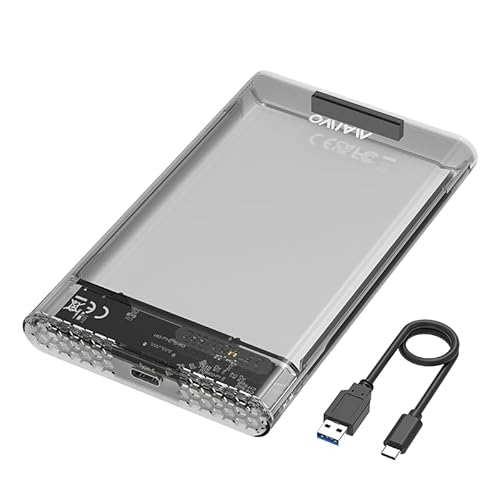
- Tool-free 2.5-inch SATA drive installation
- Up to 5Gbps transfers and 6TB support
- Compact ABS case with LED indicator
Best For: Portable storage and laptop-drive upgrades
Best Multi-Drive Pick
Yottamaster 5-Bay USB-C DAS Enclosure

- Five bays for 2.5-inch and 3.5-inch SATA drives
- Up to 120TB, expandable to 360TB by daisy chain
- 10Gbps USB-C, hot swap, and active cooling
Best For: High-capacity desktop storage systems
Best Versatile Dock
RSHTECH 3.5-Inch USB-C SATA Enclosure

- Accepts one 2.5-inch or 3.5-inch SATA drive
- 2-in-1 USB-A/USB-C cable supports varied hosts
- Up to 24TB with UASP and aluminum cooling
Best For: Single large drives and mixed USB setups
Best Compact USB-C Enclosure – UGREEN 2.5-inch SATA Enclosure
For anyone comparing usb c hard drive enclosures for a 2.5-inch SATA drive, the UGREEN enclosure combines a compact aluminum body with USB 3.1 Gen 2 connectivity. It supports SATA SSDs and HDDs up to 6TB, includes a USB-C cable, and uses a tool-free, plug-and-play design.
Best For: Portable 2.5-inch SATA SSD or HDD upgrades, backups, storage expansion, and data recovery.
Pros:
- Supports SATA I/II/III 2.5-inch drives up to 6TB.
- USB-C 3.1 Gen 2 interface with UASP support and up to 6Gbps drive-side transfer rates.
- Aluminum construction helps with heat dissipation without a cooling fan.
- Tool-free installation and broad Windows, macOS, Linux, console, TV, and router compatibility.
Cons:
- Limited to one 2.5-inch SATA drive.
- Does not support M.2 or NVMe drives.
- USB-A-only devices require a separate USB-C-to-USB-A cable.
This is a strong all-purpose choice when you need a small USB-C enclosure for a single 2.5-inch SATA drive. Its capacity limit and form-factor restriction are the main considerations.
Best Dual-Drive Dock – SABRENT USB-C Cloning Dock
The SABRENT EC-CH2B is a practical option among usb c hard drive enclosures when you need to access two bare SATA drives at once. Its dual bays support 2.5- and 3.5-inch SATA HDDs and SSDs, while the offline cloner can copy one drive to another without a computer.
Best For: Drive-to-drive cloning, two-drive file transfers, and working with both 2.5-inch and 3.5-inch SATA disks.
Pros:
- Dual bays mount as separate drives over USB-C.
- Offline 1-to-1 cloning requires no computer and runs up to 60MBps.
- Supports both 2.5-inch and 3.5-inch SATA HDDs and SSDs.
- Tool-free, hot-swappable design with access LEDs and included power adapter.
Cons:
- Supports SATA drives only; M.2, NVMe, IDE/PATA, and Molex-based drives are excluded.
- Offline cloning requires the target drive to be the same size as or larger than the source.
- USB-C-to-USB-A connectivity may require a separate cable or adapter.
This dock is more versatile than a single-drive enclosure, especially for cloning and migrations. It is best suited to users who regularly handle bare SATA drives rather than those seeking a small travel enclosure.
Best 3.5-Inch Capacity – ORICO USB-C SATA Enclosure
For a desktop-size drive, the ORICO 3588C3 is one of the usb c hard drive enclosures designed specifically for 3.5-inch SATA HDDs. It supports drives up to 20TB, includes a 12V power adapter, and uses a tool-free enclosure with USB 3.1 connectivity and UASP support.
Best For: High-capacity 3.5-inch SATA hard drives used for desktop storage, media libraries, or backups.
Pros:
- Supports 3.5-inch SATA HDDs up to 20TB.
- USB 3.1-to-SATA III interface supports transfer rates up to 5Gbps.
- Included 12V adapter provides the power required by 3.5-inch drives.
- Tool-free installation, UASP support, LED activity indicator, and protective foam.
Cons:
- Designed for one 3.5-inch drive rather than 2.5-inch or M.2 storage.
- Requires a wall outlet through the included power adapter.
- The included host cable is USB-A to USB-C, not USB-C to USB-C.
This enclosure makes sense when capacity and 3.5-inch compatibility matter more than portability. Confirm that your computer has a USB-A port or supply a compatible adapter.
Best Simple Drive Dock – SABRENT USB 3.0 SATA Dock
The SABRENT EC-DFLT is a lay-flat docking station for users who want quick access to bare SATA drives. Although it is not a USB-C enclosure—the host connection is USB-A—it supports both 2.5- and 3.5-inch SATA HDDs and SSDs, with tool-free hot-swapping and an included 12V adapter.
Best For: Simple desktop access to bare 2.5- or 3.5-inch SATA drives through a USB-A computer port.
Pros:
- Accepts both 2.5-inch and 3.5-inch SATA I/II/III drives.
- Tool-free, plug-and-play design with hot-swapping and activity LED.
- Included 12V power adapter supports 3.5-inch drives.
- UASP support and USB 3.0 compatibility with Windows, macOS, and Linux.
Cons:
- Uses a USB-A host connection rather than USB-C.
- Does not support IDE/PATA, M.2 SATA, M.2 NVMe, SAS, or enclosed USB drives.
- S.M.A.R.T. diagnostics do not pass through the USB bridge.
This is a straightforward option for swapping SATA drives at a desk, but it is not the right pick for a USB-C-only computer without an adapter. Its broad 2.5- and 3.5-inch support is the main advantage.
Best Transparent Pick – ORICO 2.5-Inch USB-C Enclosure
If you want a clear, compact option among USB C hard drive enclosures, the ORICO 2139C3 is designed for 2.5-inch SATA SSDs and HDDs. Its tool-free installation, USB-C connectivity, and included USB-A cable make it useful for file transfers, backups, and repurposing an older drive.
Best For: Users who want to see the installed drive and need a portable enclosure for a 7mm or 9.5mm 2.5-inch SATA drive.
Pros:
- Transparent crystal PC shell lets you view the drive without opening the enclosure.
- Supports USB 3.0 and UASP with transfer rates up to 5Gbps.
- Tool-free, plug-and-play installation with hot-swapping.
- Works with Windows, Linux, macOS, TVs, PCs, laptops, and PS4.
Cons:
- Limited to one 2.5-inch SATA drive up to 6TB.
- Plastic construction may offer less rigidity than an aluminum enclosure.
- The included cable is USB-C to USB-A rather than a USB-C-to-USB-C cable.
The ORICO stands out for visibility and simplicity. Its clear housing, status LED, and 10-minute sleep mode add convenience, while support for both USB-C and USB-A connections helps with mixed device setups.
Best High-Capacity Pick – ACASIS 3.5-Inch USB-C Enclosure
For larger desktop drives, the ACASIS is a substantial choice among USB C hard drive enclosures. It supports both 2.5- and 3.5-inch SATA SSDs and HDDs, includes a power adapter, and combines a metal exterior with an open-frame tray for extended-use cooling.
Best For: Backup users, creators, and enthusiasts who need support for large-capacity 3.5-inch drives.
Pros:
- Supports up to 30TB and accommodates both 2.5- and 3.5-inch SATA drives.
- Aluminum shell and open-frame ABS tray help dissipate heat.
- 6Gbps transfer support with UASP.
- Includes a 12V/2A power adapter and USB-C-to-USB-C/A cable.
Cons:
- Its larger desktop design is less portable than 2.5-inch enclosures.
- 3.5-inch drives require the included external power adapter.
- The supplied details list a data transfer rate of 500MB/s, so actual performance depends on the drive and host system.
The ACASIS is the more capable choice when capacity and cooling matter more than portability. An independent power switch and 10-minute smart sleep mode also make it practical for a drive that stays connected at a desk.
Best Dual-Cable Pick – BENFEI 2.5-Inch SATA Enclosure
The BENFEI 2.5-inch enclosure is a straightforward option for converting a SATA SSD or HDD into external storage. Its integrated USB Type-C/Type-A plug design supports flexible connections, while the tool-free shell makes drive installation quick for transfers, backups, or console storage.
Best For: Users who want one compact 2.5-inch enclosure with convenient Type-C and Type-A connectivity.
Pros:
- Integrated Type-C/Type-A design provides flexible connection options.
- Supports UASP and transfer speeds up to 5Gbps.
- Tool-free, plug-and-play installation with hot-swapping.
- Compatible with 7mm and 9.5mm 2.5-inch SATA drives up to 6TB.
Cons:
- Supports only one 2.5-inch drive.
- Not designed for 3.5-inch hard drives.
- Its compatibility details emphasize Windows, so users of other systems should verify support for their setup.
BENFEI focuses on everyday convenience: a compact enclosure, quick installation, and built-in connector flexibility. Its 18-month unconditional warranty is an added benefit for buyers who want straightforward long-term coverage.
Best Compact Pick – MAIWO 2.5-Inch USB-C SATA Enclosure
For shoppers comparing usb c hard drive enclosures, the MAIWO is a compact, tool-free option for a single 2.5-inch SATA SSD or HDD. It supports 7mm and 9.5mm drives, offers USB 3.0 Type-C connectivity with up to 5Gbps transfers, and can accommodate storage up to 6TB.
Best For: Laptop-drive upgrades, portable storage, and straightforward plug-and-play use.
Pros:
- Supports 2.5-inch 7mm and 9.5mm SATA SSDs and HDDs.
- Tool-free installation with no drivers required.
- Compact ABS enclosure includes anti-shock pads and an LED indicator.
- Supports up to 6TB and includes a USB-C-to-USB-A cable.
Cons:
- Limited to one 2.5-inch drive.
- Transfer speeds are capped at 5Gbps.
- New drives may require initialization, partitioning, and formatting.
The MAIWO is a practical choice when portability and easy setup matter more than multi-drive expansion. Its 2.5-inch-only design makes it less suitable for desktop-size 3.5-inch disks.
Best Multi-Drive Pick – Yottamaster 5-Bay USB-C DAS Enclosure
Among usb c hard drive enclosures, the Yottamaster FS5C3 is built for large desktop storage systems rather than occasional portable use. Its five bays accept 2.5-inch and 3.5-inch SATA drives, while dual 10Gbps USB-C ports support high-speed transfers and daisy chaining.
Best For: Users building high-capacity, multi-drive storage with Mac or Windows computers.
Pros:
- Five bays support 2.5-inch and 3.5-inch SATA HDDs or SSDs.
- Supports up to 120TB across five drives, with daisy chaining up to 360TB.
- 10Gbps USB-C connectivity and hot-swappable drive support.
- Aluminum housing, removable trays, built-in 150W power supply, and cooling fan.
Cons:
- Diskless design requires purchasing drives separately.
- It does not provide a hardware RAID function.
- The larger five-bay format is less portable than single-drive enclosures.
The FS5C3 is a strong fit for expanding a workstation or home storage setup with multiple independent disks. Its capacity and daisy-chain features are compelling, but the size, power requirements, and lack of hardware RAID should factor into your decision.
Best Versatile Dock – RSHTECH 3.5-Inch USB-C SATA Enclosure
The RSHTECH is a flexible option among usb c hard drive enclosures for users who need to connect either a 2.5-inch or 3.5-inch SATA drive. Its detachable 2-in-1 cable works with USB-A, USB-C, and Thunderbolt hosts, and the aluminum enclosure supports drives up to 24TB.
Best For: Desktop-size hard drives, mixed USB host ports, and console or smart-TV storage use.
Pros:
- Supports one 2.5-inch or 3.5-inch SATA HDD or SSD up to 24TB.
- Includes a 3.3-foot USB-A/USB-C detachable cable.
- UASP support and an ASM1153E chip provide stated transfer rates up to 6Gbps.
- Aluminum housing, vents, sleep mode, LED indicators, and removable vertical stand.
Cons:
- Limited to one drive at a time.
- Its 3.5-inch dock-style body is less compact than a 2.5-inch enclosure.
- Sleep mode activates after 10 minutes of data-access inactivity.
The RSHTECH balances broad drive compatibility with useful desktop features such as a power button, cooling vents, and flexible positioning. It is a sensible middle ground for a single large drive, especially when your computers or devices use different USB port types.
How We Picked the Best USB C Hard Drive Enclosures
We compared these USB C Hard Drive Enclosures by drive compatibility, USB interface speed, power requirements, construction, installation method, and practical features such as UASP support, cloning, cooling, and multi-drive expansion. We also considered whether each design suits a portable single-drive setup or a desktop storage system.
Interface labels can be confusing, so advertised maximum speeds should be treated as theoretical. Real-world performance depends on the SATA drive, USB port, cable, operating system, and file-transfer workload.
Quick Comparison
| Best For | Recommended Type | What to Look For |
|---|---|---|
| Portable 2.5-inch SSD or HDD | Compact bus-powered enclosure | USB-C, tool-free installation, UASP |
| 3.5-inch desktop hard drive | Powered enclosure or dock | AC adapter, cooling, stable SATA connection |
| Drive cloning | Dual-bay docking station | Standalone clone support and matching drive capacity |
| Several drives | Multi-bay DAS enclosure | 10Gbps connectivity, cooling, capacity support |
| Mixed USB equipment | USB-C enclosure with adapter or dual cable | USB-C and USB-A compatibility |
Key Buying Factors for USB-C Hard Drive Enclosures
Drive Size and Power
Confirm whether you need a 2.5-inch SATA drive, a 3.5-inch desktop drive, or both. Most 2.5-inch SSDs and laptop HDDs can run from USB power, while 3.5-inch HDDs usually require an external power adapter.
Speed and Compatibility
USB 3.0 and USB 3.1 Gen 1 typically top out around 5Gbps, while 10Gbps models can provide more headroom for fast SATA SSDs. SATA itself limits many drives to roughly 6Gbps before overhead. UASP support can improve responsiveness and transfer efficiency, but the host computer must support it too.
Build and Installation
Aluminum shells help with durability and passive heat dissipation. Tool-free designs are convenient for frequently swapped drives, while screw-secured cases may provide a more secure fit. Check supported drive thickness, especially for 7mm and 9.5mm 2.5-inch drives.
Capacity, Cooling, and Extras
Check the stated maximum capacity if you are installing high-capacity HDDs. For continuous desktop use, prioritize ventilation, active cooling, reliable power delivery, and a stable stand. Cloning docks are useful for migration, but verify that the source and destination drive requirements match.
Who Should Buy Which USB C Hard Drive Enclosures?
- Choose a compact 2.5-inch enclosure if you want portable backup storage or need to reuse a laptop SSD or HDD.
- Choose a powered 3.5-inch enclosure for a desktop hard drive, media library, or occasional data recovery.
- Choose a dual-bay dock if you regularly clone drives, compare disks, or swap bare SATA drives without installing them in a case.
- Choose a multi-bay USB-C DAS if you need several disks for backups, archiving, or a large desktop storage pool.
- Choose a USB-C and USB-A-compatible model if you use the enclosure with both newer laptops and older computers.
Before ordering, verify the enclosure’s connector, included cable, power adapter, supported drive thickness, and operating-system compatibility. Those details matter more than the enclosure’s headline speed alone.
